
Default undo memory limit
H i , it has been times when we as blender users are using blender to finish our projects , but we can't and blender crashes because of lack of memory , im using blender at work , with a super computer , but it can't handle a 10m dense model , it took me 2 yrs to realize the problem isn't blender itself , it is the f$@#ing undo memory , imagine a file that needs 4gb of memory , fills a 64 gb ram , and you still lack on performance , that's terrible , it was so hard for me to realize where the problem is , couldn't we just had a limited amount of undo memory ? maybe a fraction of installed memory to be different for any body , and be ON by default , cause people can't guess why their software just don't work ?
3 Comments
I recently discovered Blender had been occasionally freezes on me. Just by idling at the start or when I attempt to try out 4.2 recent alpha by activating Eevee's next render consistently. I been testing until I got to play with memory limits in global undos and it fixes the issue. By setting the limits from 0 to a reasonable 4098. I stress tested and make sure that was the thing that affected the crashes. I'm that person who would need global undos on when the majority of tasks in Blender does not provide better undo expectations. I too would love to see a simple solution like a slider to how much percentage of RAM it uses instead of locking up a program when it can't understand it has hit its limit. It feels bad when I had to spend days testing why it causing the freeze. One less thing to manage before using Blender.
Just for anyone that would drop by and wondering, undo configuration can be edited here :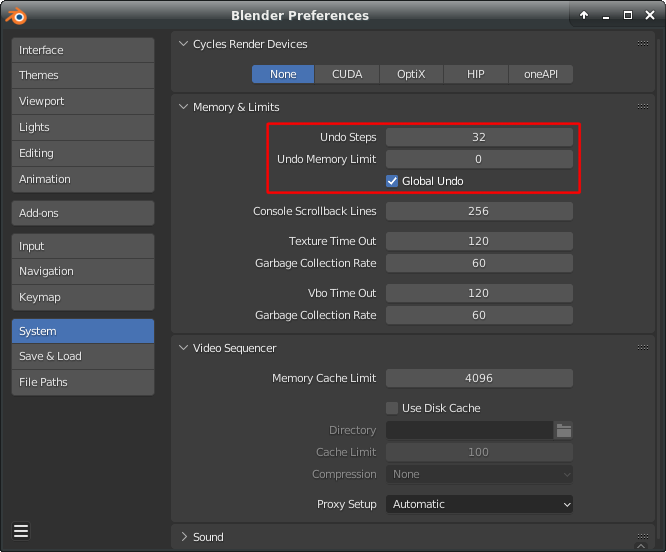
But I agree that there should be a realistic limit by default !
What would be realistic for one person wouldn't be for the other. Making limit with GB have no sense, since users have wide range of RAM capacity. Low-end machines might still have 16GB and top HEDT/workstation platforms can have 256GB.
The only sane way is to detect RAM resources and make slider with percentages like Photoshop has. So whatever RAM capacity you have you will use max 80% of it (for example).