
Implement a "Constant Keyframe Preview" option for animation playback
It would be very helpful for Blender to have an animation playback option like Maya's Stepped Preview Mode: knowledge.autodesk.com/support/maya/learn-explore/caas/CloudHelp/cloudhelp/2015/ENU/Maya/files/GUID-6A77D603-7D06-47D2-BCCC-59792ACB82EE-htm.html
When this playback feature is enabled in Maya, it changes every keyframe in the project to be the equivalent of Blender’s “Constant” interpolation type. When you turn this feature off, all of the keyframes go back to using their original interpolation type.
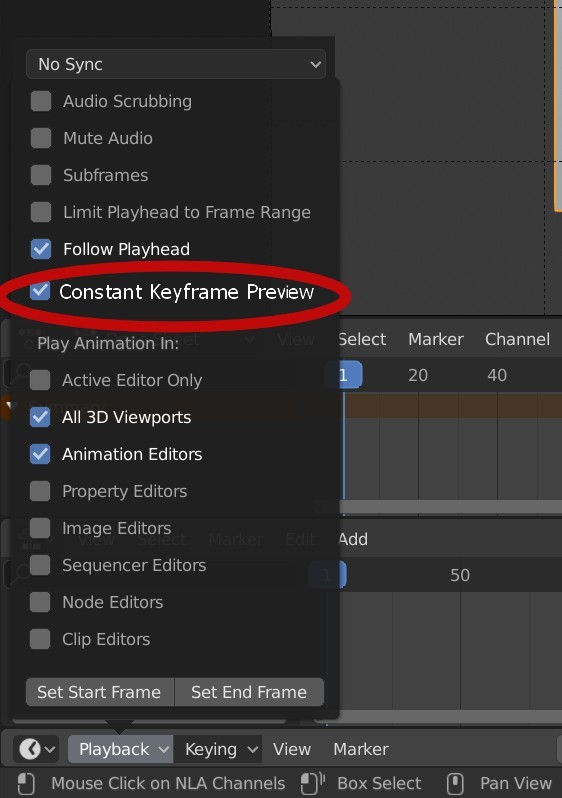
In Blender, it could be called "Constant Keyframe Preview" and would be set from the Timeline's Playback menu. I've mocked up a screenshot of what it would look like: sundriftproductions.com/blenderartists/constant_keyframe_preview.jpg
I looked around in Blender to see if it had an equivalent feature to Maya's Stepped Preview Mode, and it doesn’t appear that it exists. So I wrote a script ( blenderartists.org/t/is-there-a-way-to-imitate-mayas-enable-stepped-preview-playback-mode/1189853/5 ) that destructively changes all of the keyframes to Constant/Linear/Bezier/etc. However, this is not a good substitute for a real Stepped Preview Mode feature, especially if I want to see what the animation looks like beyond the layout stage.
Note: the following section in italics is no longer part of my feature request, after having discussed it in this thread. I am leaving it in here for completeness' sake, but my feature request is to temporarily change EVERY keyframe for every object, camera, animated shader parameter, bone, etc. to a Constant interpolation.
One additional option that might be especially nice (and would make this feature better than Maya's implementation) would be the ability to choose whether this feature affects the cameras in the scene. The key benefit that Stepped Preview Mode brings to an animator is to clearly see all of the keyframe poses/positions of every object in the scene. However, it would be very distracting if there's a moving camera and the camera's interpolation is also changed to Constant. (I have seen posts in Maya forums where users have asked if there's some way to NOT have the cameras in the scene have their interpolation changed when using Stepped Preview Mode, and I don't think there's a workaround.) So perhaps that could be an additional option, and it could possibly be set up like this mocked up screenshot: sundriftproductions.com/blenderartists/constant_keyframe_preview_2.jpg
Thanks for considering this feature!
11 Comments
I like it! It's like turning off the subdivision surface temporarily to let editing be faster.
Previewing animations with Constant Keyframe Preview could not only speed up previews, but it could also help visualize timings and sequences too!
* @bodick * Yes, visualizing timings is what I was trying to get at. You're right, that it's like turning off the subdivision surface modifier...except for keyframes.
Also, this feature might be good at identifying any weird spots in the animation, like if there's a stray keyframe that got accidentally recorded. This feature would make that sort of detective work much easier.
How does this differ from the constant interpolation type that already exists in Blender?
* @Jason van Gumster * it is non-destructive (only a preview)
Since we may want to turn it on for specific objects and leave it off for others, I wonder if it wouldn't be better to have it as an fcurve modifier, or simply extending the existing "stepped" fcurve modifier with an option to mimic the Maya behaviour.
* @Hadrien Brissaud * is it possible for this to be a modifier to have a global effect which you can turn on and off?
* @Hadrien Brissaud * If you check out the original BlenderArtists post where I mention that I came up with a script that mimics this behavior, originally I thought that the "stepped" fcurve modifier behaved exactly like Maya's Stepped Preview Mode.
There is definitely merit to having a fcurve modifier that behaves like this, and I certainly would like to see that in Blender. But it seems like it should be a feature request in addition to the one I'm proposing. The reason is, yes, having a fcurve modifier that does this could be useful when isolating individual elements of an object. But it's IMO not as useful when an animator is working out the scene's timing. Here's why:
If you wanted to affect everything in a scene, you would need to run a script or create an add-on that would put this modifier onto everything, as well as remove/disable it. (In fact, I was about to write a script that did exactly that, until I discovered Blender's "stepped" fcurve modifier didn't work the way I thought it worked.)
If you were to add new objects/channels and you wanted to keep working in a Maya-ish Stepped Preview Mode, you would have to either have your default interpolation type to be Constant or you would have to remember to put the fcurve modifier on all of the new channels...or run the script/plugin again. It's not very ergonomic to have to keep remembering to run the "Constant Keyframe Preview" script every time you create a new kind of keyframe (say, you decide to add some rotation keyframes to an object that didn't have rotation before). Because if you don't keep your fcurve modifiers up to date, your "preview" will look like a mishmash of Constant interpolation and curves.
Like I said, I definitely see a benefit in having a fcurve modifier that does this. But as a convenience feature for an animator who just wants to look at timing/keyframes while blocking out a scene and nothing else, being able to globally change all of the keyframes (except for the camera sometimes) would be a very animator-friendly feature....and a boon to productivity.
* @bodick * Good question. You said what I was getting at in a much shorter way! :D
* @sundriftproductions * I'm Hadriscus on BA.org , sorry for the confusion. :)
that's what shift+E does in the graph editor : it's a toggle for the "cycles" fcurve modifier. It works on a selection of fcurves.
agree that sounds like a hassle... not something you'd have to do very often though, what would it be like ? Select all, deselect what you want to exclude from stepped preview, select all channels in graph editor, run "stepped preview". You'd have to keep track of what you want to exclude in any case.
I am trying to think future-proof here, what if in addition to the camera, you've got a character on a motion path ? and you'd like the path animation to be smooth as well ? what about a light animation ? And how is Blender supposed to discriminate between a character rig and a camera rig ? I feel there might be too many corner cases like this one, which is why I advocated a more granular approach.
I'm thinking, what if it were an armature-level thing ? Or better, an armature-layer-level thing ? A simple checkbox "stepped preview" in there.
Hi * @Hadrien Brissaud * -- sorry, didn't make the connection between here and BA.org :)
I really think there are two use cases -- really two separate desired features -- here. Both of them would be very beneficial to have.
You're roughing out the motion in a scene (or trying to debug something). You want to get a sense of what all of your keyframes are doing and when they're hitting; you want a sense of the timing of the scene.
You're fine-tuning a particular element and you want to see what's really going on there, keyframe-wise. So you put a modifier on the appropriate fcurves and try it out.
In use case #1, it should be matched with an implementation that is super simple to toggle on or off; users shouldn't have to context switch too much, because their minds are deep into looking at their timing at that moment.
In use case #2, it definitely creates a situation where users have to think more, just by nature of how fcurve modifiers work. And it would be a good feature to have. But it wouldn't provide the simplicity of Maya's Stepped Preview mode.
You brought up some interesting points as far as what do you NOT switch to a Constant interpolation, like if you have a camera vs. a camera rig. I've reconsidered the idea of being able to exclude cameras. In fact, I'm totally fine with changing EVERYTHING to Constant for use case #2 -- cameras, objects, bones, animated parameters. I've edited my original post to reflect this.
"Constant Keyframe Preview" is meant to be a way of testing out animation timing and debugging your project file in a very straightforward, simple way, where the user does not have to think or context switch. But yes, I think there should be a separate feature request to have a way to change keyframes to have a Constant interpolation on a fcurve modifier too.
* @sundriftproductions * ah, fair enough - I didn't think of it this way. I guess I just don't use it very often in Maya either, so I don't necessarily have that workflow in mind. I understand it would have to be very simple to toggle so as not to break the flow - in that case a simple scene-wide toggle sounds good. However I don't understand why you would change your mind about excluding cameras ? That seems like a valuable option to me. In fact, there should also be a toggle for "exclude follow path constraints", but the actual "step" toggle would still only be a hotkey away, which would keep it simple and accessible. What do you think ?
Technically speaking, Blender could scan a rig's objects and IF it contains a camera, then do not apply the stepping to that rig, or maybe only to the bone it's parented to. However if we've got a 'crane' controller sitting above that, it would get the stepping treatment, even though we'd like to exclude it... (because we usually want crane animations to be smooth) ...which is a problem.
I'm thinking of the case where there's a tracking shot and you've got your character doing stuff along in the frame, and you definitely want to playblast that from the camera, with stepping enabled, but camera still smooth. Or maybe you've got a spaceship soaring along a path and you want that specific controller's transforms to stay smooth, but not the rest of the animation (I'm actually animating a spaceship right now which is why the example comes to mind).