
Unified camera controls (easy switch cameras, lock to view, make default)
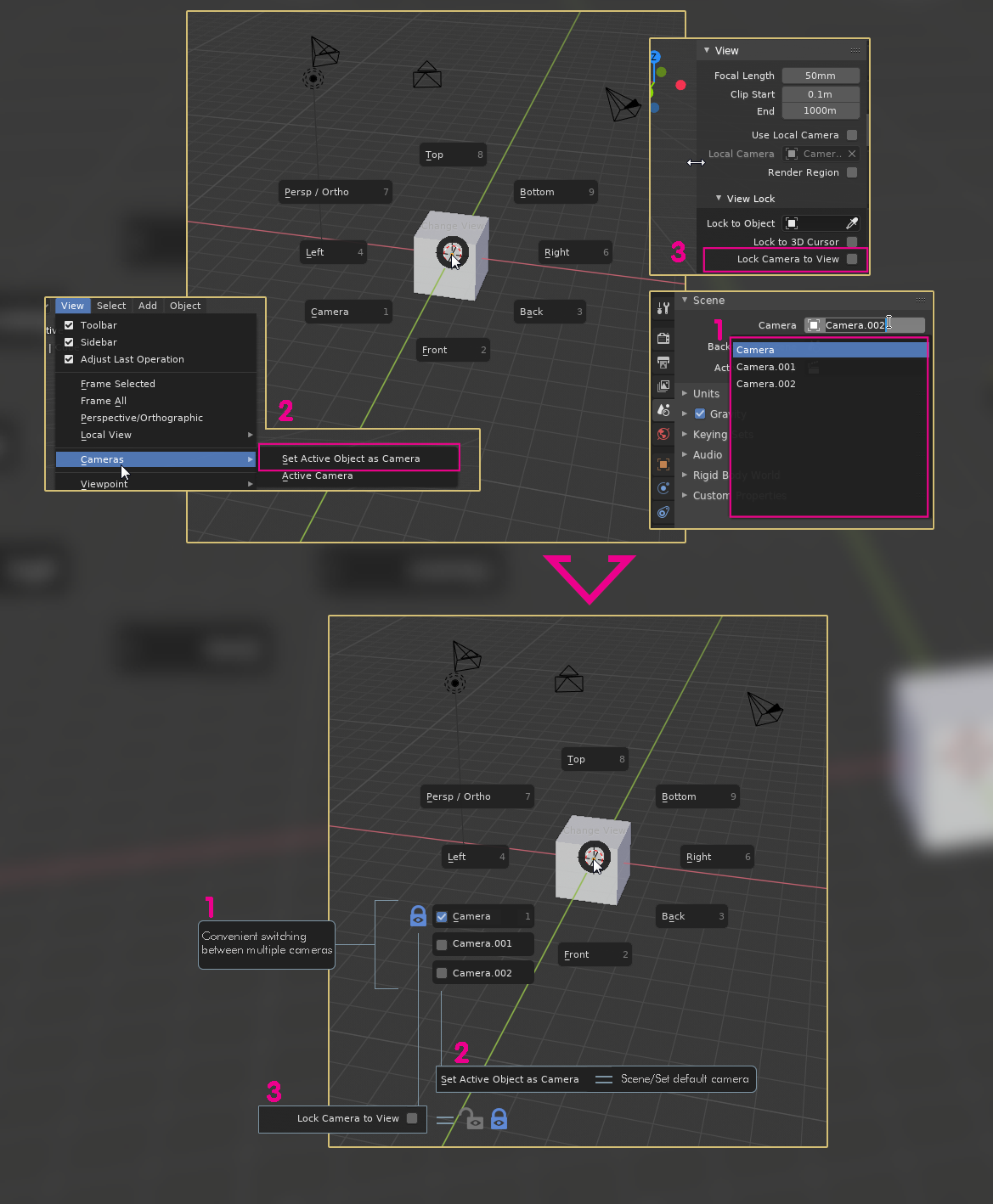
It would be nice not to jump around for those camera controls. I know that you can add them to quick favorites but how long can get that list? and camera control is standard not specific workflow. So what I propose, not necessarily in this visual form and order (I dont care if it's a Pie or a menu in the top bar) is to group the most used camera controls and a list of cameras in the scene in a single place that is bindable to a shortcut. Thanks!
15 Comments
If you need to perform (1) very often, you can bind cameras to markers and then switch them there. That's even faster. And they will be rendered like that as well. You can basically use this for simple cuts, or multiple perspectives. For (2) just press Ctrl + Num0 to make the selected Camera the Scene Camera. And (3) is used too rarely to have it very prominent, I guess.
Don't get me wrong. I don't mind stuff like that being implemented, but I'd like to point out that there are already faster ways of doing these things. Another one is to use Alt + MMB-drag to switch between views.
* @michael * Thanks, I'm aware about those solutions but they are not simple and intuitive. Even for setting default camera you need many clicks to find and select a camera in a complex scene and then hit the shortcut to make it active and onlu then you can change to camera view. Also I use 3 to control camera framing and keys all the time.
* @michael * Everyone with an apple laptop I've convinced to try Blender strongly prefers just using the trackpad over a mouse. I would prefer a mouse but wrist issues make pressing the middle mouse button on every mouse I own a pain so I'm also very very happy using Blender with my trackpad.
I also prefer using the top row number keys for 123 in edit mode so I don't want to turn on emulate number pad, this leaves me without some keyboard shortcuts, but the radial menu for most of these things is more than good enough for me... except for dealing with multiple cameras.
The marker thing on the timeline works but it's undiscoverable. Most people would go looking for a more inuitive list of menu items related to all the cameras.
OMG! That camera field under the Scene tab!!!!! And here I was wasting my life going through the menus (I don't have a number pad and my top row numbers don't work except for 1-4 luckily).
absolutely agree
The idea is cool.. Though the list of cameras can get pretty long.
* @rodgerdaledavis * Yeah I thought about it and it can be made a mouse wheel scrollable list, smaller items. Some addons have that. Or it can be a camera menu in itself similar to W menu for meshes.
Also would like to see it renamed to "set render camera" or something like that.
Buy and learn PME (Pie Menu Editor)
* @othoap * Thanks but I prefer a better blender app than another addon.
* @Ge Ro * ^This. Addons are great, but lets not use them as an excuse to let Blender languish in certain areas. This is what Unity is slowly learning with their asset store- they relied on third parties to make a lot of their features, and as those developers lost interest they entropied an eventually stopped working altogether. The same thing happens with addons for blender, and I hate relying on them. I shudder to think of the day when TeamC gets tired of working on hard.ops for example, because I now rely on it to do my job.
* @testure * True, the uncertain fate of addons is another problem but some things are so basic and critical that they need to be available and easily accesible from the start.
* @Ge Ro * Yes, I get it. However the reason I suggest PME is because you can get the tools you need now. It seams to me that maybe 2% of the request to blender are actually implemented. Forums like this are just a place for people to vent, you don't really expect much to come from it, do you?
* @othoap * This particular forum is for people to make suggestions and then upvote or downvote them and a few of the most popular ones will eventually be considered for implementation into Blender. Without people venting Blender still would not have an Undo function, let alone a user friendly User interface.
* @testure * Good points, HardOps is a good example. I wonder how much of hard ops are blender existing tools gathered in one panel or link together to help workflow. In 40 years of computing I've found it's not the plugin that let me down but the master program developer. But I do hear you.