
Aperture size indicator to camera object
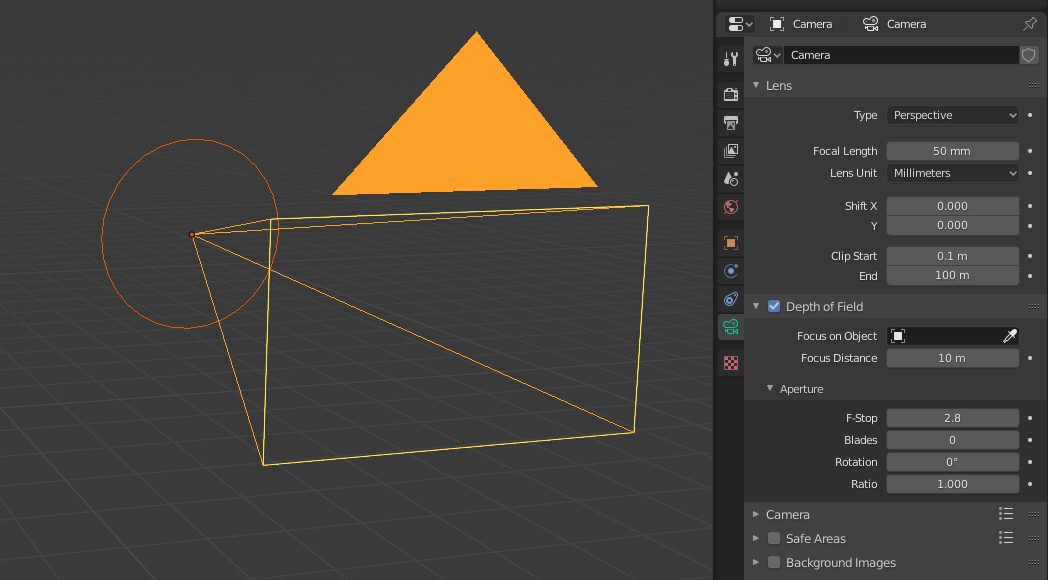
I think it would be very helpful if Blender camera object would show the physical aperture size as a circle around the camera object if you activated the depth of field from the camera settings. The circle size would change if you change the F-stop setting.
By that way you could visually see why the render exactly looks how it looks.
The circle would of course disappear if you disabled DOF from camera settings.
This video shows the reason why I wrote the idea. Without the aperture size indicator, it's quite hard to get why we are able to see "through" the corner of this table. streamable.com/vmo2o
14 Comments
Showing the physical aperture size could be misleading as f stop is only a fraction of the focal length, which means that f/2.8 on a 100mm lens would be physically larger than f/2.8 on a 20mm lens, for example. Perhaps, adding the (opt-in) option to display the numerical f-stop on the camera would help?
* @Matthew Cooke * Yes, it's true and I agree that it could confuse some people who are thinking that the F-number is a fixed size. But at the same time it's the thing I would love to see visualized in viewport (optionally). I think it could do if there was the numerical values also visible, so from the visual feedback the user would see the correlation in his actions and how the camera works. (Just like in real camera you can see the aperture size change if you zoom)
I think you maybe seeing an impossible example only achievable with a 3D camera and not possible with a real world camera, causing you to maybe misunderstand what the aperture does in a camera lens. The aperture doesn't increase or widen the field of view. The aperture only lets in more light. The aperture is that small hole at the back of the lens that opens and closes to allow more light to hit the sensor or film.
Placing a camera behind an object and opening the aperture wide open won't allow you to see around said object in the real world, neither will increasing the focal length. Obviously from your example, when increasing the focal length in Blender it will push through an object. I guess this could be called a bug?
Tim
* @Timothy Cook * No. I know that this is possible also with the real world camera, but you cannot make so extreme versions in real world cause we don't have such big apertures.
Basically what I think is happening, is that a small part of the aperture is not behind the corner of the table and you can still see the object through that small part even when it looks like that the camera is behind the corner. That's one of the reasons why I wish we could physically see the aperture in 3d-view
Because no one won't believe me; here is a video I made with a real camera about the situation. Sadly my lens max aperture don't allow me to do more extreme version of this streamable.com/wu3yw
Or do you have some better explanation for this situation?
* @Artturi Mäntysaari *
I repeat, adjusting the aperture has nothing to do with your field of view. It will not increase or decrease the height or width of the image. The aperture can never be bigger than the lens size and can not allow the lens to view more than it can already view. It's purpose is to increase or decrease the light hitting the sensor.
It's not uncommon for beginner photographers to have a hard time grasping the deference between "focal length" and "aperture", which is perfectly OK, we are all learning. :)
Here is a stack with a diagram to help visualize it. photo.stackexchange.com/questions/83017/does-aperture-affect-field-of-view
And here is one on "focal length" photo.stackexchange.com/questions/5917/what-is-angle-of-view-in-photography
* @Timothy Cook * The explanation I gave you has nothing to do with the the physical size of the image. The image size is coming from the camera sensor.
* @Artturi Mäntysaari * Also, you can have a bigger lens than the camera sensor. It is completely coming from the lens design.
* @Artturi Mäntysaari * From your quote: "Without the aperture size indicator, it's quite hard to get why we are able to see "through" the corner of this table."
You are assuming that adjusting the aperture in the real world would effect the field of view enough that you could see around the edge of the plane/"table". I'm just saying that in the real world this would not happen, and it's just a "glitch" or maybe "feature" of the Blender camera, caused by pushing the focal length through the object.
I can produce the same effect shooting underneath the plane, with Suzanne completely obscured by the floor plane.
{attachment Side_angle_of_Monkey_seen_through_floorjpg}
{attachment Monkey_seen_through_floorjpg}
* @Timothy Cook * I am not a designer of Cycles or even a programmer, but I am thinking that the example you have happens maybe because the camera sensor in Cycles might not have a physical location in the 3D-world, only direction. If you add some specific marking color to the area you think is being clipped out, you see that it still renders. (We should ask this from Brecht maybe.)
I made this simplistic image to show what I think is the reason for this. And what also happened in my real world video example.
* @Artturi Mäntysaari *
Dude read the Stack Exchange I posted! That's NOT how an lens aperture works. :)
What you see at F22 is exactly what you see at f.2, minus the dept of field blur. Opening the aperture doesn't increase the field of view or what's seen by the sensor when in focus.
If your image was how it worked in the real world only shooting with the aperture wide open would you get full use of the sensor, and we know that isn't the case. a 4K sensor is a 4K sensor at every f stop.
****** Don't forget that the image comes to a small point inside the lens and then gets flipped onto the sensor. *********
Now if you are saying the table is right against the aperture and is blocking the view while the end of the lens is on Suzanne? Then I once again, I say not real world, and you are shooting through the table like in my example. If the front of the lens is against the table then whatever it can see, it can see at any aperture.
Yes, I tried to make very simplistic version to show that the aperture physically is blocking the view to the object. There is no way that the light would go to the camera sensor if the aperture in this situation is completely behind the table and no part of it would be over the table. I also know very well how camera obscure works.
Then also; it's impossible that you wouldn't see something more on the table if top part of your aperture is higher than the table compared to the situation where whole aperture is blocked by the table. This however of course is not changing the FOV. The field of view stays the same whole time if you only change the aperture. I was not implicating anything else in any of my messages...
However, if you zoom, then it's the different story because that will change the FOV. But this whole question even is not about the FOV. I think you got it wrong what I wanted to tell with that image. It's probably my fault, but I only wanted to tell about the physical obstacle that the aperture is doing in this situation combined with the table. Not many photographers even are doing this kind of examples, but I typically use aperture and focal length together to for example blur the fence or window out in zoo, or similar.
It's kind of the same thing. You kind of can see through, or behind the fence or similar obstacle and blur it out, when the aperture is big enough.
I scaled down the zoomed version of the sugar cube to match it with the zoomed out cube. I never adjusted the camera stand. It was all the time at the same level. Everything I did was just to change the focal length and because my lens is Nikkor 70-300mm 4.5 -5.6 VR the aperture also changes. I was also using 2x teleconverter to maximize the zoom and allow me to use smaller apertures.
So, the F number is not the aperture diameter. The aperture diameter is calculated by this way:
Focal length / F-stop.
So I had 140mm / F9 = 15,5mm at "wide angle", and 600mm / F11 = 54,5mm when zoomed in.
I also took few additional photos with different apertures without zooming at all. From F-11 to F-81. Sry about the dirty sensor. Should go to maintenance with it, tho I typically don't use this small apertures.
imgur.com/a/lRZrRyD
* @Artturi Mäntysaari * Upon seeing your photo I see that I wasn't getting what you were arguing, my bad and my apologizes :) I was totally missing what you were trying to say. :) I was stuck on "field of view", and what objects in view will stay in view regardless of the aperture, and of course I now see you are talking about.
I was just taking a photo to give you a real world example, which I was wrongly arguing. Sorry for wasting your time. I do need to slow down my reading of post! :( :)
Tim
* @Timothy Cook * We are completely fine. :)