
add filter width to displacement shader node
What it says on the tin. It is my understanding that the displacement shader node is hard coded to .1 bump filter width. It would be nice to be able to adjust this for cases of extreme sub pixel detail particularly for metallics without having to split the detail from the source height map into a bump shader node. Sorry if this is a copy. Attached is a quick mockup of what it might look like.
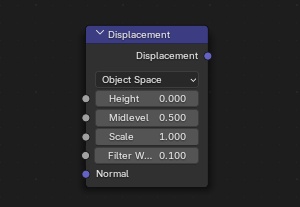
1 Comment
The displacement node works very differently to the bump node. It's merely a math container to scale along the normals in different spaces, while the bump node creates detail with sampling.
As the displacement node doesn't sample anything and is not working with pixels, there wouldn't be any filter size, that could be adjusted.
For reference, the displacement node only does: Normal * (Height - Midlevel) * Scale with a possible Vector Transformation Object -> World after, if the node is set to object space.
I don't think a Filter Width value would be necessary or even possible for the Displacement node, but let me know in case I misunderstood your proposal.