
Another Edge Length request
Here is the annual request to add some ability to type in the length of the selected edge(s).
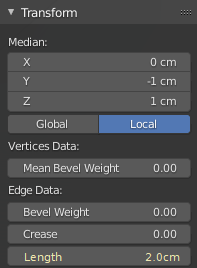
- the selected edge length is reflected in the sidebar Edge Data->Length
- if more than one connected edges are selected Edge Data->Total Length
- when in Edge select mode changing the value will lengthen/shorten the edge(s) from the midpoint along the edge(s) (i.e. point on polyline, not the arbitrary 3d median point)
- when in Vertex select mode changing the length value will treat the first selected vertex as the anchor
5 Comments
this already exists in blender, using builtin mesh tools addon. In the 3dview sidebar under edit -> mesh tools -> edge tools. What would be nice is also being to set the size of faces and any selected geometry.
You're right, it does exist, but I wouldn't say it's implemented in the best way.
Having to dig into an addon (albeit, built in), and the way you interact with it (modal pop-up etc) is a real flow breaker.
Blender is already capable of showing us edge lengths on the fly (via the edit mode overlay options), which also update in real-time when you scale the edge. So the core information needed for us to write a new length is already there.
The only thing that's missing is an 'edge length' option in the transform panel and/or the ability to type a value into the edge length overlay, which, at least for me, would make blender much more useable for precision modelling.
We don't have "first selected" in Blender, but we do have the active selected.
Well,
MMerge can merge verts at first selected or at last selected, so at least some tools are aware of selection order.True true, forgot about that one.