
Move 'Render Single Layer' to the top header
Hey,
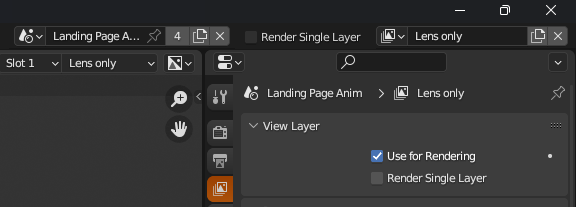
I often use render layers and I find the location of the 'render single layer' a bit strange. Right now it looks like it's a layer-specific option, but in reality it takes over the visibility of the layers, doesn't it? Would make sense to also place it on the top header too IMO.
1 Comment
I do agree it feels weird to have it as an option for a layer while it kinds of impact other layers, but I don't think the header is a better place. That's not a place where we change scenes options at all.
Since it's really affecting "only the active layer", and not "a specific layer", maybe that should be just moved to the Scene's tab under Scene panel:
Or the Output Settings tab > Post Processing Panel:
Alternatively, maybe make it easier to bulk manage this?
In sort-of miss what we had back in version 2.79 and prior, where the old "Render Layers" tab was designed to manage all the scene's layers from a list, similar to how materials work. And thus we had this little list UI there:
Render Layers — Blender Manual
Now we just switch the render layer from the header and handle its options from the new View Layer Tab, which does not need the ability to display all layers, but lost the ability to bulk-manage their states and makes it hard to have a global view of layers.
Maybe we could bring that particular thing back?
Or make it possible to handle it from the outliner?