
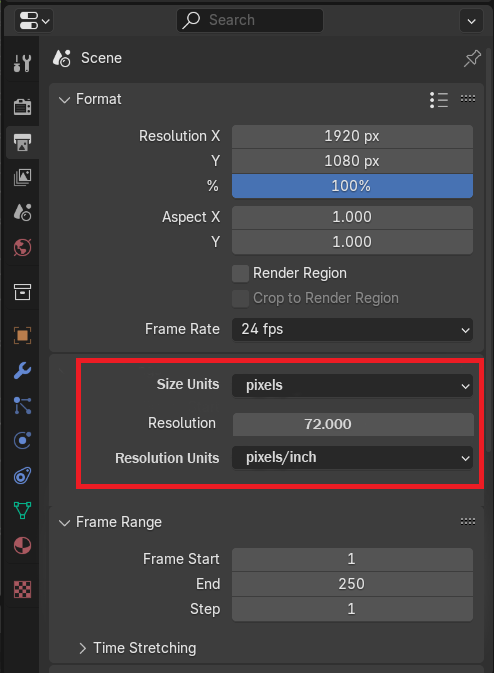
Size units and Resolution Units for output settings
Blender has a good output image, but I would really like to be able to choose the resolution and intensity (like DPI, but for all supported image formats) This is already implemented in other alternative software, so it would be great to have such a professional option.
Size units: pixels,inches,cm,mm,points,picas
Resolution units: pixels/inch, pixels/cm
8 Comments
I don't see any purpose in this personally. The only purpose of DPI is in drawing applications where you have a ruler on the canvas so you can measure how it would appear in the real world. Even then there isn't much point as you would have to take into account your screen size, resolution and how big your canvas is.
The only point I could see this having is checking how much resolution you need for a certain size print at a certain dpi. But couldn't you do that calculation yourself?
Judging by your logic, probably the developers of Maya and Houdini are "not quite smart" if they have such an option in the software. Surely the term "Industry Standard" is some kind of far-fetched thing?
Sorry, I didn't mean to come off rude. I am trying to understand the purpose of having dpi as an output option. I still don't understand the use case for it. Is the metadata what you would like? Btw I found a plugin on the extensions platform that lets you set the dpi: extensions.blender.org/approval-queue/dpi-tool/
Thank you! This is closer to the point! You see, not only I came to this, and a good person has already independently written an extension. This need is not exclusive to me. I do not represent any studio or project. I use Blender and other software for the sole purpose of maintaining my professional qualities. Since this site is designed for suggestions for improvement, I decided to focus on this issue.
Out of interest, what do you need this for?
DPI is an abbreviation for "Dots Per Inch," which means the number of dots or pixels per inch. It is a unit used to measure the quality of images, print quality, and display resolution. DPI represents the number of image dots (or pixels) per inch and is commonly used to describe the level of detail in images or print quality.
I just want Blender to be better! I can see the difference between the output image quality of Blender and Maya. And this is a big difference! Because the level of detail of small background objects in Maya is maintained thanks to these settings. Options for transferring source images to other graphic editors do not solve the issue of clarity and quality of the source image.
Can't you just increase the resolution in Blender. Autodesk has an article here: autodesk.com/support/technical/article/caas/sfdcarticles/sfdcarticles/Images-rendered-at-300-DPI-in-Maya-appear-at-72-DPI-when-opened-in-Adobe-Photoshop-s.html
They basically say no matter what size you render at, once you import into photoshop you will always get a result of 72 dpi. Because real-world size has no relation to pixels.