
fixing the movement of the Navigation gizmo in an axis
hi,
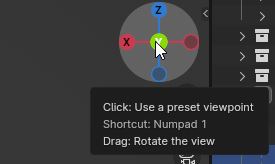
"Clicking any of the axis labels will align the view to that axis. "
but if i want to move the view aligned it is not possible. a hotkey to align this movement would be great.
so in the attached picture, if i could hotkey click on the green "y" or "x/-x" axis the movement would be constrained horizontally. if i could hotkey click for example on the "z/-z" it would be constrained vertically
....instead i have to klcik "4" or "6" to move sidewards for example...thats much too slow, even if you declared small degree movements that are important to align correctly.
thats very important for all technical and architectural creators that often work vertically, horizontally
big thanks for your work and for a solution !
1 Comment
think I understand the problem. It would become better if a much more "intelligent" transform behavior in different Blender modes will be developed.