
3D Viewport Edit Modes navigation
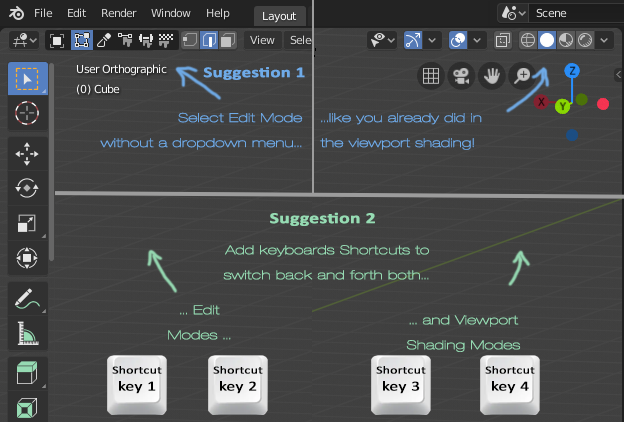
Hi! Blender 2.8 seems to be going very well in general and also in terms of UI, I really like that the "Viewport Shading Modes" are displayed as buttons in the top-right portion of the area, instead of the old dropdown menu, and I think that it would be VERY nice if the same treatment were given to the "Editind Modes" at the top-left portion of the area.
13 Comments
Use pies, it is faster. And do anything you need. {attachment 7024932jpg} Also you can assign shortcuts to shading buttons. So please learn Blender and existing possibilities before making suggestions.
* @ Vyacheslav * if it's already done with shading modes, why not to do the same with editing modes?
* @ogat.ramastef * 6 different hotkeys for editing modes, when you are mostly using 2 of them? Bad way. Pie is faster: it allows one hotkey and move. If you did not know, pies can work non only with clicks, but with drag: push key, move until it selected, release and you are in the new mode.
* @ogat.ramastef * also! You can make simple addon/script, that only register operators like «sculptmodeswitch», that contains only bpy.ops.sculpt.sculptmode_toggle() Thats it. If you have such operator, you can add hotkey for it in 3dview-Global keymap. And it will work with your own hotkey personnaly for you. But for all and for fast work it is bad solution.
* @ Vyacheslav * 6 different keys? No, I said 2, one to switch forward and one backward. For both edit modes and shading modes. Now about the dropdown menu, pie is really good I agree, but still, if it was done with shading modes (getting rid of the menu) why don´t do the same for the editing modes? It´s just 1 click instead of 2.
Even worse idea. to switch between object and edit it is 2 keys instead 1 Tab. And to switch between texture painting and object mode it is 10 pushes (or 6 between object and vertexpaint if selector is cyclic). What is wrong with you? Such a perversed way…
* @ Vyacheslav * XD no ad hominem. No one is obligated to use in some or other way the buttons, menus, hotkeys, add-ons. I always advocate for the diversity of ways to do things. No one here said to drop the Tab shortcut, but just to add this option. To switch back and forth (in a cyclic way) between edit modes and painter modes would be very usefull for me, as usefull as doing to all the shading modes. Each person works in a different way, and that's what we should have in mind when designing a UI.
TS speaking about not only add this option, but showing all five modes button at once without names. That will make interface worse for all. More non-context buttons — worse usability.
But not each person works proper, fastest and most effectiveness way. So I prefer, when people with high skill and speed make proposals, advices and interface, may be such way, that I do not like at first, but the way, that forces me to learn to work fast and easy. And Blender do it better and better by time.
And this proposal looks like joke, trolling or idea from unskilled person, who never thought about consequences. Just imagine: you have model with few Millions polygons. And you want to change mode from object to sculpt. But edit mode between them will stun viewport. So you need to make time-histeresis between button-actions. And option for it in preferences. This way making bad interface, then trying to patch it to make it better…
So NO WAY! Nobody should learn such cluttry-woopsy-doopsy way by default, even if they want. Blender is professional software ant first, not a toy. But it allows to make toys: some python, and you have as much buttons and shortcuts, as you want.
Also ALL UIs in professional 3D software are overloaded due to insane quantyty of functions, possibilities and properties. So sweet spot for UI is: good fluent context-oriented interface, minimal amount of buttons, 0—2 levels of nesting, less clicks, no unnecessary clicks (meet noclick mode!), clarity in naming, short and clear tooltips, clean separation and combining elements in short logical blocks . And this proposal is overwhelmingly far from sweet spot.
* @ Vyacheslav * yes.
As you said: less clicks, no unnecessary clicks (meet noclick mode!)...
The same way they get rid of the drop down menu for shading (showing just the icons without the title), and changed the toolbar titles for icons, all those things made the ui clearer! So it would be just to give the same treatment to the editing modes menu. Make it clean and with just 1 click.
* @ Vyacheslav * Now about the assertion "Nobody should learn such cluttry-woopsy-doopsy way by default, even if they want." I can reply that nobody should have a say about what is or what is not a woopsy-doopsy way of working. To have different options available by default is not the same as to obligate others to use it. If someone don´t want to use a given option, he/she should just not use it... As long as people are different from each other, the way their minds operate are different as well, so it´s not all the times that the shortest path from A to B would be, in practice, the fastest for some people.
* @ogat.ramastef * parallel options are okay. Spoiling one of options to make it worse — not. If somebody want to eat broken glass, I prefer to stop him and call dumb.
* @ Vyacheslav * yes... parallel options...
* @ Vyacheslav * Yes, maybe. But still, the box for edit mode selection being displayed as inline icons instead of a dropdown menu, just like it´s already done with shading modes, is an idea aimed for fast work since it´s one click command instead of two!