
Ambient Occlusion Pass - Eevee
Hey all,
The ambient occlusion pass in Eevee needs to be fixed - I call it broken because at one point it was working correctly; An environmental pass (like mist, depth, normal, etc.) is not a functional pass, if it cannot be separated from the combined and selectively applied in compositing. It would really benefit not just NPR, but also VFX users and anyone else who uses Eevee in production.
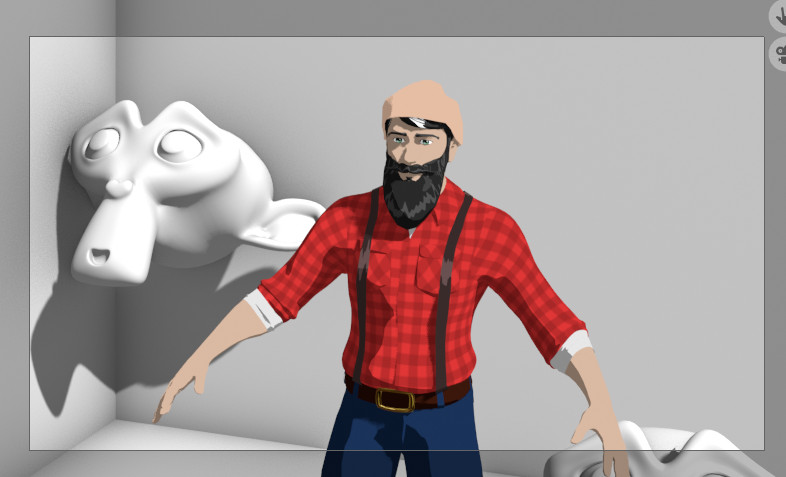 Customized simple scene with current way of working (AO nodes on all-but-some shaders)
Back When AO pass: In Blender Render, the ambient occlusion pass was what it was. You set your settings under the world and you got that as your pass in the compositor, but you had the option of turning it off for the render, so you could limit it's application. This makes 100% sense for ambient occlusion as will be used for the compositor, because such a global property, will generally only be excluded from a few objects.
Today's pass in Eevee (up to 3.6):
Ambient Occlusion is editable on a per material basis, but no all-encompassing pass. Which means, if you want ambient occlusion control in post - like excluding a few shapes - you can't, because the viewport AO and the pass are 1 - if it's off in the viewport, it's off in the pass, even if ticked.
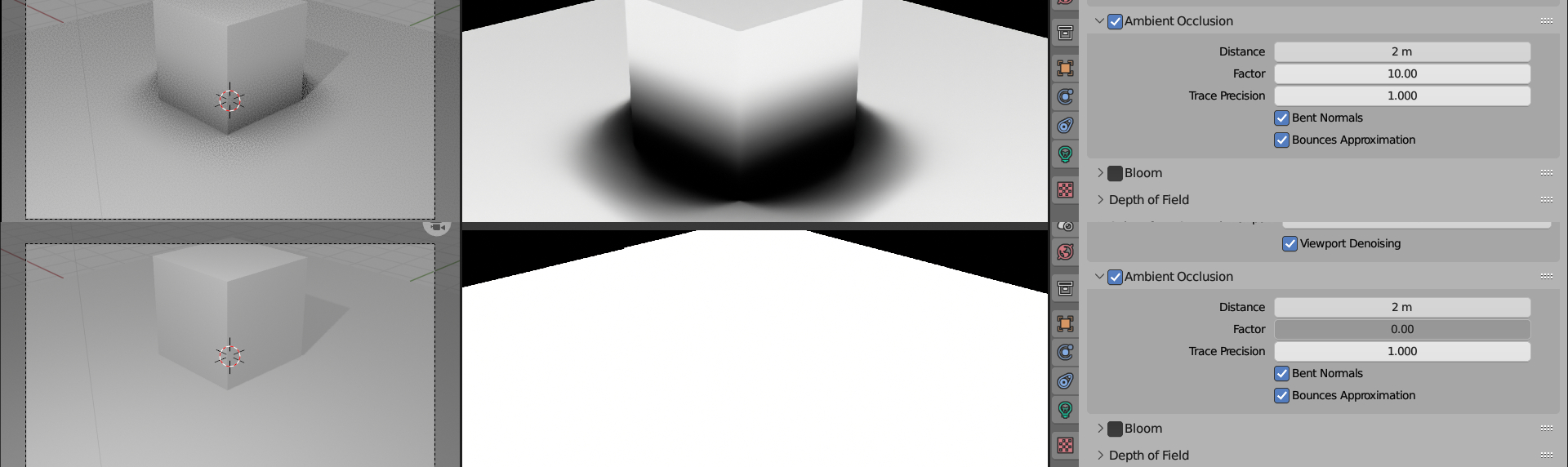
I'd like to propose that the pass be separate from the viewport one, tied to the settings of the SSAO (such as distance), but be able to render separately from the scene, like the normal pass, Z and others.
Having to edit EVERY object, except the one you don't want to have AO on, is a very cumbersome and disruptive way of working, from a compositing and shading perspective. Let me explain:
I am currently converting a very big project to Eevee atm and we're talking like a 200:8 ratio of AO:nonAO objects. So I have to customly add AO to 200+ objects, while 8 don't get it. If the AO pass worked like it did before: cryptomatte, select objects via Asset, and done.
This is the primary expected behavior from any pass in compositing (Normal, Depth, Vector, Mist, etc.); possible to have in the view, but cab be separate from the combined so it can be manipulated for the whole or the part.
- You could argue that I should just use a shadeless nodegroup that comes with the add images as planes. Well, no, because if something doesn't get ambient occlusion, doesn't mean it's automatically unlit. In VFX, your object could already have AO, so you don't want extra, but you do want the object to still receive shadows, like adding a person or robot to a scene, for example, where the environment is CG and the character is, but the object or prop is real. In NPR, it's the same. You want it on your background, but not on your characters. Which again would mean that you'd have to go through the whole scene, because you want 1 character, 1 object or 1 element to behave differently - without AO.
If AO worked the opposite way, where you'd only want it on the few, Absolutely! it would make sense this way. But since global or scene-wide passes work the opposite way, it's not practical...
While I do love HEAVY customizability, this is just one too custom, hehehe.
Please let me know what you guys think below! Be awesome!
14 Comments
I didn't see this idea, but someone was kind to repost this on the meeting minutes of the Eevee-viewport module meeting of this week. See devtalk.blender.org/t/2023-07-03-eevee-viewport-module-meeting/30150/5 for the answer.
The architecture of Eevee-next to give this flexibility with the requirements of render passes and viewport compositing. So I expect this to be solvable.
Current Eevee was designed with just a few render passes in mind and the concept of viewport compositing didn’t exist back then. Eventually I tried to add most renderpasses but could not do it efficiently and as mentioned with some limitations.
I'm glad it got noticed and shared where it could make some difference. Thank you for taking the time to look at it and I do hope it works out for Eevee Next, because honestly, in the small studio I work for, Eevee is the work horse for everything, hehehe. We've only used Cycles where Eevee didn't have the features, like panoramic renders (equirectangular). Even there, we used Eevee until render time, haha. Again, big thanx for checking it out!
this works well in blender 3.5, 3.6 if you can update.
Nope, still the same in 3.6...
Maybe I am missing something here but an Evee ao render pass seems to render fine if enabled in evee render settings and in View layer even for a scene with no material.
Render the scene without containing AO in the render, but have it in the pass. You'll find it's impossible. The two are linked. The only way to have a few objects not have AO, is to customly add it to everything else. That's not practical and the reason for this proposal...
For a local property, this manner of working makes sense, because you're only going to be applying it to a few objects, but since AO is a global thing, a scene wide thing - is it practical to add it to the whole scene, one material at a time, or easier to remove it from the pass with cryptomatte for the few that you don't want it on?
Oh I get it, it's only that I do not use renders and compositor too much.
So the AO effect seems to be also baked in the individual light passes not only in the Combined so it's not possible to recompose the final image with them and use the AO pass because it will be adding it twice. Sorry for your trouble, this is not even a bug if you read the documentation. Layers not helping either because the AO is a global render setting. The only solution I see here is to render twice with AO setting on + render pass and then with AO turned of and recompose after. I hope this will get addressed.
Exactly! The irony is that it has worked differently before, to where if you had it ticked but influence on 0, it would give you the pass without being in the combined render... That's honestly the way it's supposed to work, imo...
This is the best place to question it after so many releases, I guess... 🤷♂️
Unfortunately, rendering everything twice because of such a design choice is more impractical than applying it to a million materials, bar a few... The reason is that if you want to change the smallest things, it's 2x again and again and again.
I was playing with this and learned new things :) It seems that AOV Outputs are not controlled by the AO factor and a small script can add a this to all materials. So you need to make a group named "AO" containing an AO node connected to a an AOV Output. Add the AOV in the View Layer. Set the AO factor to 0 in Evee settings. The group just needs to be copied into each material. For convenince I generated this with AI (I don't know python) that you can refine to your needs:
AOVs are very limited and scripting is not an approach I want to follow, imo. As an aside, I'm not against it, actually working with AI to build my first add-on, but it's still needing to apply it to everything but the one or two... It really needs fixing, not a workaround. In the meantime, I'd rather do it manually, because if you do you have custom distance control.
AO pass will work if you turn on ao for scene in eve render settings:
Please read before commenting...
I see... You want ability to have ao pass without also adding it to combined render (just like cycles). You should probably edit title or description to make it more understandable.
Correct!
Yes, it's my fault you didn't read... 🕵️♂️