
Grease Pencil - Replace Primary and Secondary colors with Stroke and Fill colors
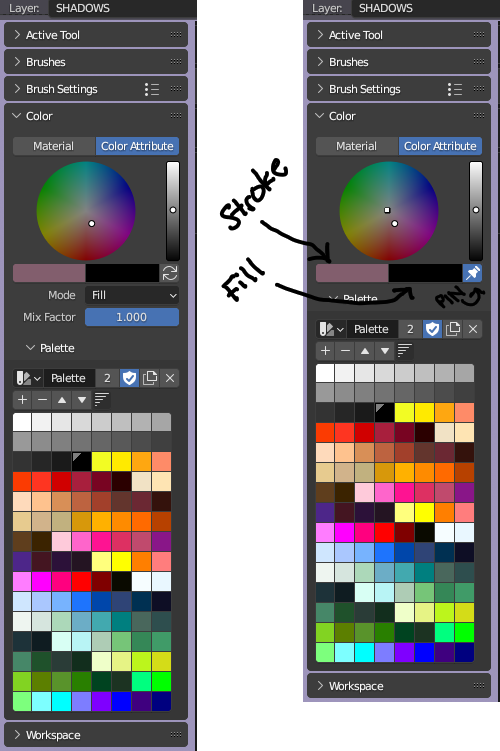
In the Grease Pencil Color Attribute paint mode sidebar, there is a Color tab containing two color buttons: "Color" and "Secondary" colors. (what is "Secondary" color anyways and is it ever used?)
I propose changing these to Stroke and Fill buttons.
Beside these buttons is a "Switch Tint" button.
I propose changing the switch tint button to a global Pin colors for all brushes/tools. If the selected Material has "Stroke" or "Fill" checked, use this pinned respective color.
To select a color with the color gradient wheel, LEFT click to select Stroke Color and RIGHT click to select Fill Color. They are represented on the gradient wheel as an open unfilled circle and a filled square respectively. For tablet users tap gradient wheel to pick Stroke Color, hold CTRL to select Fill color.
At a glance, artists can see what the stroke and fill colors are at any given time and easily and quickly change them.
3 Comments
Fine fine. The PIN button can stay swap STROKE and FILL colors. I wanted it that way anyways.
It's a quick access color so that you can paint or do actions that either profit from having a quick access to two colors, or is used by tools that can require two colors, or tools that can use the secondary color instead of the primary so that you can keep doing whatever you were doing with the primary. It is widely used in virtually every painting and photo editing program, it's quite a standard actually.
TL;DR it is widely needed and used, there's no point in "replacing it" by something that it's could already do as is.
I am aware that MSPaint has foreground and background colors and a button to between toggle them.
Grease Pencil is NOT a paint program, it is vector animation tool that can overlay polylines on 2d and 3d scenes in Blender. The strokes (polylines) are drawn with a Material that defines the STROKE line color/style and the FILL color/style. This is important.
Trying to shoe-horn raster paint program concepts into the Blender UI interface contradicts and confuses both the end users and the development process.