
Hooking Vertical or/and horisantal keyframes as preselection
Hi,i want to propose a way to work with keyframes efficiently espacially with the nightmare of hundreds of Keyframes, we all sometimes or frequently want:
- many vertical Keyframes (in the same frame) maybe not all of them stay all the time vertical in any tweak we want.
- many horizontal KEyframes conserve the same gap of frames
-
both 1) and 2) situations
The proposal is going to be useful especially for Grease pencil users because the GP object has two type of keyframes,it has keyframes of drawings and keyframes on its properties, any change on drawing keyframes frame (position of kf in timeline) may require to change the Kf of a property in order to synchronise them, so it will be good to link their frame in the dopesheet eg:when we kf the factor of Build modifier and after a while we move the kf of the drawing here we need to adjuste the kf of the factor, to avoid unecessary steps:
I propose Hooking Vertical or/and horizatal keyframes by a visual link act as preselection to all hooked keyframes. whenever we grabe one keyframes, all hooked will follow.
- to edit this link there will be 2 operators, "Link kf " and" Unlink kf ".
- to tweak the position of one keyframe that is linked without letting the others kf follow it we can use a shorcut for that like alt+select then we can move /rot/scale , delete as we like.
here a a humble mock up
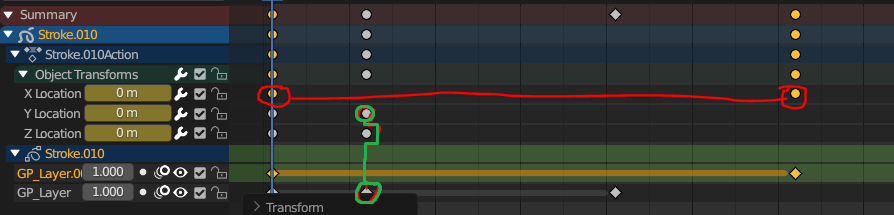 we can link two links to have a bigger one
also i propose the Cut tool for cut a link to have two smal links or erase all the link by holding 'Shift' or alt anyway.
hope i was succesful to explai may idea.
we can link two links to have a bigger one
also i propose the Cut tool for cut a link to have two smal links or erase all the link by holding 'Shift' or alt anyway.
hope i was succesful to explai may idea.
8 Comments
I can see the value in linking keyframes, but I worry it would quickly make a mess.
In the scenario of a user not familiar with the idea of linked keyframes, or when you give your file to someone else who knows the principle but doesn't know which keys are linked together, or when you come back to a project after not working on it for a while and don't remember the links you made.
There needs to be a way to tell which keyframes are linked and how. And it needs to not make a mess.
in the picture there is the green and red line they will appear in dopesheet and they will avoid be above any kf they turn around as drawn in the mock up , effectivelly, if we select a linked kf the link appear with bigger shape and highlighted, i think agree with you using this feature must be used carefully, maybe deactive this feature temporary can let us have what we have already in viewport overlay panel, UI designer must be more skillful than me to come up with something more sophisticated and readable, but it's a much needed feature, plus, markers can act as comment for clarifications if we want to comeback to it later or share the file'
if we can have another mode for linking kf maybe this need much work, and i want the feature be simple as possible
Thing is, you made simple examples that are not challenging the issue. If someone links a hundred key that are on different channels and frames, which themselves are not close from each other to begin with, how will it look? How do you avoid having an unreadable spaghetti mess, and how to do you prevent performance issues ?
How will this look in the graph editor ? This kind of links will still be active, except now the links display is competing with animation curves.
writing here since you linked this on the papercuts thread on devtalk. This isn't really a papercut. It requires a great deal of design work before it can even be implemented.
However I am also having trouble understanding the use case. Maybe you can enlighten me, but the functionality is already there provided by the summary channel. So you can just select the summary key and move the whole column. And for keeping the distance you just select both keys and move them.
Unless you want only some keys to be linked, in which case I am worried this will turn into a mess really quickly
there is many use cases especially for grease pencil object because often we want animated properties be synchronised with drawing keyframes so any change need retweak in many places.
agree the summary select the whole column, i'm aiming to select a bunch of them not all of them and also the keyframes in other columns.
and the optional feature is if we select one keyframe a line that represent the linked keyframes will appear to show linked keyframes like in the picture red/green line ,this option can be desactivated.
I think instead of linking individual keyframes, structuring fcurves in custom channel groups would be a better solution. As far as I can tell this would do what you need. What do you think
for this its not possible to do that for Grease pencil drawing kf and its properties kf besides grouping channels from different objects not recommended and either it's not possible. so idea link kfs from different objects and for grease pencil kfs as mentioned