
New "Grid Snap" is inferior to the old "Increment Snap" with Absolute Grid mode
With the new major release developers removed Absolute Grid Snap option from the Increment snap target and made new Grid snap target as a replacement.
However, the new Grid snapping can only align objects to the floor grid whenever used in perspective viewport, which was not the case in the previous Absolute Grid Increment Snap. The new Grid snapping will break your workflow if you want to just move a vertex in specific axis while maintaining snapping to the absolute grid.
You can work around it by
a) Using Increment snapping. But it will not snap to the absolute grid unless mesh is already aligned to it.
b) Using Grid snapping with Ortographic viewpoint. But it will only hinder and slow your workflow as you will have to constantly switch viewpoints after each move. Moreso if you have multiple floors above each other (like on video above)
If the reason for this change was to solve this problem projects.blender.org/blender/blender/issues/79245 Then it also doesn't help. As other 3d packages do not snap objects to the floor level, but rather allow dragging objects with gizmo along the X and Y at the same time, which is indeed useful.
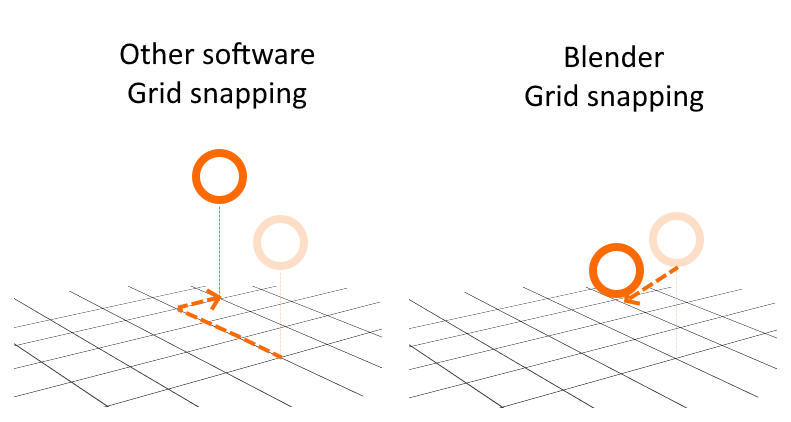
This problem can be easily solved by making Grid snapping identical to old Absolute Grid Snap and adding new options to it, such as "Ignore Z axis", "Snap to floor"
8 Comments
upvoting and adding some info. the new grid snap doesnt let you move objects in relation to the mouse position. say you have grid snap on and shift D an object. previously the new object would move relatively to your mouse. now it snaps straight to where ever your mouse is. and doing this without grid snapping on still has the old behavor...
between this and the 3.3 change to uv unwrapping. i feel like the devs arent actually seeing how they are changing stuff for the worse
The way the object snaps right to the mouse position and doesn't move relative to its original position is absolutely ruining the entire snap feature for me and forces me to reimagine my entire workflow for working with absolute coordinates. An extremely unfortunate and inconsistent change. I also hope the old workflow will be added back as an alternative option.
It's really bad!
Absolutely it's weird that absolute grid was downgraded like that
Hi, the problem shown in the video was actually a bug that was recently fixed: projects.blender.org/blender/blender/commit/504c1506b2
Snap with constraint using 'Snap to Grid', should work similar to 'Absolute Grid Snap'.
New builds are already fixed and the fix will be backported to 4.2 LTS builder.blender.org/download/daily/
unusable :/ new grid snap in orthographic view when transforming vertices constrained in one axis or with move tool, does instant teleportation close to mouse position nearest grid point and shift precise grid movement does not work in isometric projection or perspective.
Yes, this is a major drawback in my opinion. I dont mind the new option, but it does snap to the nearest grid point where the MOUSE is. the old increment and absolute grid snap combo snaps to the nearest point whereever your selection center is. That makes it great for zeroing out objects or aligning them. PLus if the grid is not fine enough you could toggle that with shift, all in one go. Glad i'm not the only the one who noticed that
It seems to snap just fine when the transformation is constrained to an axis but will drop the mesh to the floor grid if not constrained. This didn't happen in the old version and is definitely a regression. I've also noticed you can't hold Shift to fine-tune the increments anymore.