
Blender 2 8 - Proposed Settings for Interface Layout
Follow below the link of a well cut video with my modest proposal of changes.
They are only small adjustments in the design organization of the current interface.
I believe that the proposed adjustments can contribute to an even more intuitive and visually more comfortable navigation in the interface currently under development.
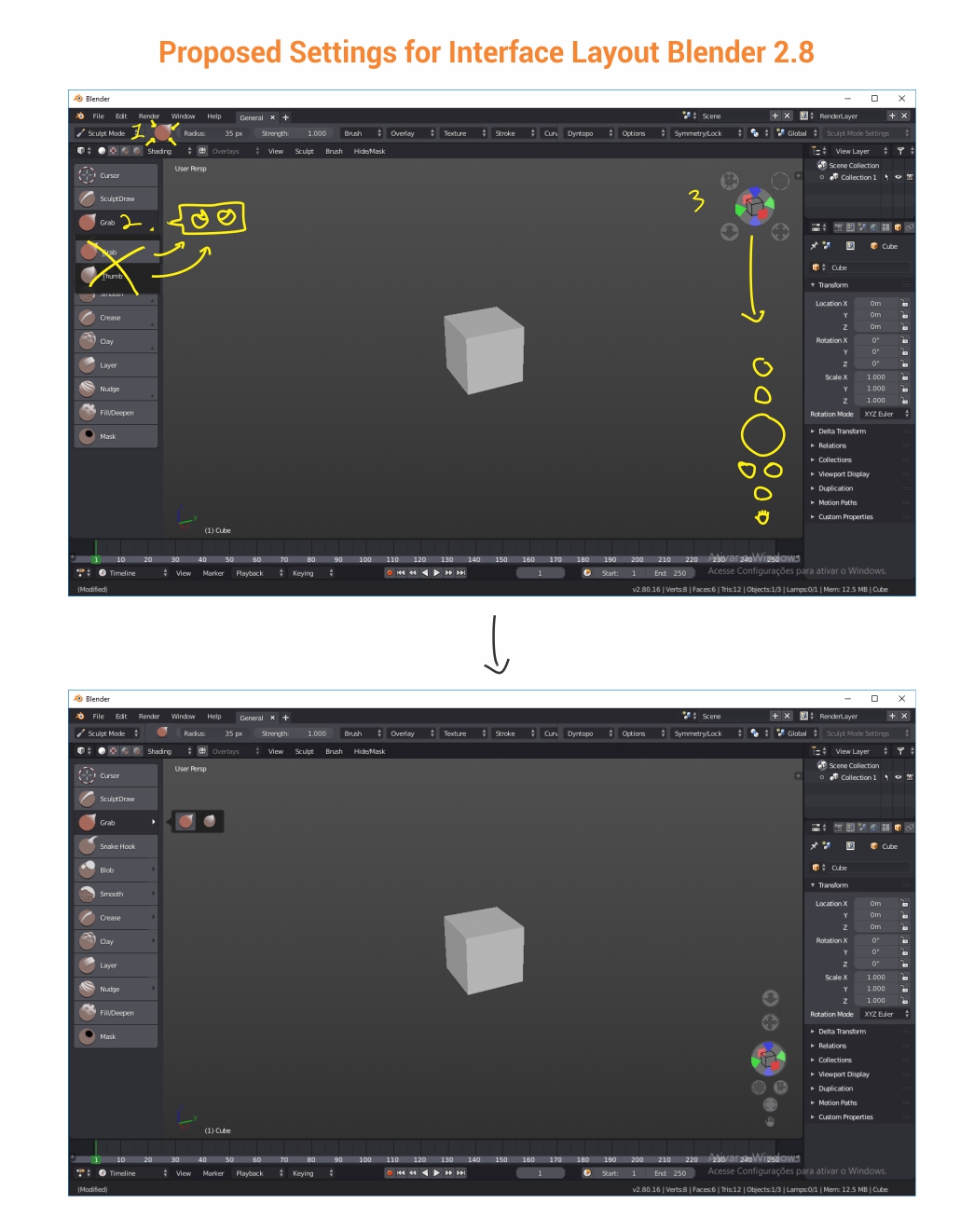
They are only three proposed adjustments. see:
1 - Reduce the size of the icon indicative of the active tool next to the upper bar of properties. Currently these icons are exceeding the margin of the bar.
2 - Change the selection mode of the tools that are nested in the side menu. The idea is to behave in the same way as the menus in the upper bar (tool's property bar), so that with just one click the menu opens to the left of the option and allows easy selection of the Nested tools with mouse or stylus pen.
Currently it is necessary to click, hold the option until the menu is opened for only then can be selected. In addition, there is a superposition of menus and that ends up spoiling the beauty of the layout.
3 - Move the options of "Navigate Manipulator" to the lower left corner, redistribute the options to facilitate access to the options "Zoom" and "Move" view (the most used by beginners in Blender). It would also be quite interesting to have a new option for "Fullcreen Area" and the direct activation / deactivation of the "Navigate Manipulator".
Currently the position of the "Navigate" is very annoying to have to take the mouse to the top of the screen. It is also a factor of distraction and visual contamination (I have the impression that there is a drone flying over the 3d stage).
5 Comments
Click and hold is important otherwise you wouldn't be able to select the visible tool with just one click. This is pretty standard.
And moving the navigation controls to the bottom doesn't make too much sense for me, seems pretty ok where it is, even though I'd prefer a very simple version of this, as someone suggested in the past:
Cheers...
Plus this is where a lot of other softwares placed their nav buttons & manipulators.
I agree with all everything except your navigation manipulator takes up more real estate than the original. It could be confined to a corner much better by using a layout like this:
I added a little minus button in the top right corner so the manipulator could be hidden without the need to open User Prefs.
@dpdpforlife: Your proposal is also a good improvement option. Except I would position the navigation handle below and, in addition to the small minus button, would add another button to the fullscree.
If you look closely, there is also a button to hide or show the navigation handler.
Thanks for the comment!
@dpdpforlife: PS: The size of the navigator manipulator in my proposal is smaller. In fact the buttons are smaller but were intentionally scattered to facilitate the continuous use of some options (mainly zoom and move view)