← All ideas1 Mar 2019FudushaeOpenUser InterfaceFudushae1to3fall5FalconCreatesIIIFGIIIIdeas-BattleshipIneCmbLauloqueMetinSevenVyachbnzsbriecmuldoonckohl_artlcs.cavalheirolsscppmomotron2000nanomanpropcservice.dordogneromanvolgushev4565thephobosthiagocavalcantecarvalho
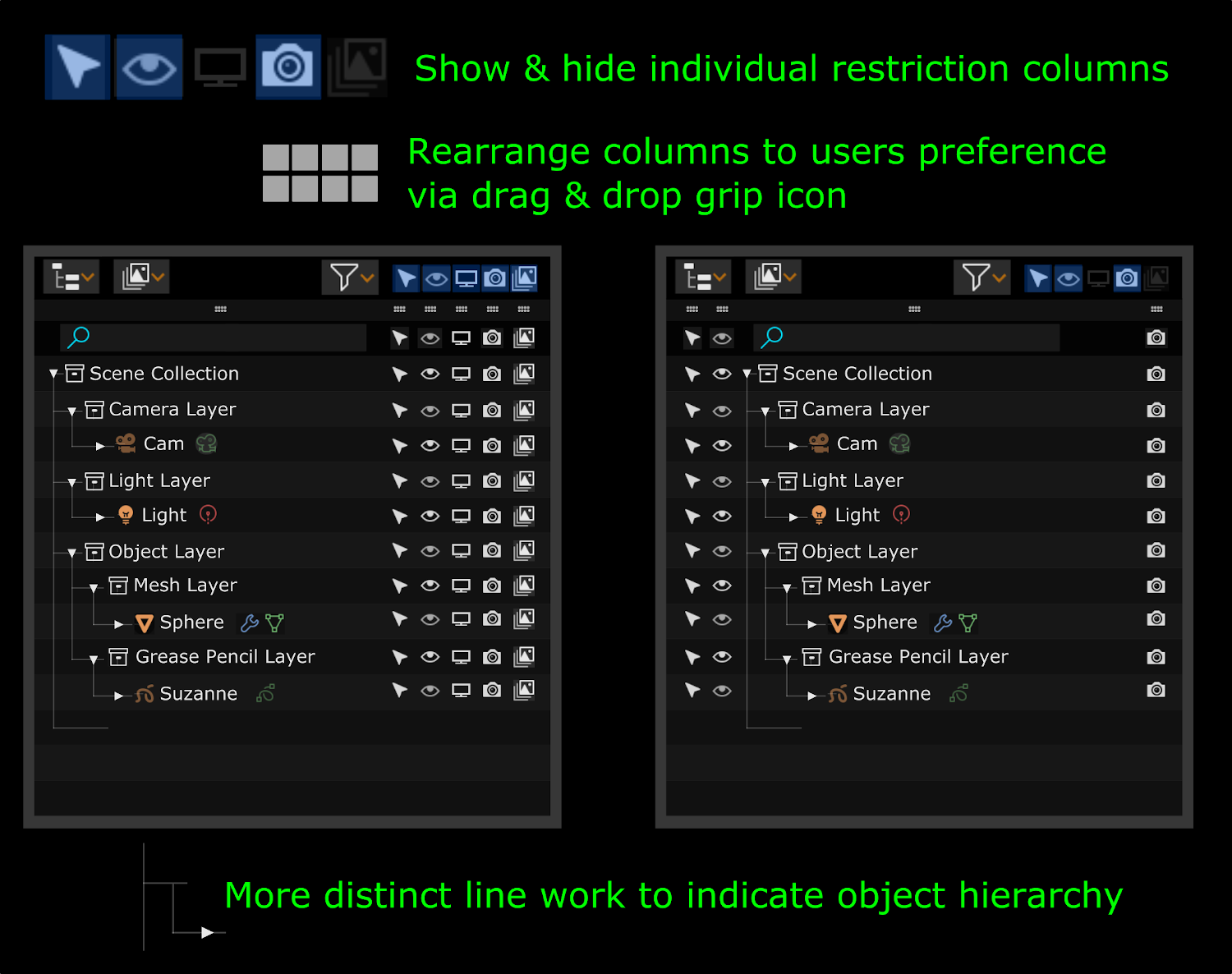
Maybe something like this? Drop down with icons and names.
Reasons:
More compact. In future number of available columns types can grow up so store all of them in one row on top of Outliner will be impossible.
More informative. Contain names which can help to understand what each icon mean.
Bonus - Max Column Management GIF
1
F
FudushaeAuthor
*
@forestgumpovu4
* Yes the drop down menu would be better. I had the icons displayed in the bar for discoverability (cause Blender pre-2.8 loves to hide functionality), but the drop menu is best solution in the long term.
V
Vyach
I like it in general. But visibility should be one column, because «hide for all» overrides common visibility. But hotkey for hard-hide selected will be nice.
What does layer-column means?
F
FudushaeAuthor
*
@ Vyacheslav
* I'm not sure what you are referring to by "layer-column". Do you mean the naming of the collection icons with "Layer", if so just renamed the collection name with the word layer added.
F
FudushaeAuthor
*
@ Vyacheslav
* Oh realized, did you mean the far right layer icons column? Thats to toggle the "Exclude" collection function.

5 Comments
Maybe something like this? Drop down with icons and names. Reasons:
Bonus - Max Column Management GIF
* @forestgumpovu4 * Yes the drop down menu would be better. I had the icons displayed in the bar for discoverability (cause Blender pre-2.8 loves to hide functionality), but the drop menu is best solution in the long term.
I like it in general. But visibility should be one column, because «hide for all» overrides common visibility. But hotkey for hard-hide selected will be nice.
What does layer-column means?
* @ Vyacheslav * I'm not sure what you are referring to by "layer-column". Do you mean the naming of the collection icons with "Layer", if so just renamed the collection name with the word layer added.
* @ Vyacheslav * Oh realized, did you mean the far right layer icons column? Thats to toggle the "Exclude" collection function.