
Pie Menu With Widgets
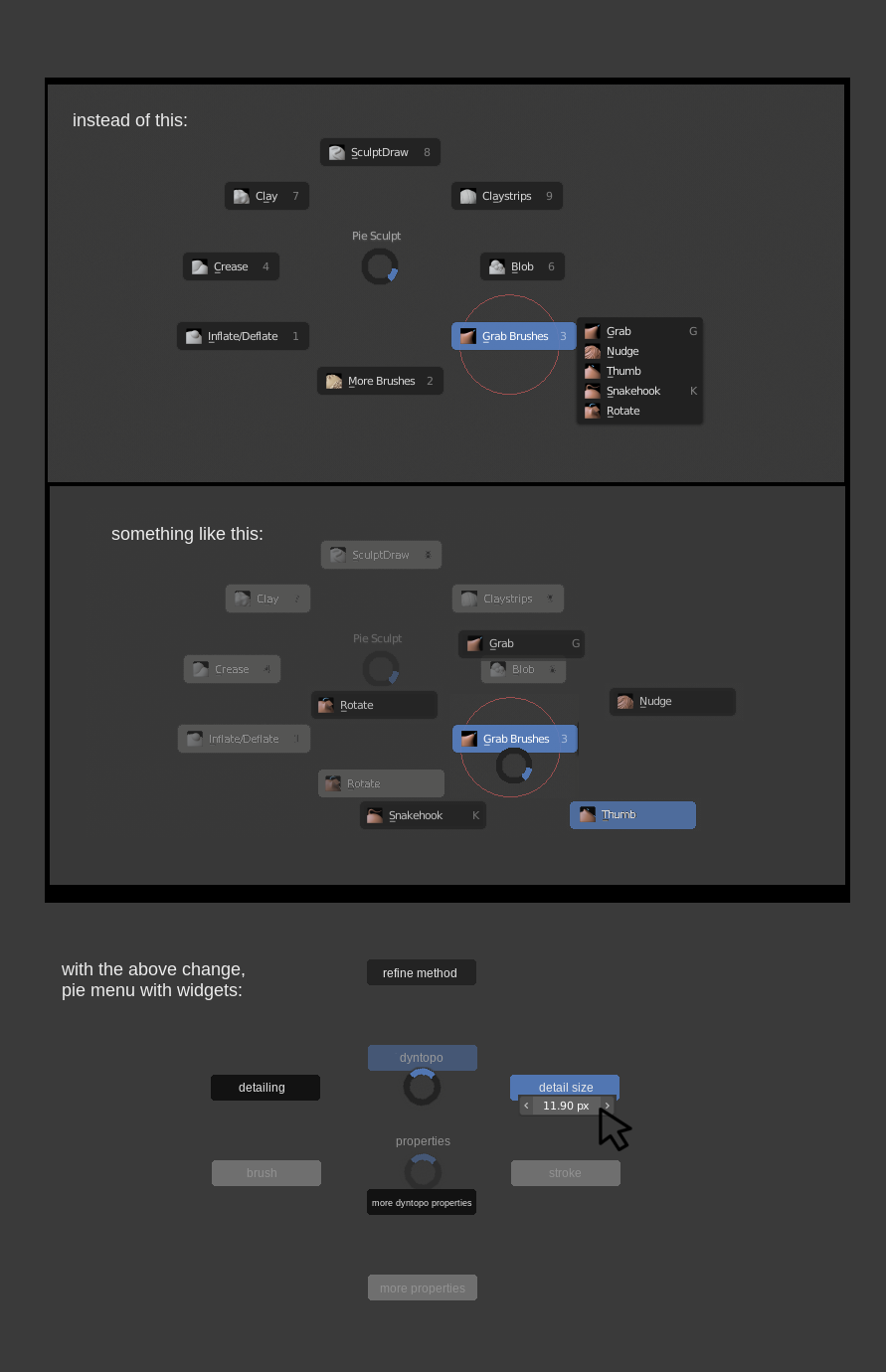
A Pie Menu with widgets!
This would give users the fastest possible navigation to manipulate widgets in the Blender interface. Why? It requires the least amount of pixel real estate to navigate a device (mouse,pen) to the widget and manipulate it.
Three obvious effects:
- Workflow speed up
- Cleaner Blender interface (Less menus needed to be always displayed)
- Learn Blender faster
The thumbnail below will help visualize the suggestion.
Who is doing this? I think no one. Let Blender be the first! (Well I guess Maya is doing something like this now that I've been informed after my first post.)
(If you have trouble seeing the thumbnail below, here is a higher res pic on my google drive) drive.google.com/file/d/1MXhMi5SlbdqlB42vnzVBNBzHO54-IhJL/view
7 Comments
Maya's marking menus work this way...;) Voted
* @impacman * I don't use Maya so I couldn't have known. But that is encouraging!
Great suggestion! +1
Modification Suggestion - Right-Click Activated
This Pie Menu should be activated by Right-Click in All modes: Object, Edit, Sculpt, etc.
Currently, some modes use Right-Click to bring up a tool setting widget. Perhaps the Pie Menu could surround the settings widget.
Modification Suggestion - Recent Action Item In Menu
For example, if a user adjusts the detail level of a sculpt, in recent items a sub-menu would display this action as an item so the user would not have to sub-navigate again to this action needlessly.
Modification Suggestion - Active Menu Centering and Mouse Relocation
The default behaviour for sub-menus is that they pop-up based upon the location of the mouse.
This feature would keep the active sub-menu always centered in the middle of the screen (or a chosen user area). All sub-menus would be displaced and dimmed so user could keep reference.
Secondly, the mouse should reset in the middle of the display of a new sub-menu (or when moving up to a super-menu).
This would create this effect:
Concerns: Mouse relocation I think would work great with a mouse and trackpad, but I've interested in how this might be solved for a drawing pad.
Possibly, if a drawing pad were being used that the entire menu would be in grab mode, moving with the pen. This would allow the menu to be centered and once approximately centered maybe stop grabbing?
This would make me much happiness.