
An Easy Way to Add Materials/color to edges of object
Wouldn't it be nice if there was a way to apply color/materials to edge of an object just as easy as the normal color/material of face of an object. see image
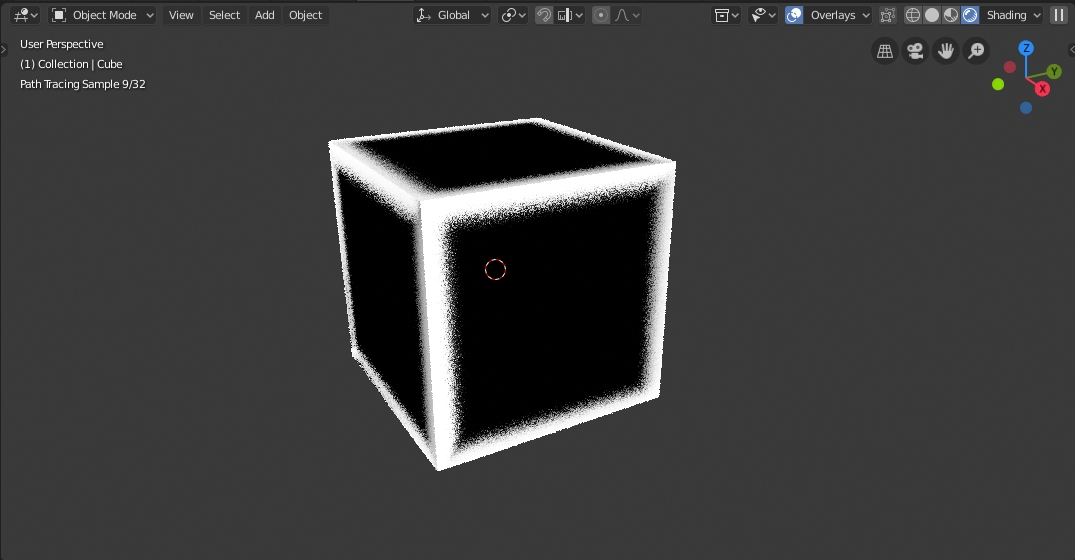
Wouldn't it be nice if there was a way to apply color/materials to edge of an object just as easy as the normal color/material of face of an object. see image
8 Comments
I suggest you learn what is possible already in blender, you can already do this with nodes.
Unfortunately, when you consider the rendering engine, this suggestion doesn't make sense. Without faces, there's nothing for the path tracer to work on (how can a ray of light intersect with a locus of zero area?). How would this handle normals and tangents? Even in your thumbnail, you show what is basically a loop of faces around the edges.
Cycles uses BSDF material definitions - this means bidirectional SURFACE distribution function. It needs a surface to work on!
If you want to give a material to an edge, use Freestyle and freestyle edge marks -- you can have any number of line styles. If you want to apply a material to an area around some edges, use vertex colors or the wire-frame node to create a mask (also AO+pointiness, as others have suggested). Or inset faces. Or use edge-loop offset tool (ctrl-shift-r). Or bevel the edges. Afterward, assign materials to the faces.
I do agree that Blender should implement edge/face groups, like vertex groups, and make all of these data layers accessible to the rendering engine. If you like that idea, vote for the edge group proposal and my own Cycles-vertex group proposal.
This is a feature suggestion, not looking for help on how to do it.
I am suggesting doing this like faces are handled for color. If it can be done with nodes, it can be done with a separate color/materiel panel... just make it easier.
ATM try to uselocal AO and Pointiness.
* @ Vyacheslav * Pointiness currently only works in cycles thou, would be great if it would work in EEvEE. Ao Really only effects areas that would be darker on the mesh So it also can't be used for this by default. The possibility of an edge detecting shader in EEvEE would be really needed in the long run when talking about procedural texturing. I know there is the bevel node fort that but that one is hard to set up. The way it is proposed here thou is nonsense. What Blender would need thou is a Layer Blending Based Procedural Texturing system in combination with procedural masks and Shaders. ((Lets just replace substance xD ))
There is this workflow currently thou youtu.be/IUETiqovOI0
I guess what i am thinking is... currently we have a panel (on right side) and node for applying material to faces. Can we add a second panel/node separately for applying materials to the edges. It would be much easier than trying to do the same things using just nodes. Which I don't know how to do for this effect.
* @Frank Hilton * Bad idea. All edges ≠ sharp and pointy edges. Try to use AO+Pointiness to generate desired map