
Blender Should Ask: What You Want to Copy On Duplicate?
For a while, sometimes, Blender creates a linked duplicate, even though I pressed shift+d. Only now, I found out the cause: mesh was turned off in this setting:
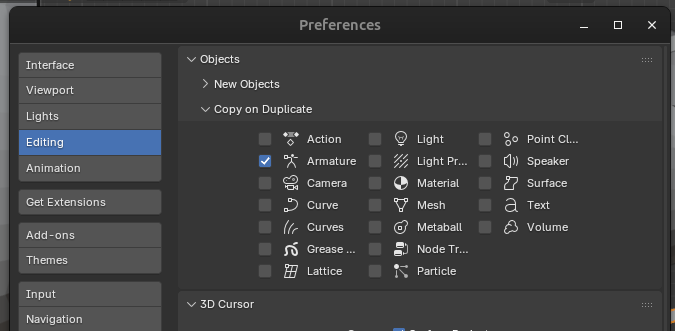
But sometimes I want to turn some of these on or off. E.g. I'll duplicate a mesh because I want to edit it and then compare them to learn if the changes I've made were worth it. And then I find out I have a bunch of duplicated materials :( This isn't the only issue.
If I could remember to change these settings before duplicating something, then I would. But the reality is, I forget, and then after 30 minutes of hard work, I realize I have to fix the issues caused by this.
This could be solved if, any time I press shift+d or alt+shift+d (edit) or copy and paste or anything similar, Blender asks: which would I like to copy on duplicate?
P.s. I'd make this an addon if I knew how.
Edit: This has happened at least 1 more time since I posted this. :(
2 Comments
It's a good idea, but would you remember to press 'alt' when pressing 'shift+d'? because, only 'shift+d' is not a good idea for people who want to just quickly duplicate something.
I want to shift+d, not alt+shift+d, but it acts like alt+shift+d unless I remember to do the thing I described in my initial post.