
Edit Mode: Allow "Only Locations"
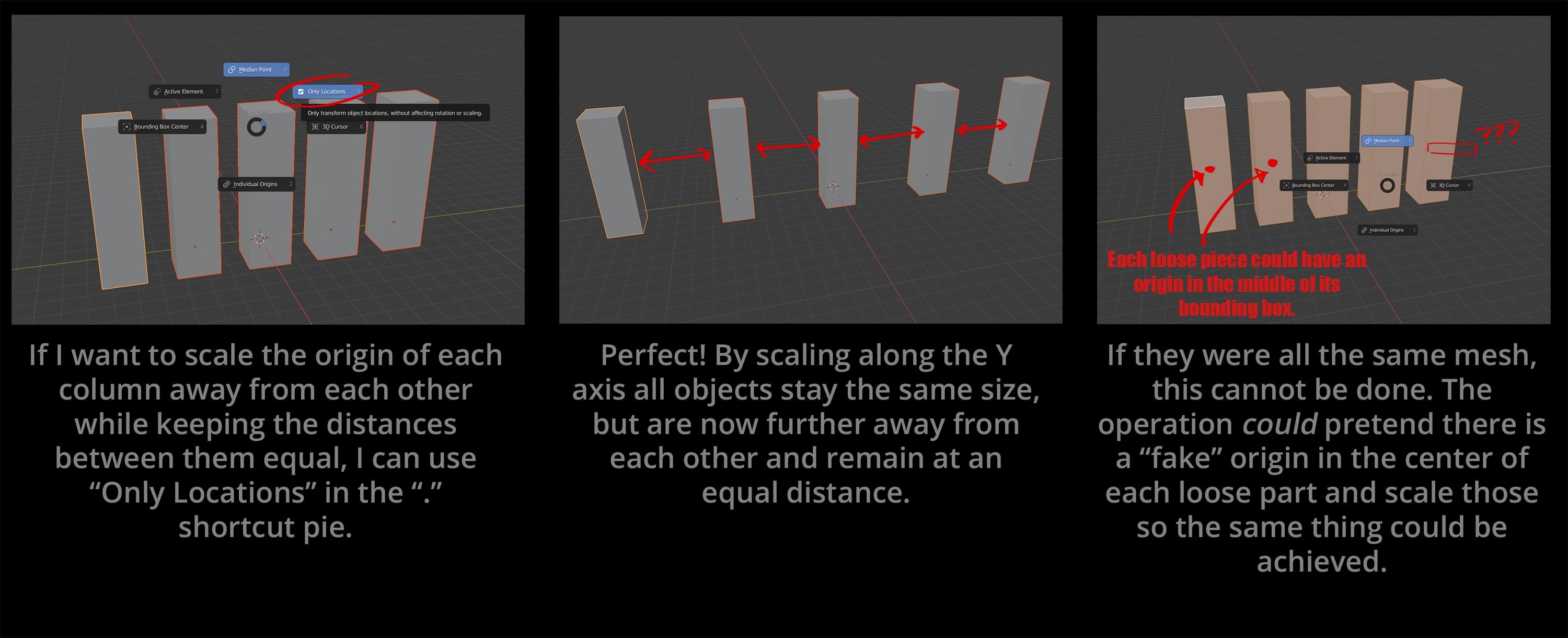
In Object Mode you may scale objects away from each other without affecting their dimensions by using "Only Locations". This is very useful for spacing out even elements. This is however not available in Edit Mode. To achieve the same thing each piece must be made their own object or moved manually.
I propose that this setting is added to Edit Mode, inside of the "." pie menu and under "Options" in the top right (Just like it is in Object Mode). To enable this to work, each loose part (of the selected parts) could be treated as having an individual origin, just as they would in Object Mode. These are not constant and would of course be different depending on what you select.
This exact thing already happens in "Independant Origins" pivot mode, but we don't have the ability to scale origins away from each other since Only Locations is missing.
3 Comments
this is pretty trivial to do with a python script, just not sure how useful it would be as a built in feature, and hijacking 'Only Locations' for this purpose could be confusing and a bit misleading to most users, especially given that it is already a bit of a convoluted feature.
If it's useful though, I've written a quick modal operator that does exactly what you described. Just download this and drop it in your Blender/scripts/startup folder and restart blender. Once you've done that you can do an operator search for "Spread Out Loose Parts" while in edit mode (or bind
mesh.spread_looseto a hotkey/pie menu)pastebin.com/jVeXsGGv
But the thing is, it works in object mode because you are only dealing with objects, not their content. In edit mode, you are in fact modifying the objects' content, in this case meshes.
So, “only location” applies to each component selected, which are mesh components, and such will deform accordingly.
Also, in object mode, “only location” means that only the location values are being scaled. Which is simple to do, because each object has an origin. But in edit mode, mesh loose parts don't have origins. As you rightly pointed out, transforms origins in edit mode are arbitrary, depending on your tools option, being the selection's median point by default.
So, in order to have something similar in visual effect, you need quite a different work in the background:
Create arbitrary origins for each loose part selected, and then scale the locations of said origins, without distorting the selected mesh.
Yeah this is what I mean by creating a "fake" origin for all loose parts.
The funny thing is, this fake origin and the calculations to create it already exist! If you use "individual origins", you can rotate all loose parts independently or scale their dimensions independently, based on a point in the middle of their average volume. So we have an operation that basically already does this exact thing, we just don't have the ability to use "Only Locations" to allow us to scale them away from each other.
You can try it out yourself by duplicating the default cube a few times into random positions, join them together into one object and then turn on "independent origins" in edit mode.