
Cycles: Solution to a FASTER preview !
this feature is implemented into 2.8 , its called pixel size and its working like buttersmooth , for some reason i cant delete my post , dont pay attention to this topic thanks
Hello
first let me just clear the potential confusion :
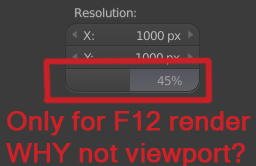
- You can have a final render , using F12 , bringing you to the image viewer , that where the scaling resolution > option work , only there , and there only
- You have the Rendered View , the one we are using 90% of the time , hitting SHIFT Z and CTRL B all the time , > essential tool that everybody use, we'll call it the PREVIEW view , as the title make reference to .
the problem is with the rendered view , yes you can optimize it , lower the sample , bounce , subdiv , particles, texture... but no resolution scaling ? why ? its is this scaling option in the propreties tab, only avaible for F12 render and not the most imporant render tool of cycles : shift z render .
i get it; you cant have more than 100% scaling because youre stuck with the native resolution of youre display but what about 80% 50% 20% ?? it could dramatically make the preview shift Z render twice , third, FOUR TIME FASTER.
(we should have the possibility to scale down the rendered view pixel rate , while not being affected on other > type of view , so if youre full screen with a solid view and a CTRL B border with a Rendered view inside , the part of the screen that is on solid view should work at 100% pixel scale , while the rectangle of the border at 80,50,20% for example )
the system right now (i think), is that youre stuck with thepixel rate of your display , if you have a 720p screen , rendered view will be 8x time faster than a 4K screen , so if you use a 8K screen , cycles preview will just not be usable at all .., i think its quite a big deal to be punished for having a better display .. the purpose of the rendered is to be fast ... can we correct this "4k punishement" ? and making it even faster for everyone ?? :)
Thanks everyone for your attention ! :)
happy blending
14 Comments
Great idea, we need this
@razin1993 I agree! And I'm wondering if there shouldn't be any option panel available for modifying the preview render on other parameters than sampling in order to go faster without resolution (thus, size) lowering. Or we could all upgrade our gpus :D
yesssssss !!!
Jus unpin 3D View ans scale it
There is a viewport pixel size option in the render options. Its a tap called "Viewport". There you can set the pixel size for the viewport. I hope this is the option you are searching for?!
@marcus: yes, wasn't present on my 2.79 weirdly
if i understood correctly, you can already do that in the Performance tab, at the bottom of the tab you'll find Viewport resolution, it scale down the resolution x2 or x4 or x8 and it become so fast but pixelated ( i have a 1080p screen )
@razin1993: logically, yes but : we only need this to the rendered view , doing this to all of the views is a big punishment, pixelated vertex and so on... Quite a poor workaround while à simple option in the properties should do the job perfect
Or... you could just have small 3D VIew that's dedicated to preview renders.
@Jason van Gumster: hello, making the windows smaller and smaller is a poor solution to go around this problem, it's not confortable to have your face taped to the display because you want to have a faster cycle viewport, let's be realistic here: maybe it's okay for a 1080p screen, but not for a 4k one, you are still being punished for having a better display :(
@Jason van Gumster: its a really poor workaround..
@Jason van Gumster: yes, poor workaround! You need to see the details of the render, of the shaders etc.
@Cédric Lepiller: If you need to see details, then lower resolution renders won't help there, either.
@Jason van Gumster: @Cédric Lepiller: its called pixel size and its already on 2.8 , for some reason it was remove on 2.79 ... jason , sorry but no , if you have a 4k monitor again you are forced to have 4x time more resolution to render for a same ctrl b render border , but well again its in 2.8 and it work like perfect , for some reason i cant delete my post