
Compositor Nodes (as Post Processing) And Linking it to World Materials -> to Make the World ''Blender's Post Processing Volume'' by Including Compositor as a World Setting (Long Detailed Proposal))
Introduction: The compositor is post processing in blender. It affects all the renders. And It will be real time soon. If we want to have different look for different shot or different lighting scenarious, we need to change the world type or the compositor nodes everytime manually when we render . There is no way to have different compositioning options like having many compositioning materials and plus no way for linking them to different world lighting scenarious. (I know there are scenes, but I think there is still need for having different grading or lighting scenarious in same scene because its more handy)
If we want to have more than 1 post-processing by compositor for different grading/mood scenarios. There should be more than 1 compositor . If we have different world HDRI lightings and we want different post processing in different worlds, there should be away to link compositioning to the world and ''MAKING THE WORLD to include compositor settings. ''
Detailed Steps to Implement This:
STEP1: , the compositor should have multiple ''Compositor material/nodetree'' like having many geometry node trees (I am calling it material even though its not material).
- Then compositor will have the options to change compositor node trees as well as
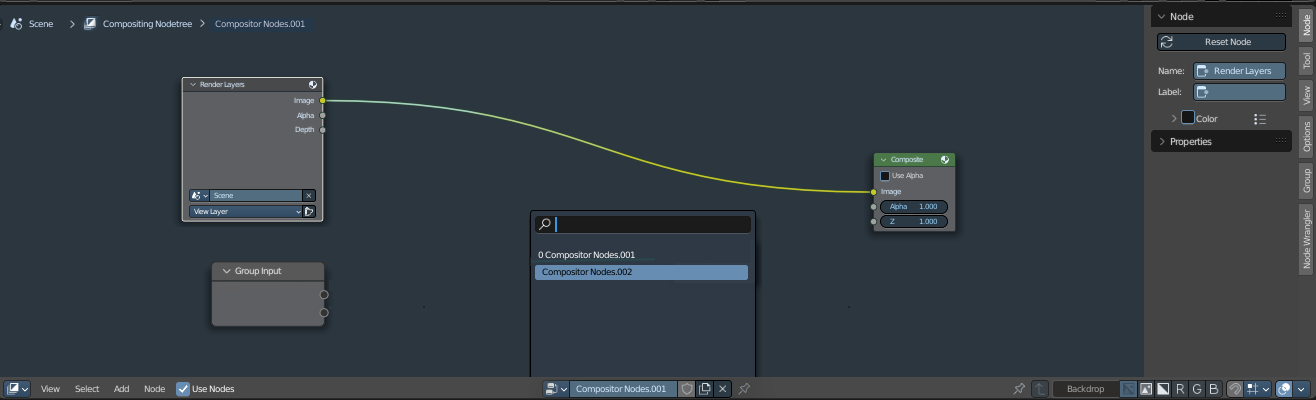
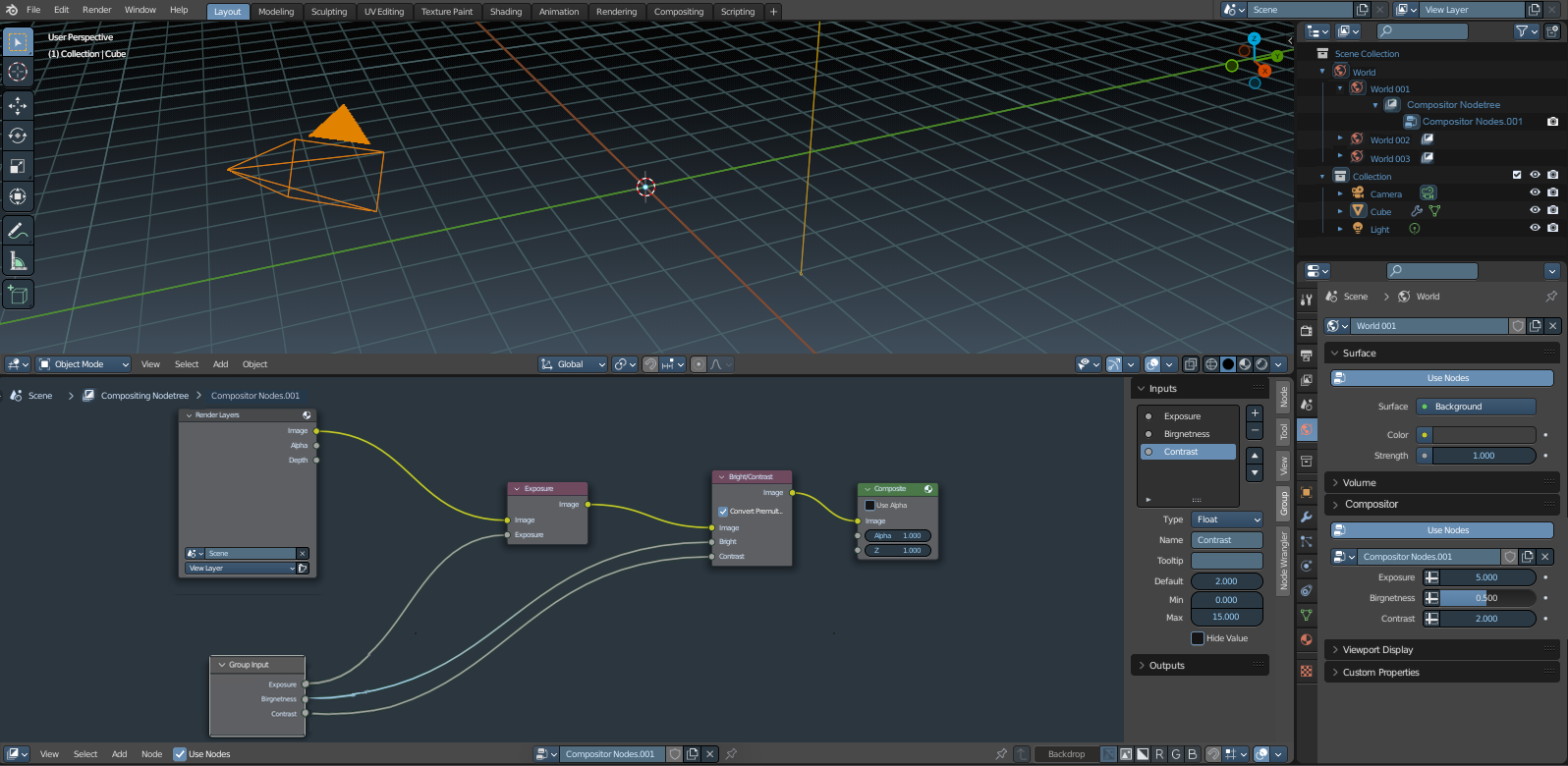
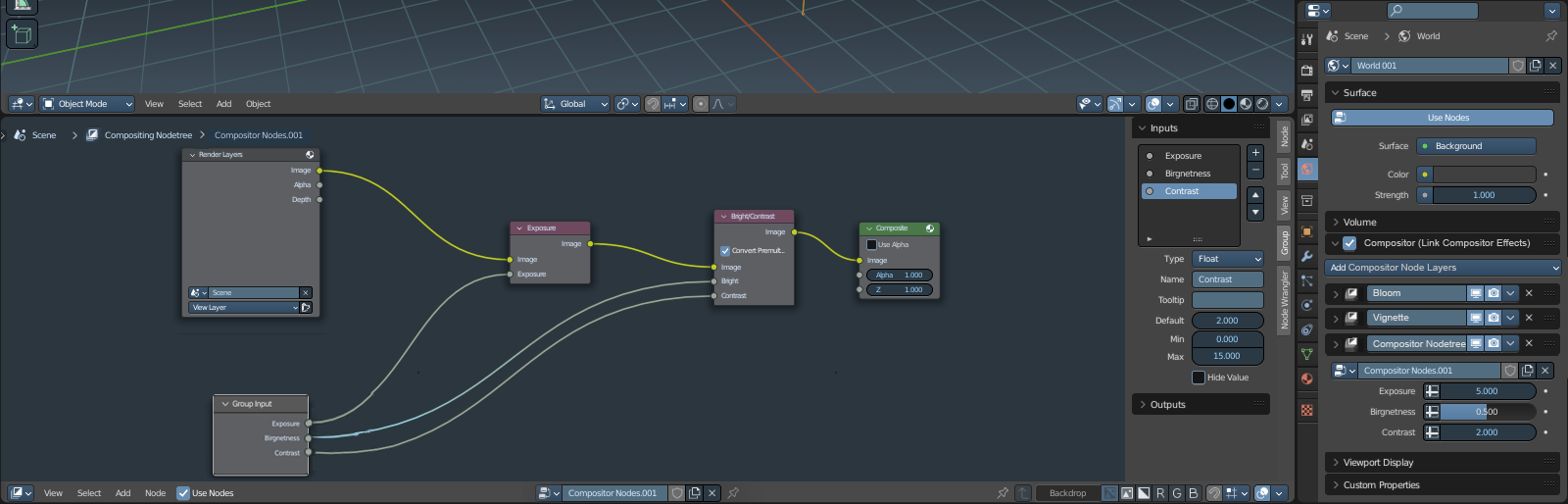
STEP 2: Also compositor materials will have extra node input sockes to expose some values that are used frequently (similar to geometry nodes exposed to modifier, but the exposed values will be seen on world properties instead of modifiers as it will be explained in STEP3)
- Now we can create our custom compositioning compositor node groups
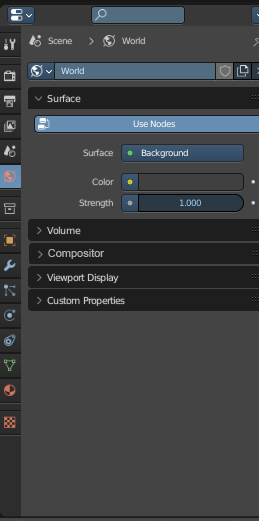
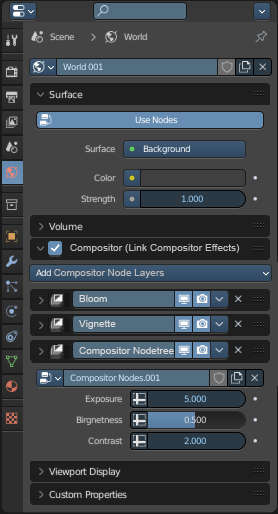
STEP 3: The idea is to link world materials/worlds settings to include a option to choose the which compositioning setting/material to be used with that world. So we can assign different compositioning schemes to different worlds. This will be located under world properties as a new dropdown called ''Compositor / Compositor Effects''
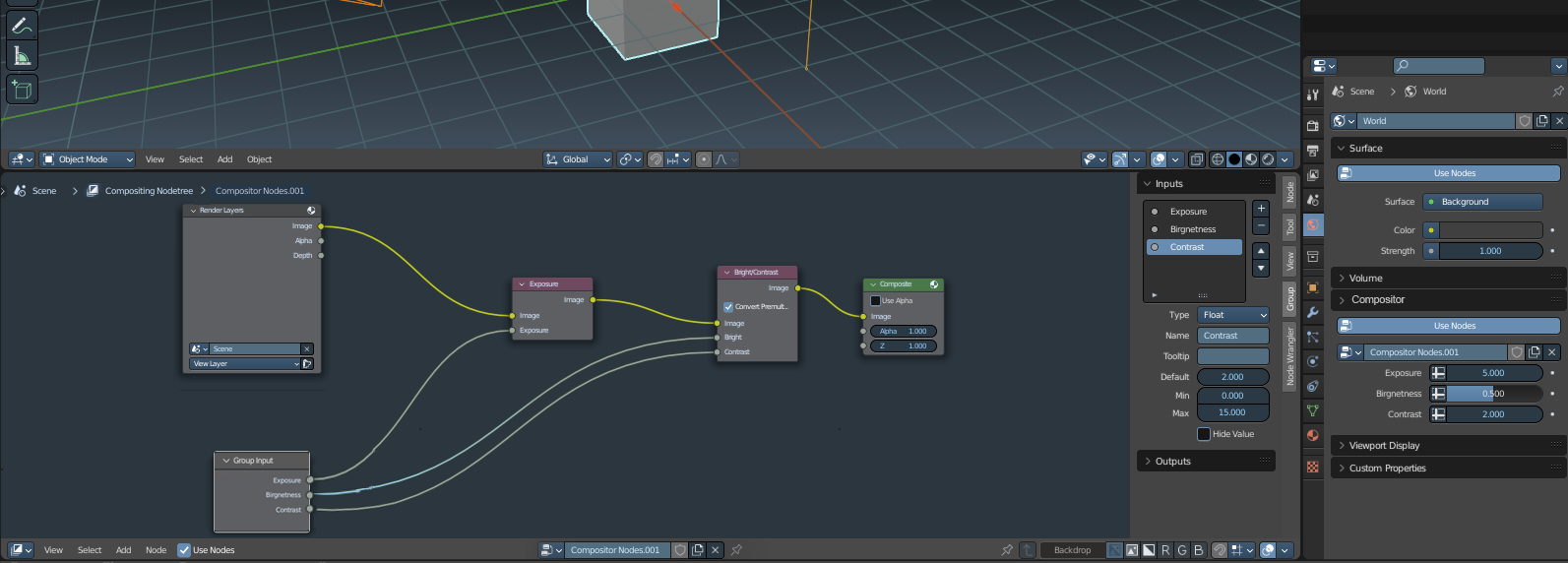
- Now we are able to assign compositor node groups to different world materials.
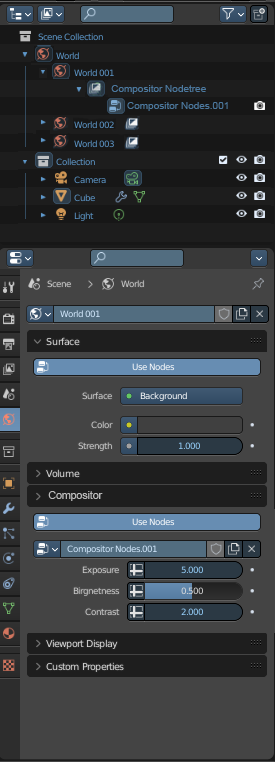
STEP 4: Making world to be seen in outliner like sun object (like a collection of world materials) and when u expand the hieararch, different world materials should be seen under at first hieararcy expansion. Then when u expand the world material hierarchies and compositor material/setting is seen that is linked or assigned to each world material. -This will allows us to ''USE WORLD AS A POST PROCESSING VOLUME SIMILAR TO UNREAL ENGINE''as a one main world object in outliner. So we can change different worlds by clicking a differnet world material under world hieararcy (this way of collecting multiple world materials under world hieararcy will prevent to enable 2 worlds at the same time and keep things organized compared to Unreal engine logic)
- As it is seen in images below, the active world has rectange highlight like active camera, therefore it shows which world is used actively. So active world can also be changed from outliner instead of properties window's world tab.
STEP 5: Adding essential realtime cycles post processing affects to world's compositioning settings like bloom, chromatic aberations, vignette, basic color grading. (These affects will be aside from Custom compositor nodes that are exposed like geometry nodes in STEP2'') So simple users can just use these without nodes to affect the mood or grading of the world. The interface will be similar to modifiers, so their order can be changed and premade effects like bloom and chromatic aberations can be added like modifiers on world settings
STEP 6: Cameras should also have option on camera properties tab on properties editor. So we can assign different worlds to different cameras. So in camera hieararchy we will also see the world material and linked compositor post processing when u expand.
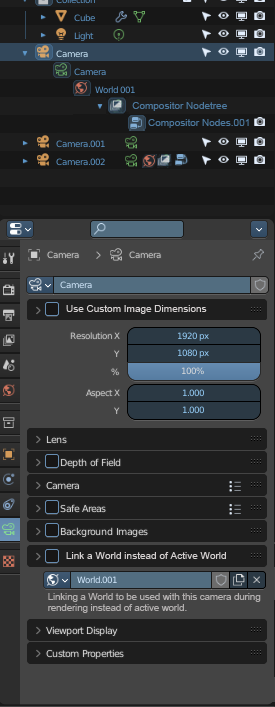
Also, an option to camera setting should be added to make the camera to have its own aspect ratio and image size. There should be an option called ''Use this camera's own image size and aspect ratio instead of render image pixel size and ratio'' under camera settings. -We can assign different world (having linked compositioning settings) and have different camera aspect ratio and pixel sizes.
Step 6 Note: I know that post processing is more related to camera in real life, however, if we were to link compositor nodes to cameras, it would be hard to handle cuz there will be many cameras and its a hardship to do it. There for its better to include compositor post processing inside world and then linking both together to different camera because most cameras might be using the same LOOK.
General Note 1 (Alternative Option): Another alternative would be having seperate compositioning tab on properties, and moving the Compositor panel inside the world tab to that Compositor tab in properties editor. So we can use Compositor in a similar way to modifiers in its own tab. But still we should have option on world settings and camera settings to ''Link a compositor scheme to this world instead of using active compositor scheme'' or and same for camera tab setting to link a compositioning scheme or a world having a compositioning scheme or a world without any compositioning scheme to desired camera.
General Note 2 (Unrecommended Alternative Option): Another option would be to combine compositor nodes into world shader material node editor as WORLD NODE EDITOR. UE5 has post process volume (similar to Blenders World concept that I explained ) so it can includes world volumetric effects, 2d color and camera post processings as well as the HDRI inside this. So a way to implement it as nodes would be to have a output node that has 3 sockets -SURFACE : Same as Plugging which hdri and shaders to use in world shader editor -VOLUME : Same as plugging volume scatter or volume nodes to shader world editor -COMPOSİTOR / POST PROCESSING : this will be the same place that we plug compositor nodes to viewer or render result output node. This can be divided into 2 sockets as viewer and render result if needed. But not recommended since it will create confusion at nodes, so its better to keep things at compositor node editor.
Note about Submission:
- I will add the pictures to explain my idea when its possible more and more by time and sorry for the typos because I made a detailed explanation so i didnt have time to check typo mistakes.
- I am sorry if I should not give the name of other game engine / software like Unreal engine, but it was a good way to explain the concept...
2 Comments
I often need to change exposure based on which world I have active. I guess it would be convenient to use an exposure node in compositor and have a different compositor setup for each world.
Yes, its hard to have control over different renders with different lighting or exposure scenarios when there is only one compositor nodetree rather than having many like materials have. I always have hard time trying different light scenarios or after time pass for a project, I cant remember which world was being used with with light or which exposure. Now realtime viewport compositor is coming, so this is really needed :( Thank you for your support even noone notice it...