
Flip normals back after mirror
<b>For haters:</b> Give me a valid reason for this behavior (non-technical, non-coding) and I will delete this proposal
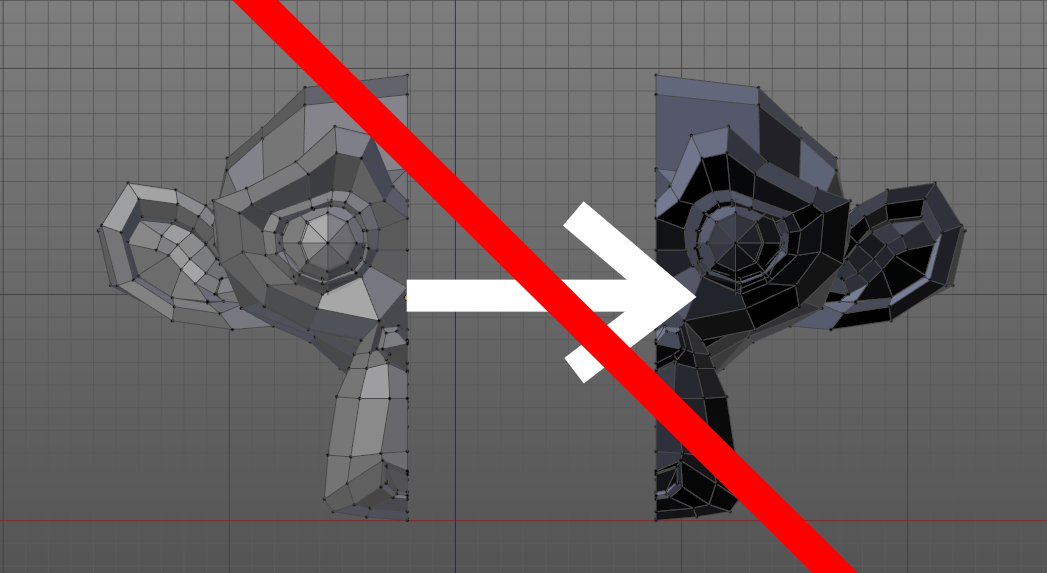
My idea is simple and simple. You know that after the mirroring operation, the normals turn out. So you have to flip them back. I know that this is due to the order of the vertexes in the polygons. This is a technical, non user-friendly thing, so I suggest:
- Flip normals back after mirroring in edit mode
- Flip normals back after applying transform with negative scale
- Flip normals back after scaling with negative scale in edit mode
When I mirroring object in 99.9% cases I doesn't want flip normals, and i need to use <kbd>CTRL</kbd>-<kbd>N</kbd> or <kbd>W</kbd>-Flip normals. If I apply transform, I need to enter edit mode and select all with A - so many unnecessary actions! I see no reason to justify them except one - a technical component that mostly is unknown to the user.
Think about this: mirror modifier doesn't flip normals (instead <kbd>Ctrl</kbd>-<kbd>M</kbd>), why? Why does one tool flip normals, outer one - doesn't? It's illogical!
This is more user-friendly especial for beginners, but for more advanced users it saves the time! If in some reason you want to flip normals you can always press <kbd>CTRL</kbd>+<kbd>ALT</kbd>+<kbd>N</kbd> or <kbd>W</kbd>-Flip normals
Some links from newcomers:
blender.stackexchange.com/questions/121914/merging-vertices-causes-distortion
<b>For haters:</b> Give me a valid reason for this behavior (non-technical, non-coding) and I will delete this proposal
17 Comments
CTRL-N and you will have all faces recalculated. Not entirely sure if there is a real use of resizing in negative and maintaining the faces flipped, honestly. So yeah maybe if no one can provide a proper reason for that maybe it would be wise to have them flipped automatically. If no one gives a valid reason for this behavior I might upvote the proposal as it would just be more efficient for 99.9% of the time.
I want to dig this thread from the void. The problem that was described by topic starter is not full, I will add to it.
I hope this will be taken in consideration! Thanks!
For mirroring an object, it is more advisable to use the mirror modifier and then apply it. Normals will be in the right direction. For "smaller" operations, the operator can not integrate operations that are not related to the tool. Advanced users especially want the scale negatives tool not to return the normals. Because this is a special case. Sorry for the translation...
@valentinwn: Yes! Mirror modifier doesn't flip normals! why? Why does one tool flip normals, outer one - doesn't? It's illogical! For special cases, I can always flip normals manualy - when I mirroring object in 99.9% cases I doesn't want flip normals, and i need to use CTRL-N or W-Flip normals, and if I apply transform, I need to enter edit mode and select all with A - so many unnecessary actions! I see no reason to justify them except for one - a technical component that is unknown to the user
@Michail Soluyanov: Read below.
@luisburdallo: Look:

Why does one tool flip normal, one - doesn't?
@Michail Soluyanov: That mirror is not a modifier. Modifiers are in the Properties menu. That mirror seems to flip one side to the other but not duplicate it or copy it. I think your proposal might request to change the function to be called Flip which I might agree with as mirroring should work as the modifier does. I never used it but I found this using Google. blender.stackexchange.com/questions/10597/interactive-mirror-ctrl-m-doesnt-mirror-object nonetheless you get the faces flipped when used in Edit mode. You should not use that tool to mirror your object. If you use it in object mode it doesn't flip the normals but it does exchange positive and negative axis.
It would be nice if your proposal didn't start off so defensively. Not everyone who disagrees with you is a "hater."
For instance, I could see this being a logical operation for the mirror operation itself. However, I'd personally be absolutely against auto-flipping normals on an inverse scale operation... especially if the mirror operation does auto-flipping. If that's the case, then I chose to scale negative instead of mirroring for a reason. I wouldn't want Blender to second-guess that decision.
@Jason van Gumster: Why would you need flipped normals for an inverse scale operation? Just wondering?
@luisburdallo: It's a quick way to flip normals on a whole object without jumping into Edit mode (like for a quick world dome). And that's just off the top of my head. The point is that if I know enough to try scaling by a negative value, then I should know how to manage my normals on my own as well.
@Jason van Gumster: In all honesty I don't think this is vital and I haven't upvoted it yet because it takes 1 second to hit ctrl-N but I was wondering what uses would be out there for having the normals flipped. But if 99% of the cases you would need them pointing out why not making that 1% of cases use the flip normals function?
@luisburdallo: In the case of the mirror operator, I absolutely agree. For inverse scaling, I don't.
@Jason van Gumster: Actually one way or the other someone will have to use CTRL-N or Flip Normals eventually and I am not going to take either side because is not a big deal to me. Those tools are there for a reason too. It takes no time to just flip them manually.
@luisburdallo: ok, lets say for me it takes 1 second to flip normals back, but what about for beginners? First they need to understand, that something happens with his model. Next, they try to find what is this and how fix that. They write a posts in forums, ask a questions, finally they press ctrl+N. And of course, maybe can be a option for this. For example "Keep normals" turned on by default, and can be turn off in F6-menu.
@Michail Soluyanov: I agree about that. I still think the default behavior should be to have the normals recalculated by default.
A good reason: Because when we apply Ctrl + M on a part of a mesh, if the normals turn around, they are no longer in the right direction compared to other vertices. Maybe the problem is not more than flip a mesh but an object. This function works perfectly well in object mode. Again, sorry for translation...
@valentinwn: It's works well until you not apply transform