
Outliner - Change visibility of the selected items.
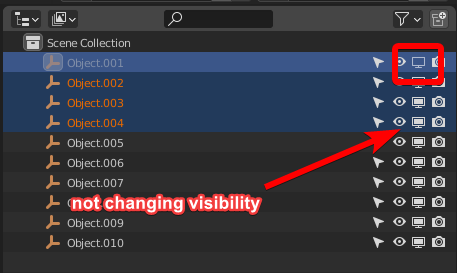
Hello, Is there a way to make all selected items change visibility in synchronized way, or add keyframes? :)
(IMO) By intuitively changing the visibility of one of the selected objects, all of them should change.
There is how it's works for today:

2 Comments
Have you heard of our Lord and Savior, ⎇ Alt Click? This little shortcut allows to apply (almost) any property change on the entire selection.
You can ⎇ Alt click to hide all the selection.
This works because selecting in the outliner also selects the object in the scene, which is the condition for the alt click to work,
BUT since Blender decided that you can not select a hidden object (don't ask me why) (also don't ask me why you can select things in the outliner but not "actually" select them), this is impossible to do for showing them back.
Hello, there is one solution to change visibility off. Turn off visibility for one item, select all items with shift LMB, right click on the item you want to copy, and choose copy to selected. This is right for to turn off only, not for to turn on. This is right to disable render. Sorry for my poor english. Best regards