
Isolate or Solo tracks in the VSE
I'm sure a few people might experience this. Working in the VSE, and your editing so much clips on top of each other that at times you might need to know what that one clip under is about ( is it a duplicate, a retime strip that you want to compare? so on).
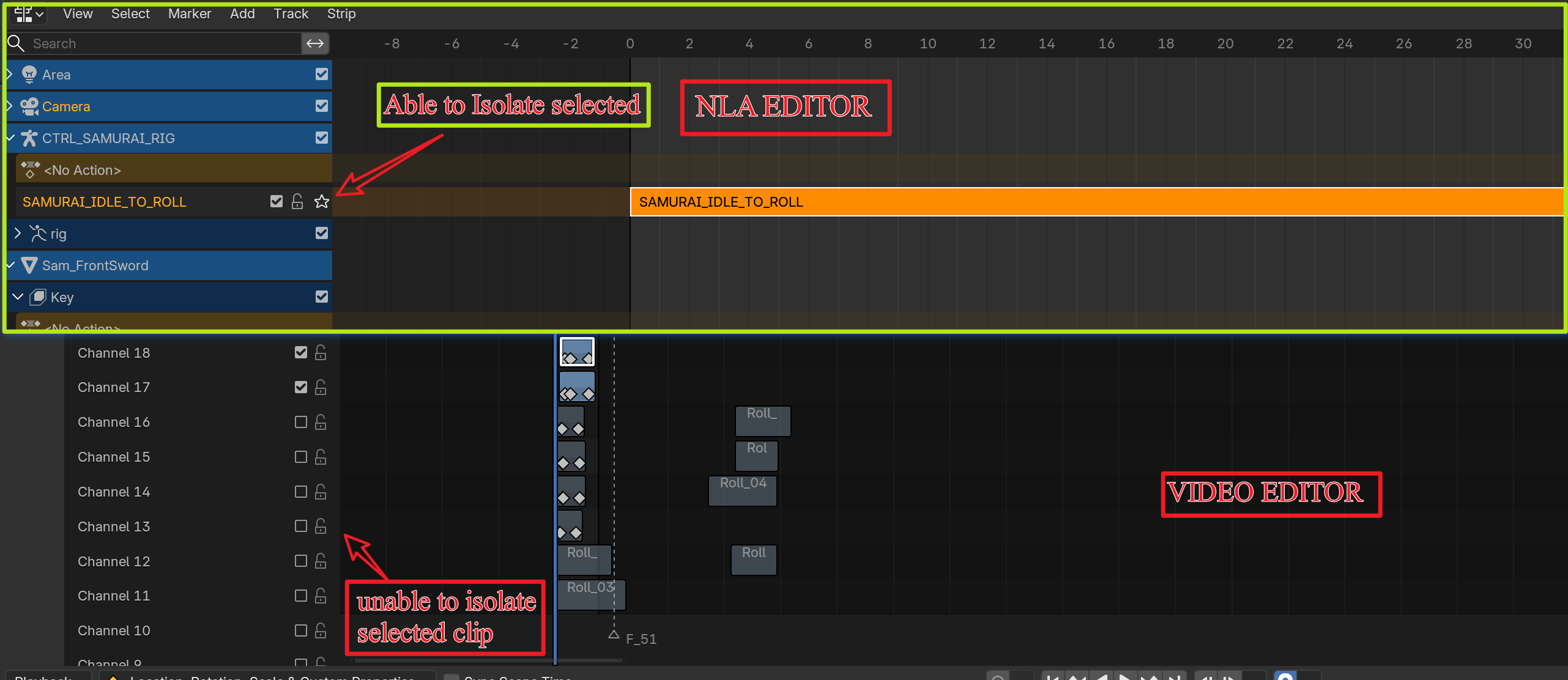
Below is an image that shows the NLA Editor above and the Video Editor below it. The NLA has a star icon on the left that isolate or solo tracks and below it, the Video Editor on the left hand side we don't have one.
I'm wondering if it's possible to do the same for strips in the Editor? Would be very helpful, instead of unchecking all the strips above to see the one below. Anyone feels that this would be a great help vote it up and drop your input. Thanks.
3 Comments
Solo tracks would be nice, yeah... in the meantime use shift+h to isolate strips...
Wow, would have never guess it had a hot key, thanks. Most new users and experience users like myself might have no idea there was a hot key for that. And indeed, having the icon to click would help to solo the track.
AFAIK since Blender 2.80 the BF has been on a hunt to make sure any possible operator has both a presence in the GUI to avoid the scenario of "only those who were told the shortcut know about it", and their GUI shows the operator's shortcut if it has one.
And thanks to that, most operators can be found in their corresponding editor's header menus, and hopefully in one that makes sense:
And if you don't want to look in menus, you can run the operator search with F3 which will show both menu location and shortcut.
If there are any misses, they should be reported ASAP. But as you can see in our case, all is fine! 🙂