
Normal Edit modifier vertex normal split
The normal edit modifier is quite a handy tool for NPR to point normals of certain faces in a spherical or directional way. However, it is a bit limiting. It doesn't split the normals of the vertices affected by the modifier, overriding the direction it points to between the different targets and averages the normals between the faces to smooth it out.
For NPR, especially anime, this can cause a lot of problems when we want to create a nice flat shaded side. There is a way around this where you have to create 'islands' of the mesh. It's basically the different vertex groups and the faces they encompass, which have all been separated to create extra edges and to split the normals of the vertices up.
This is a very long process which takes a lot of time and doesn't work very nicely when it comes to subdivision surfaces as you then have to set up edge creases for every edge so that they stick together. It also creates a problem for NPR line rendering.
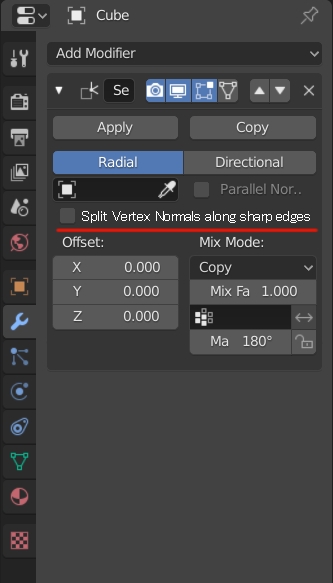
Regarding the normal editor, it would be help if an there was an option to split the normals along a sharp edge, pointing to the respective target of the face.
I'm not quite sure how easy it would be to implement such a feature within the normal edit modifier, but having such a feature available would be very handy for NPR cartoon rendering.
11 Comments
This already is a modifier:
* @motionblur.of.doom * Unfortunately, this is just splits the edges and doesn't do vertex normal splitting that works with the normal edit modifier. When working with meshes, you have face normals and vertex normals. When using flat shading, the normals of the vertices are split and follow the face normals. However, when using the normal edit modifier and you point a vertex group to an object, all vertex normals point in that group points in that direction. The issue it brings is when you have multiple vertex group bordering one another. Along this border is where I want the vertex normals to split. Currently, in order to do so, I have to manually split the edges themselves as the modifier doesn't help to create 'separate/split vertex normals' in order to manually get 'split vertex normals'.
Having the vertex normals split along a sharp edge (Or better yet, among a 'split vertex normal' edge line) will help to create better normals to better control stylized NPR shading.
* @znake13 * The regular vertex normal split along sharp edges already happens when you activate "Auto Smooth" with a full 180° Angle (also make sure to clear custom split edges first, if you imported the mesh from an FBX or equivalent).
This splits the vertex normals on all edges marked as "sharp" without ripping apart the vertices.
If you have an angle lower than 180° it also additionally factors all these Angle breaks into the sharpness of the edges. You can convert the set angle to marked edge seams by clicking "Add custom Split Normals Data" below.
* @motionblur.of.doom * I haven't noticed or seen the custom split normals data option before. I'm going to test this later today. Thank you for your reply.
* @znake13 * Don't worry. It's been there for a long time but it took me quite a few releases before someone pointed it out to me, as well. It's one of the more obscure things when you don't know where to look.
Even Epic had a livestream years ago where they ignored it and showed the split edges version as the only one available. Can happen to anyone. Don't ask how often I've requested a feature only to learn it's there already. :D
(edit: BTW - make sure to set the mesh to smooth first. Otherwise you won't see any difference and every edge will be treated as split vertex when adding custom split data)
* @motionblur.of.doom * I'm going to have a look at this a bit later. If this solves my problem, I can probably close this proposal and I'll write up some methodology in the NPR community area.
* @motionblur.of.doom * I tried it out, but there's still smooth shading along the sharp edge when vertex groups border one another. The Add Custom Splits Normals Data option gets overridden by the Normal Edit modifier.
* @znake13 * Ah I see. You want individual vertex groups for normal editing also be able to split along the edges so that you don't have to do it manually, correct?
Yes, in that case you'd still have to border select all the edges around your vertex groups and mark them as sharp, manually. Yeah, that's probably not in Blender, yet. At least not automated.
In that case you'd still have to go through all groups, select them, do a border select and then a sharp edge: imgur.com/a/8s4oR7e If you put border seelct on your quick menu it's at least ffaster, though. ;)
* @motionblur.of.doom * Your solution works only if there is no normal manipulation using the normal edit modifier. With the normal edit modifier, you still have vertices of one group that boarder another group all point in the other group's direction if you set it to point to a target.
* @znake13 * In that case I probably don't know enough about the edit normals mdifier or what you want to do with it, yet.
If others have the same problem in understanding you could maybe update your proposal with a picture to show what you want to achieve. Then again maybe it's just me. :D
* @motionblur.of.doom * I was busy replying to you this morning when the power blew out xD I'll have a look at the proposal again and include some more image examples once I get internet again. Basically, whenever using the normal edit modifier, it overrides all the vertex normal split and sharp edge data. If you had split edges before, those split edges from the vertex group now all point in the direction you set it to. That is why I propose to have the vertex normal split along sharp edges option to keep those vertices' normals split.