
Preserve UV Seams when applying a bevel modifier with an even number of segments.
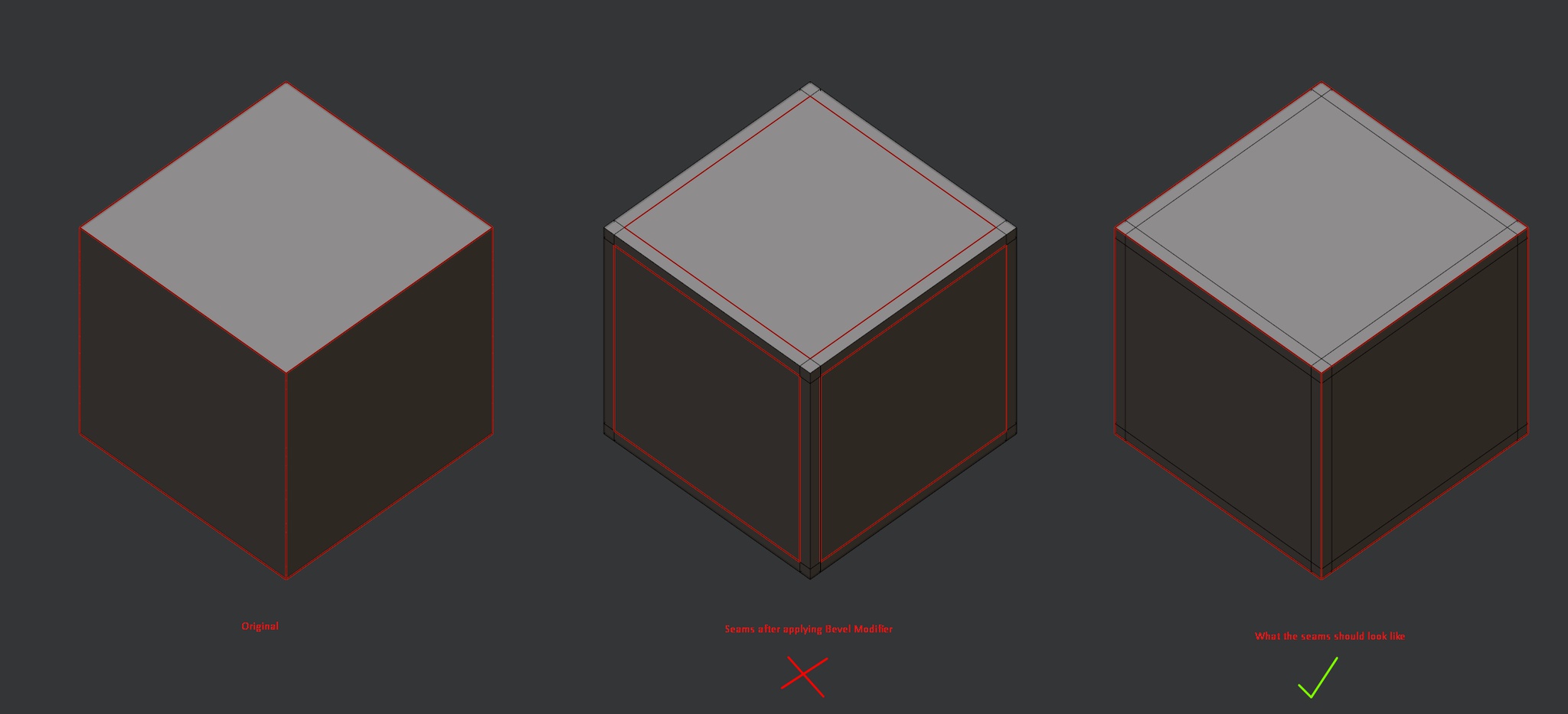
When applying a bevel modifier with an even segment count the original seam edge remains. This edge should be considered the new seam but instead we get a seam that is completely wrong.
In addition when applying the bevel modifier it will break the existing UV unwrap. For example, this set of UVs:

When a bevel modifier is applied to give support loops will result in these UVs:

Which may seem fine at first glance but zoom in and you will start to find little tears and breaks in the island:

Alternatively we could perform a seams from islands to really see our new UV seams. Here is an illustration that shows some of the issues we get.

This may seem like small problems and an easy fix but when creating meshes ten or hundreds of times more complex than this the time required to fix these issues multiplies too.
19 Comments
This would be an amazing improvement ! Is there still work being done on this ? I come from 3ds max where beveling doesn't destroy uvs and it does save a lot of time.
i found a solution but it's not bullet proof, first apply the bevel modifier, clear all your seams , then in the UV editor, Merge menu (M key)>Merge by distance, then UV>Seam by Islands.
be careful sometime merge by distance need to be tweaked and even then sometime you need to manully merge some vertices
This is a pretty nice workaround to this issue, it works perfectly with not complex assets. Thx
This is definitly among the top 5 blender problems ... and it has been for many years ... This issue has caused me many hours of extra work (remake seams again and again ...) for every project I've ever done in blender.
Please change this finally !
Also, I would very much be willing to pay money for an addon that does this (Bevel that respects existing seams). But I'm not a good coder ... And I couldn't find such an addon so far (although I've looked many times ;)
Just experienced this issue myself, after applying the bevel modifier I realized it basically broke my UVS. It is really dissapointing as I was excited to be able to mark seams and unwrap my mesh before applying bevels. I really just expected the seams to stay in the center, as I use 3 loops in my bevels (exactly as the picture above). This is pretty standard practice in Subdivision workflow, and you certainly want your UVseams to be in the center loop of a bevel. I'll have to unwrap my meshes after applying the bevel modifier after all, not game breaking (this is what I would have done in Maya before) but it feels like a missed opportunity for the Bevel Modifier. I hope Developers rediscover this issue, though I am not very hopeful since it seems it has been around since 2017
No updates on this? After the 'harden edges' option was added, as well as the extra options for face weight and weighted normals the bevel modifier has become really powerful for non-destructive hardsurface modelling.
This would be the last step required for a 💯% perfect bevel modifier.
where's my centre seam in bevel modifire? lebowski :)
did this get fixed?
I really hope that this will be implemented someday. So far, we have to generate scripts using AI, since there are not even addons for this function.
I've just run into this issue as well, but I can confirm, this feature is available since 2.80, according to the documentation . It's called "mark seams". In 2.9x it's under the "Shading" options. Check this checkbox and apply the modifier to maintain seams. Although, seams doesn't seem to run in the middle when using odd number of segments , but on the innermost edges.
No, this option don't preserve seams. It does new seams that are not well placed too. But thank for the highlight of that option! If you have news about it, you can tell ! Thx
So would this replace the existing behavior or be a toggle-able option?
Replace. As it doesn't really serve any useful function as far as I can see. The worst of it is that the UV's break too, splitting in weird places. I just spent the best part of the day fixing the issues cause by applying a bevel modifier to my asset. (it's rather complex of a piece)
I have updated the post with a few more examples and illustrations.
Fixed to show the images in-line.
What's the solution when there's an odd number of segments?
Thanks! for an odd number of segments it could just use the original method where it damages the UVs as the original edge isn't really being preserved. Either that or to select one of the new edge loops and set that as the seam. But if the user specifically sets the bevel modifier to have an even number of segments as a way to preserve the original edge and it's seam location then blender should do its best to respect that. As the current result isn't useful for anything really.
I'm in contact with a dev trying to work out a solution developer.blender.org/T48583
* @Jac Rossiter * Is there still work being done on this? In 2.82 the behavior is unchanged - and the discussion you linked to seems to be about a variety of Bevel behaviors..
or invent something clever ...
example : i.imgur.com/Qem1ujI.png
mark (just) one - of the two most inner bevel-edges as seam .
then bridge the cross sections with a seam.