
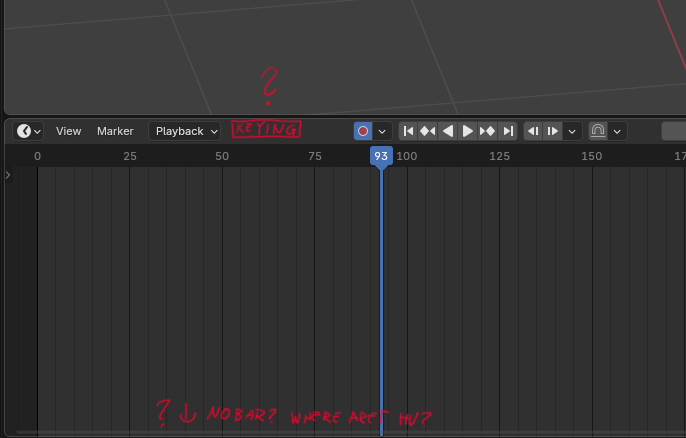
"Keying" drop down menu back to Timeline editor?
The "Keying" drop down has been dropped to a low bar of a Dope Sheet editor with intention to remove the Timeline editor - but the latter didn't happen.
Could we have "Keying" sitting next to Editing Context in the Dope Sheet editor or in the still existing Timeline editor? It is confusing and inconsistent for people who hid their playhead control bar once the 5.0 was released and forgot about its existing
6 Comments
I do feel like the "keying" operator menu/hotkeys (pick one) seems to jump all over the place and change way too often. It's a crucial thing for animation, and one gets weary of "ok, how do set it NOW...?"
(Is it I, or E? Which menu bar is it in? Which editor?)
Honestly, as an animatior, I never use the playback controls panel - the only thing I need from it is "Play" - easily accesible from my keyboard. That would not justify keeping it present on my screen all the time. The rest of options that this footer provides I set once for the whole animation. If you decided to keep that 'Timeline' Editor, I can't see the reason why would you remove one of its functionalities keeping the rest in place. The argument that you moved it to the new footer is not valid since that panel is duplicating that rest to the playback menu. Ain't see no reason why this one option was treated in a spacial way.
As the decision was made to keep the timeline but make it a purely time-only editor and move the animation-related things to the dopesheet and graph editors, then by that logic: a menu such as
Keyingshould be moved to the dopesheet's header since it's meant to become the main keyframe-handling editor.And while I loved that new shared timeline-footer when it was supposed to replace the timeline editor, now I am not sure whether it is a good idea anymore if the timeline editor stays. It adds yet another place things may or may not be among another, it's indeed adding confusion.
why do you think having they keying options in the header is a better place. We put it in the footer since you usually want to see the playback controls once, and the "keying" menu is also only useful to have once.
I hope to not sound angry or annoyed! I'm merely trying to voice my perception of the issue and the confusion about it. So correct me if I am wrong, I understood that the reasoning for the removal of the timeline editor in favor of a playback footer - for the user's perspective - was something like this:
In other words, less confusion and screen-space waste.
Now we are in this weird "caught between two stools" situation of going back on the decision to remove the timeline, but still added the footer that was supposed to replace it, hidden it in the default workspace and default new editors, and yet still moved stuff there.
Those who follow Blender's development, that's just a cumulation of 180° changes that get hard to catch on. And for those who don't, all they see is the keying menu is gone.
And people keep using the timeline as it was before, except now there is a menu we find only in the playback footer available in all BUT the timeline editor.
IMHO the "move stuff out of sight because it's only useful to have once" idea makes sense only for things you set once and forget about it, like your unselected graph curves transparency.
But keying set is pretty much like autokeing: Yes it's something you might set only once in a while, but you need to know its current state to avoid problems. And when you do get problems, you need clues to understand where they come from. Hiding that away in a hidden GUI doesn't help that.
short answer: use the dope sheet, the timeline is not meant for animators.
The only reason the timeline editor was kept was because we got feedback from non-animators that they want a simple area for scrubbing that isn't cluttered with all the keyframing features.