
Grease Pencil - Technique for cleaner cutter tool results
Currently, the cutter tool leaves visual overhang when cutting intersecting lines. This happens when the stoke being cut is wider than the intersecting stroke at the point of intersection. This overhang is difficult to manually correct.


Based on how i've seen this problem handled in other vector drawing programs here's a (very rough) sketch of how the cutter tool could be improved to avoid this problem.
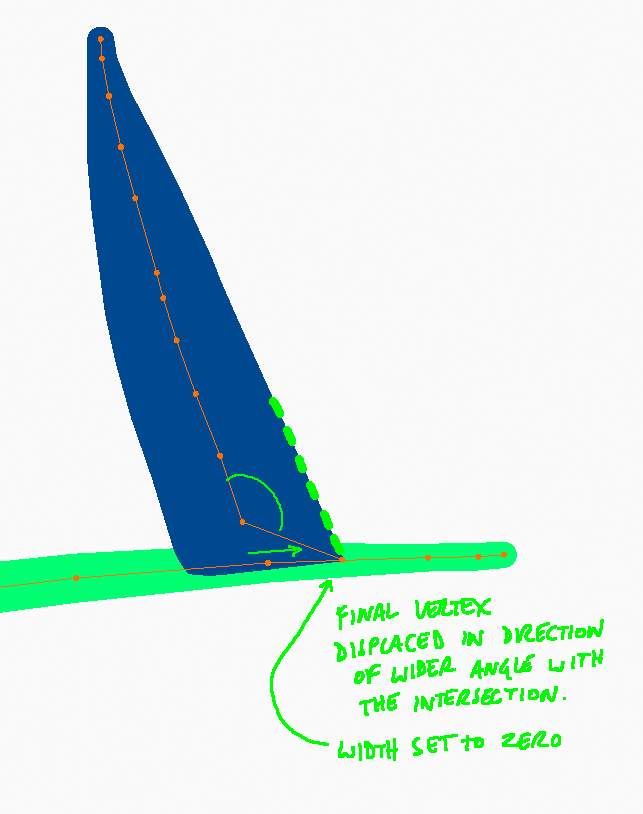
First here's how the vertices would look after the cut operation:


The cutting operation would do the following:
-
Place a new vertex in the line being cut, at a (geometrically appropriate) distance from the intersection, at the opposite site of the part being cut. I'm not sure how this distance should be determined!
-
Add one more new vertex after that, and discard all subsequent vertices.
-
Set the width of the final vertex to zero and move it to the intersection. This vertex is displaced to the left or right (whichever angle is wider) by a distance that aligns it with the visual edge of the stroke being cut. So its position takes the width of the preceding vertices into account.
The result won't be perfect in every case; this technique will cause some distortion if the line being cut is strongly curving at the point of intersection. But in my experience this is rarely the case.
6 Comments
Another option is use Toggle Caps option in the Strokes menu{attachment Screenshot_2020-09-27_115429png}
* @Daniel Martinez Lara * Maybe this "turn of caps" could be a default option of cut tool
* @Daniel Martinez Lara * this works well for strokes that are close to perpendicular, but still creates overhang when they're not
* @tomasz.brain * True, just now making some test with this case. but anyway have this option it would be an improvement in some cases. In this exact case, how your proposal works? can you make a capture?
* @Daniel Martinez Lara * this is how the same example looks using the technique above (mockup made in blender by moving the last two vertices and setting the width of the last one to zero)
* @tomasz.brain * Cool! looks nice in deed, I suppose that the problem here is how calculate the exact position of this two vertices to have the desired result. Let's see what Antonio says about this.