
Restart blender after setting custom scripts directories
When the scripts directories are set for the first time the addons can not be loaded successfully and often times result in python errors. This often times leads to bug reports which are caused by blender not being restarted after a custom scripts path has been specified.
It would be great if there would be a window popping up when a custom scripts path has been set that tells the user to restart blender in order to load the addons.
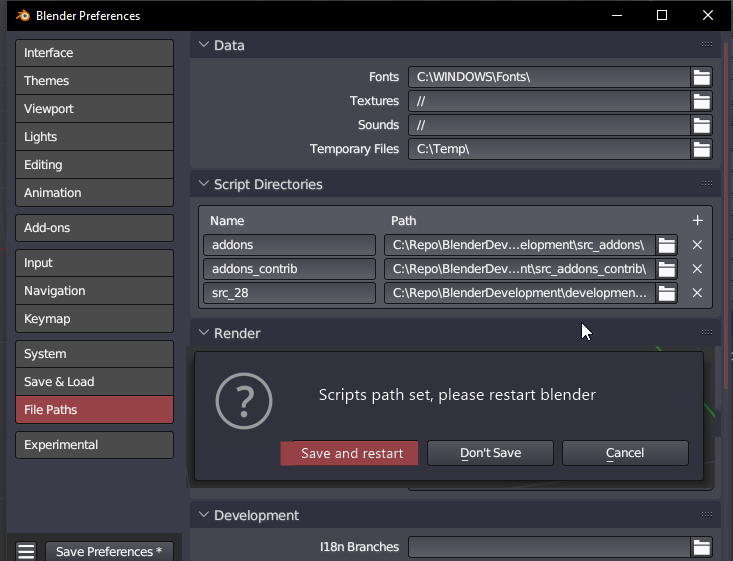
4 Comments
Blender has two operators that effectively refresh the addons' list:
If I make a new script in any of my addons folders and hit that, it gets added in the addons list. But if I add a new folder to my Script Directories, none of these will pick it up.
I think that the better solution would be to make at least the Addon's refresh button to also fetch Script Directories.
Otherwise, if a restart can't be avoided, I would tweak the wording a bit:
Thanks for making this addition, i was not aware that it is limited to the reloading of addons in scripts directory. Also i agree with your proposal to fix the reloading of the addons in the Script Directories. This makes me wonder if this is a bug and not a feature request.
I couldn't find anything about the subject after a quick search on Issues - blender - Blender Projects . You could try using the menu help > report a bug and tell the issue (feel free to use my screenshots for speed), and the devs will let you know whether it is a bug or just how it's designed for now.
I created a bug report here: projects.blender.org/blender/blender/issues/112453