
Add Seamless texture node
"Seamless Texture Node"
Greetings!
I really miss the analogy of the tiling tool on the similarity from the "Materialize" program. It looks simple and very useful in it.
Important features:
- Crop images inside the blender
- Blending edges with multiple types, such as blur/alpha gradient.
- X, Y shift
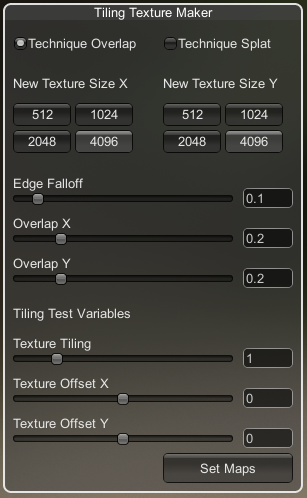
Added: I thought about connecting the display node and the function I proposed, but I found it not correct, less flexible and difficult to interoperate.
Perhaps this is a good functionality for the image editor, and not for the node, but it can be discussed here and done as it will be better.
But, the rough idea is this.
11 Comments
There is an addon called "Seamless" that can do the work for you.
I guess that kind of things could come when the devs get to work on the texture node editor, I think I do remember reading somewhere it was planned to be reworked and brought back to a usefull state allowing to generate or edit textures and use them in shader or anywhere else.
Yes, you can read about it in a comment below, I hope this suggestion will be taken into account, although it is quite standard for such an editor, so it should appear anyway, it's cool! I can't wait for this editor to be released! This will be the totality of blender!
There is no texture generator like Materialize (yet) inside Blender, so how do You miss that node?
Why do you need the whole generator? If you need to make another texture from one texture, you can use other software for now.
And my suggestion is universal, it doesn’t generate a new texture, doesn’t bake them, but makes a seamless texture in simple ways in a blender, you don’t always need a PBR texture made based on one texture, you can use the built-in texture generators for bamba and other things.
I thought about the connection of the mapping node and the function I proposed, but I considered it not correct, less flexible and difficult for compatibility.
This feature would be really useful.
The only thing is maybe it's good functionality for the image editor, not for the node, but it can be discussed here.
Executing complex algorithm on every pixel/ray BSDF sample? That would be inefficient AF. Also You said "blur" that is "no no" for shaders (and piece of cake for cached/generated bitmap).
Maybe even as a node in texture nodes(?) that are in development. But i'm not following progress that .
No, I'm not talking about the shader editor, but about integration with the "Mapping" node. But this is a bad, very bad idea, it's still better to decompose the nodes according to specific functions, goals. The node I suggested should either be a separate node in the shader editor, or as a tool implementation in the image editor.
Blur, I wanted to say something like blending, overlaying the edges of the texture. If you used Materialize, then in the screenshot it is Edge Falloff, this allows you to mirror the edges and make smooth transitions to the center. This is a very handy thing.
Layered Textures Design - It looks good! Most likely this function will migrate there. Thanks for the link!
He actually wrote :
alpha gradient is already a thing: set an image texture node's projection to "Box" and you will have a nice Blend setting that will blend the edges of the box by alpha gradient.
As for the blur, yes and no. Don't expect a Gaussian blur in shaders, but blurs such as the ones we can already procedurally generate from vectors, that works. It's far from perfect, but having a node to do exactly that out of the box is not far-fetched.
AFAIK most of the options you show in your screenshot could make sense under the image texture node.
Some softwares actually already do this (i think Arnolds nodes, or Maya's native nodes) have such options. It's basically all about how the texture is repeated.
We already have an parameter to chose whether or not the texture is repeated, we could add the option of chosing an amount or repetitions.
And bellow that, hawe parameters to control the blending: by defaut at zero as it behaves today.
I agree, yes, we have already discussed this point with the position in the editors, we will wait for the first release of texture nodes, it will be clearer there. Thank you