
Mode for using primary color for fills and secondary for strokes
Using color attribute mode for materials that use both fill and strokes is a bit of a pain because the active color colors both the fill and the stroke so I have to go to vertex paint mode and manually replace the stroke color. It's also a pain going back and forth between drawing fills and strokes because you have to change the color each time. I could of course use material mode, but then I would need a material for every color and fill/stroke combination which isn't always optimal.
My proposal for these problems is to have another option in the color Mode dropdown which will use the main color for fills and the secondary color for strokes.
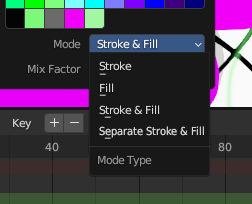
I'm not sure what the mode should be called so I just put "Separate Stroke & Fill" in the mockup, but it's not a very good name to be honest.
3 Comments
you have to dupplicate the strokes play with materials checkboxs one is fill and the other is stroke + we only need now to lock material that we wan't to change it's color and so ,it's a work around,
Thanks for replying. Duplicating strokes isn't a bad workaround, but it takes a lot more time between duplicating them, changing materials and colors etc. And then, you have two strokes which isn't very good not only because every time you edit it you need to edit both, but also because my project has a lot of strokes and keyframes which is slowing the project down a lot. Just moving keyframes around on the timeline is laggy. If I double up strokes, the amount of memory usage will rise and things will slow down even more. I feel like my proposal shouldn't be very difficult to implement, and is the most optimal solution I can think of.
totally agree with you