
scale cage: handles can get too close together
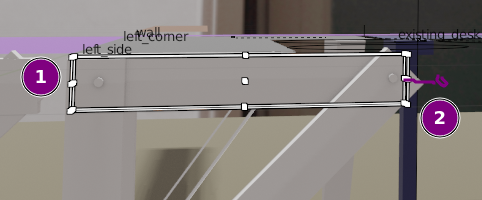
I can't reliably grab the center handle next to (1). Ironically, this is probably the most common view angle for adjusting that dimension. The handle I can grab most easily-- the center-front one (or is it the center-back?)-- is useless in this view.
Option 1: make the center handles stick out a little like (2) so I can grab them easily. Their offset can be a fixed screen distance, a la the Grab gizmo arrows. The center handles could even be drawn like the grab gizmo arrows, or left as white scale cage handles.
Option 2: Just like grab gizmo fades out the unusable arrows when they get too close to the eye direction, scale cage should fade out all the handles that are 1) too close to the eye direction, or 2) too close to other scale cage handles (with a preference for the face-center ones or in the case of overlapping handles, the ones closer to the eye).
1 Comment
I am totally agree that there should be some pixel limit when the points get too close blender should just show the center point of cage, even an option (in preference) like displaying only 6 center point of cage would be much useful as we only use them most.