
Drivers creation directly from the UI, workflow speed improvement
A little proposal to modernize a little more the blender 2.8 ui I know it is neither a priority nor a necessity, but here is my proposal.
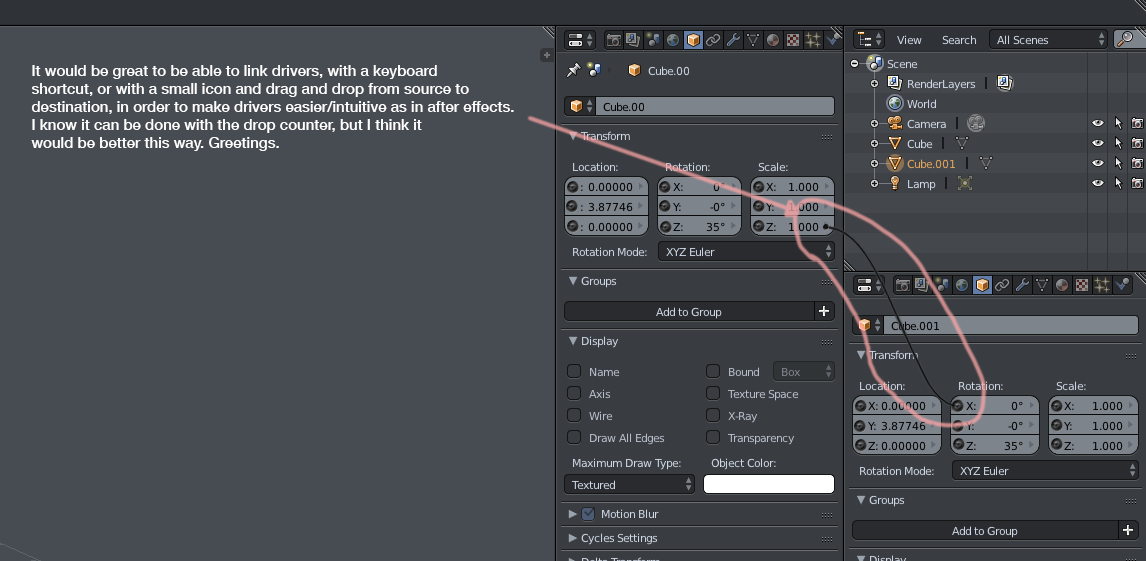
It would be great to be able to link drivers, with a keyboard shortcut, or with a small icon and drag and drop from source to destination, in order to make drivers easier/intuitive as in after effects. I know it can be done with the "drop counter or picker" (Single from Target), but I think it would be better this way.
E.g. by holding down control and simply dragging source to target.
To make the mockup I used a logic curve of the Game Engine, It would only be visible while you drag the mouse + holding ctrl.
22 Comments
TBH, I'm not that keen on this suggestion, mainly as it runs into many of the same limitations that our current interactive/eyedropper style tools run into: Namely, that the properties you often want to drive aren't visible. Only, now that you're using drag and drop, it also gets fiddly and uncomfortable to use (admittedly, I'm really not a fan of drag and drop as an interaction mechanism in general).
Anyway, the good news is that we were planning on having a meeting/design session here in Codequest HQ to explore what options we have for improving the situation her.e
@Joshua Leung: Being able to drag and drop is intuitive for users and gives the application a modern, contemporary feel. But I think it might be nice to have a kind of rope to link two properties together by dragging and dropping. It would be a way to make the drivers more accessible and cool.
@Joshua Leung: The cool thing here is that this is something familiar to some groups of users (specially 2D animation users that use After Effects) and for new users is something pretty visual. In fact, while I´m new to drivers (up to some extent, just in Blender, not to it´s concept) I found rather unintuitive the eyedroper because it had no visual feedback on the interface, while with the wire you could see some effect.
Also another thing is that when one parameter is referenced in at least by 1 driver it should change it´s color too, not just the "parent" parameter, but also the "child" parameter should indicate you that it´s being used in a driver, it´s not related to the "wire" proposal, but it came to my mind while I was writing this so... :)
Cheers!
@Juan Gea Rodriguez: This is thanks to Pablo Vázquez who keeps us informed to the community thanks to his videos of all tastes, that the Blender GUI is guiding the easy access to our software to people who come from other 3d programs or new ones to which can facilitate the task of adaptation with a more visual and less based on quick access keys, without having to access the results of the program to access hidden tools that are seen at first glance in a visual way ...
For this reason and following this philosophy of interacting with Blender in a more intuitive way and that is already working hard on the interface, it does not seem at all unreasonable to take this step proposed by Zebus3d to make more visible and natural access to drivers that they are very powerful and that they are barely used among users with a medium-advanced level in terms of what it is to reach these and manipulate them.
In fact, I found the search for procedural objects with the mixer and today I am very satisfied with having reached these and their innumerable possibilities that they offer us without touching a line of code in phyton.
That said, congratulations, zebus3d for the proposal, also a Pablo for his interest and those who do not want to miss the extraordinary potential that drivers have.
@Joshua Leung: my first thought seeing this was that it'd work much better in a node tree especially if you could add object info nodes to work with based on your actual object selection in the 3d view or outliner.
but nodes everything isn't really a 2.8 target rather than a 2.8+ target.
@Josh Strawbridge: this is your point of view guy... thank´s for your opinion.. we need feedback
@Neouser: feedback...
the linking points re-clutter parts the UI that was just cleaned up recently.
drivers frequently are more than a simple 1:1 copy of values so you still end up having to continue to set them up in the drivers editor in most cases. you can't even flip a negative rotation for same sized interlocking gears without having to go into the driver editor even with this. as such, the driver editor is where the focus should be if you want to make creating drivers quicker, more intuitive, and simpler.
outside of the driver editor something like @dpdpforlife mentioned where you could just type expressions into transform boxes or wherever would also make it a easier to create simple drivers that aren't limited to pure value copies. as long as you bothered to learn the variable string format blender uses for things then you could easily flip to a negative rotation for interlocking gears of the same size or even differing sizes. power users may very well be able to set up some decently complex stuff with just that without having to ever go to the driver editor.
constantly pinning and unpinning object info for a driver isn't exactly intuitive either. even if it's a bit less intuitive of a start, the eyedropper from the variable pane in the driver editor works just as well as this if not a little better because you don't have to constantly pin and unpin object info.
everything nodes is supposed to be on the horizon. i get that this would be helpful for now as a quick start to a driver or for really simple drivers but i can't help but feel that if drivers get a node system this won't be needed.
i thought it was an alright idea at first but the more i think about it the less it seems helpful.
@Josh Strawbridge:
Josh Strawbridge says: "the eyedropper from the variable pane in the driver editor works just as well as this if not a little better because you don't have to constantly pin and unpin object info."
That's not true, the moment you have to see properties of different objects at the same time you're going to have to do a pin.
Josh Strawbridge says: "drivers frequently are more than a simple 1:1 copy of values"
Of course, that's what the current driver editor is for. It is not a question of covering a solution for all possible situations with drivers, since it would be impossible to do so, but to make the quick driver mode easy and accessible.
writing expressions directly in all fields could also be helpful.
@zebus3d: i told you before i've been using blender for about 10 years and this proposal is the first thing i've seen that would make me think i'd want to pin something. i guess you just thought i don't ever make drivers or something.
when you add a variable in the driver editor it has an object selection with an eye dropper. if you set the variable type to transform channel it has options for type of transform (x,y,z for location, rotation, and scale. and another option to choose world/local space. this allows you to select the transform channels you want from the objects you would be pinning.
you can also select both what you're making the driver for and the object you want the variable for if you really need something beyond that (delta transforms for example) and as long as you make sure your would be pinned object is the active selection you can get to that information without pinning while still having the driver data available in the driver editor because that object is still selected too. but then "delta_location.x" and the like is what you'd type into the single property variable's path box for that kind of thing
there's no need to pin or i'd have not made it 10 years without really knowing you can pin that stuff.
@Josh Strawbridge: . I'm just bringing a new feature that from my point of view would make for a better user experience. It is only a proposal that could give a modern style to blender.
@zebus3d: you were the one telling me i'd have to pin things to make drivers to in reply to where someone told me to give feedback. what i said was in reply to that and also proof of that. i've gone 10 years without ever needing to pin object data even while making drivers. that's what it had to do with it.
my replies were relevant to what they were in reply to.
i'm not opposed to making things easier for other people but i was told that people wanted feedback not a simple view.
Thankful for your comments @Josh.. I have used during lot years many postproduction software and in some way linking parameters intuitively between them makes the work much easier to reach a more productive result. Anyway, you do not need your experience for 10 years that drivers should not be more accessible and fast in terms of management, does not mean that should not be changed. It is your respectable point of view but it does not coincide, for example, with my interests so that rendering is faster and more powerful in this aspect. I find the proposal of zebus3d very interesting and an adaptation to the times that run where all the tools of the latest generation programs are faster and intuitive. Even one of the concerns of the Code Quest in the 2.8 is to make an interface where all the tools are accessed in a more visual and simple way ..Anyway this is my opinion only Guy. Greetings.
YES. Softimage does this. It ads a drag/drop system that creates the expression with a A = B driver. Click, drag, done. I WOULD KILL FOR THIS.
Then later you can edit the expression for the driver in the Driver editor, if necessary.
A possible simpler solution to see two panels of different objects at the same time would be this, so we would avoid having to create an additional panel. In color green the current object, in red locked object panel.

YES, I've been thinking about writing up a request myself (coming from After Effects background), but in the back of my mind thought no one else would think this worthwhile. Glad to see that's not the case.
Amazing proposal!!!!. Waiting feed back with our friendly Pablo Vazquez. ;)
This is something I was wanting to do a proposal on myself. I may still write it up with my particular flavor of achieving this. Shake had a great way of doing this where you could type an expression into any field. These could reference any object in the composite. So for instance to drive a the red value of a color correct node using the position of a mask you would get the address of the object and include it in an expression like this: mask01.position.y / 1080
In blender this expression would be longer for instance the scale of an object would be: bpy.data.objects['Cube.040'].scale.x
It may be hard to keep up with python code for some (these being people who seem to be allergic to anything that looks like code) but if you could right click on a value and "Copy Driver" it would simplify the process and speed up the workflow. This would allow you to get the address of the value you want.
You can do really powerful things using expressions and only would have to dig into the drivers editor rarely if at all.
i know we're getting multi-object editing in 2.8 but how exactly would one go about having the two different object information settings actually shown at the same time in order to do this if the active object is the one it always shows the info for?
@Josh Strawbridge:

with these icons you can block/unblock any panel to continue viewing it whenever you want. I didn't realize to activate it in the mockup. You block the properties panel of your first object and select the second object so that you can see the properties of both objects at the same time.
Icons:
@zebus3d: i've been using blender for almost 10 years now and i never knew that lol.
do you use that a lot? this is the first thing i've seen that even made me think i'd need it.
@Josh Strawbridge: Yes, here you can see an example of using drivers:

As you can see in the video, I am related to values, for example the height of the cylinder is directly related to the number of steps of the stairs.
video example in after effects:
