
Principled BSDF Workflows
Hi, my Name is Emre Can Özcan, I have worked with Blender for 2 Years now, for personal and commercial projects.
Whilst working on Shader setups, one thing I did notice, was not having the Option to change the PBR Workflow Method.
Blender is only currently using the Metal Roughness Workflow, which might be frustrating for many users being used to the Specular Glossy workflow since almost every other Render Engine has the ability to at least let the user choose the favored PBR Method.
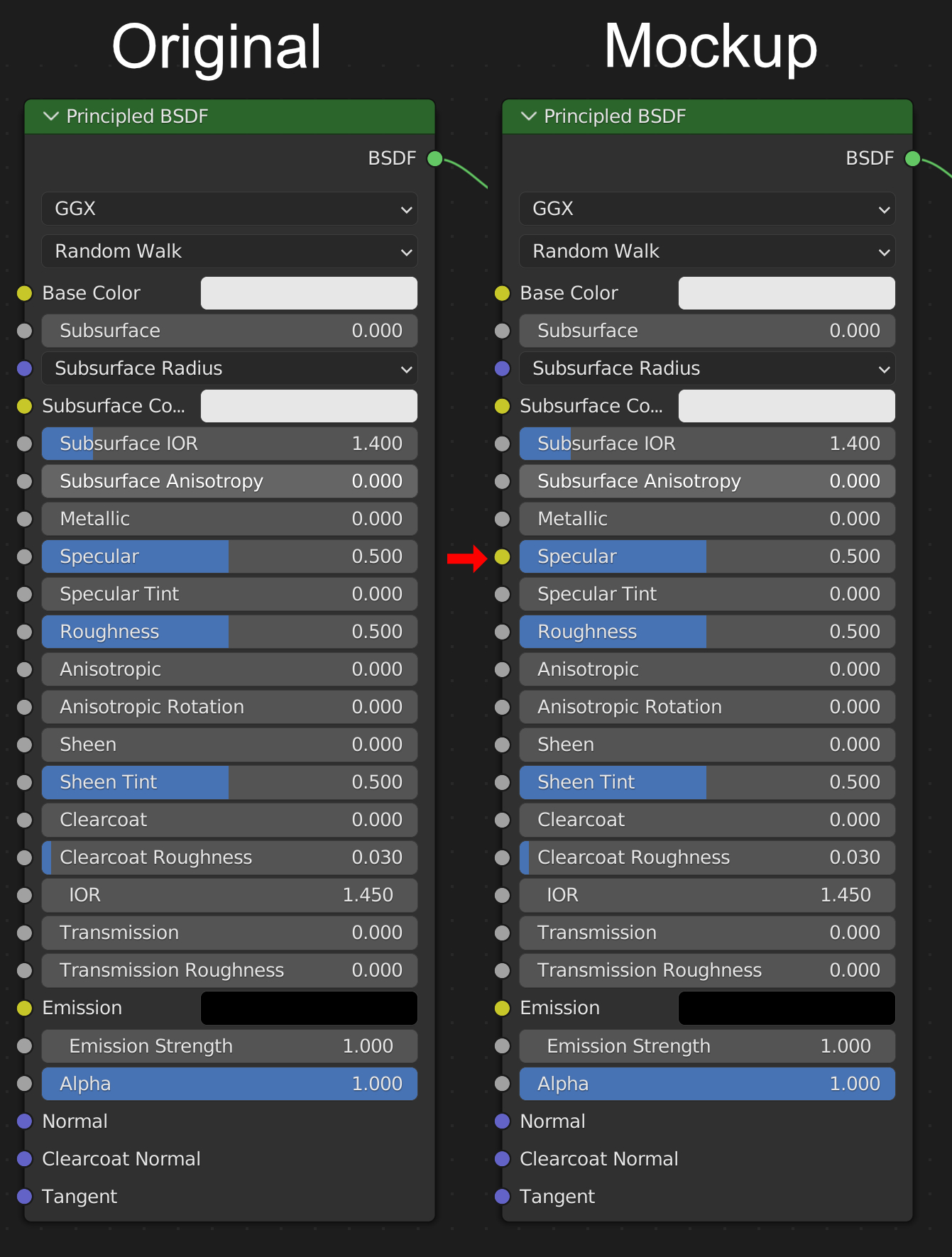
That said, I have made ONE adjustment to the Principled BSDF. The Specular Input is an SRGB input instead of a value input.
This would allow the user to use the favored PBR Workflow method of choice inside of the Principled BSDF. According to the connected Maps inside the BSDF, the following workflow is then used, to make this very easy for the User.
I am also aware that the Specular BSDF exists in Blender but is only supported in EEVEE.
Please note that I am referencing the official PBR Guide from ALLEGORITHMIC. Link to the Guide Part 2: substance3d.adobe.com/tutorials/courses/the-pbr-guide-part-2
Any constructive criticism and thoughts on this are highly appreciated!
14 Comments
Hello, I think you have a lot of confusion with the blender shader system. First I'll tell you: I come from 3D Max and like you at the beginning the change was slow, I've only been with Render in blender for a short time about 2 years too.
There are 2 systems PBR and Raytrace (Raytracing). Blender is totally PBR while for example Max with Vray is Raytrace.Currently Vray already comes with PBR but that is not real but it is under the hood in the programming, and even so it does not have the PBR Shader mode and blender if it does.
All you need to do is use your Specular textures on the roughness. The metallic is only the Fresnel checkbox of Vray or the IOR Reflect in Corona, the specular color is given in the Albedo. Blender works with materials like Unreal, 3d coat, Substance... which are the real PBR. PBR Shader Mode is easy and you just have to know that it is much more visual and not as technical as working in Vray. I hope this information helps you. And if I am going to give an Upvote because it would be good if what you propose can be included
Thank you for your Comment!
Please note that I am referencing the official PBR Guide from Substance.
The there mentioned Specular Glossy Workflow is currently not Supported in Cycles.
Have a look at it: substance3d.adobe.com/tutorials/courses/the-pbr-guide-part-2
For everybody who doesn't want to read through an entire PDF guide ;)
The thing that this proposal would change is actually just one socket - specular to accept a color instead of just greyscale for strength. The problem with Metallic is that it alsmost always adds bright color values in the matallic areas and then defines the reflectivity color by a secondary metallic map. It's easy to handle and only requires one map for metallic definition.
(edit) more specifically - because it was confusing: Metallic workflow derives the reflected color value from the color of the albedo pass. So the Albedo pass has to have a non-black color value in order for metallic to reflect something. What is visible along the Alias Edges are the parts in the texture that aren't 100% metallic/electric value over to plastic/dielectric. In specular setup all the reflection parts are derived from the specular pass which is then calculated (negative multiply I think?) over a dark albedo. That way there aren't any vidible edges. In short - it makes mid-metalic values look better, eliminates alias artifacts especially in lower res maps and can give effects that aren't possible with Metallic map alone but is also mure complicated to handle and much more user error-prone if done wrong. (/edit)
The downside is twofold, though:
I agree that this would be really good to have. But until then I think there is a different shader that you can mix together. Not ideal but doable. Though I also find that this is important to be in the standard BSDF shader - especially with the upcoming new features intexture and material baking in a year or so...
I had already read it a long time ago and guide 1 too. But that doesn't mean you can't work
Hello. very good information, thanks
youtube.com/watch
So after reading this through one day later I have one problem with the way this change in the proposed way: It's in the way the shader would accept Metallic and Specular in parallel. There should be a difference in modes. Otherwise the shader would be able to kind of double merge the epcular color when the user inputs metallic values and colored specular maps. In the documentation there's a chart for how the passes are calculated: docs.blender.org/manual/en/latest/_images/render_layers_passes_combine.svg
If we don't split up the modes then metallic values and specular color could possibly fight each other. Making a mode switch in the node could introduce compatibility issues. Maybe a separate Specularand Metallic BSDF node would be a better idea.
Then again maybe it's not that big of a deal? How do other renderers (outside of game engines which have a hard split usually) handle this case?
My First Design proposal was this here: files.catbox.moe/8lbjpk.jpg
where we can have another drop down in the Principled BSDF to change the PBR workflow method as favored
but the Mockup was just using the already existing EEVEE Specular BSDF
I think a separate node would be the better idea due to compatibility and ease of use reasons.
I love the idea of being able to use colored images instead of grayscale for specular. I once extracted a model from prey 2017 to make a render but it only used specular colors with no metallic masking, meaning I can't use it to make a ray traced scene. I wonder why they made it so you can select specular bsdf in cycles even when it doesn't work.
So what is the difference with that sRGB input?! You can already plugin images in these inputs.
you posted the same picture for the mockup and original...
No. There's a one socket change - from Specular greyscale to Specular Color. BUt it could be made a little more obvious, yes.
I have made the change more obvious! thanks for the Feedback