
Sculpt Mesh Filter: Remove Spikes
In cases where multi-res meshes get messed up and create spiky artifacts, it would be great to have a mesh filter that measures the magnitude of displacement, and selectively smooths the areas that have the highest contrast (in terms of magnitude of displacement).
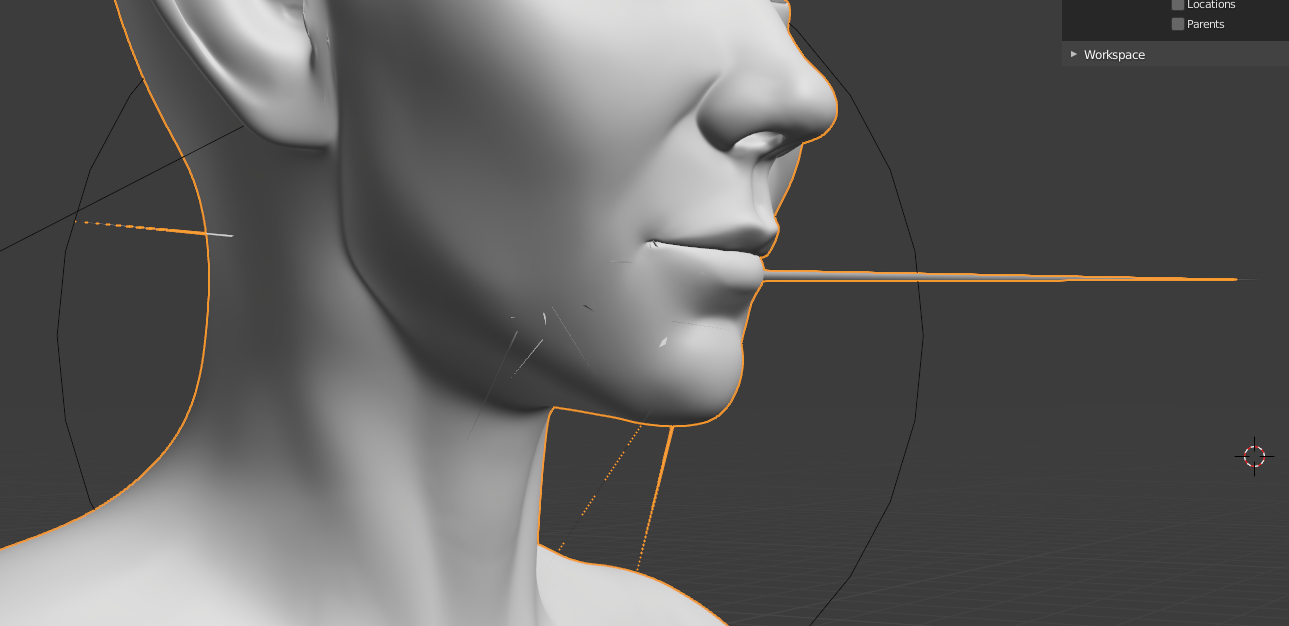
4 Comments
Those spikes shouldn't happen in the first place.
If doesn't work, don't ship it!
* @Regnas * still this could be a useful tool even in cases not caused by the multires modifier (or anything really) to fix some unwanted spikes
This would be great, I haven't had this problem in Blender but I get it in Zbrush every time I do a projection. In Zbrush I fix these with Mask by smoothness button and then use a huge morph brush to fix it real fast. Sometimes I have to play with the falloff on the mask, but it does a pretty good job of catching any spikes like that. I think it's pretty strange how this isn't an automatic solution yet, seems like individual points sticking way off the general mesh would be something pretty easy to detect.
* @gabe687 * In truth, I want it as a vertex-group modifier. Cloth simulations produce spikes sometimes, too. I think it's a common enough problem that a modifier would be a good solution.