
Camera Projection for matte painting, decals,...
Hello everyone, As a matte painter, my day to day job is to play with camera projection, camera mapping, textures and stuff ^^. I'm a newby at blender and I was searching for ways to do matte paintings in blender and I see that the only way to do that is to use a uv project modifier.
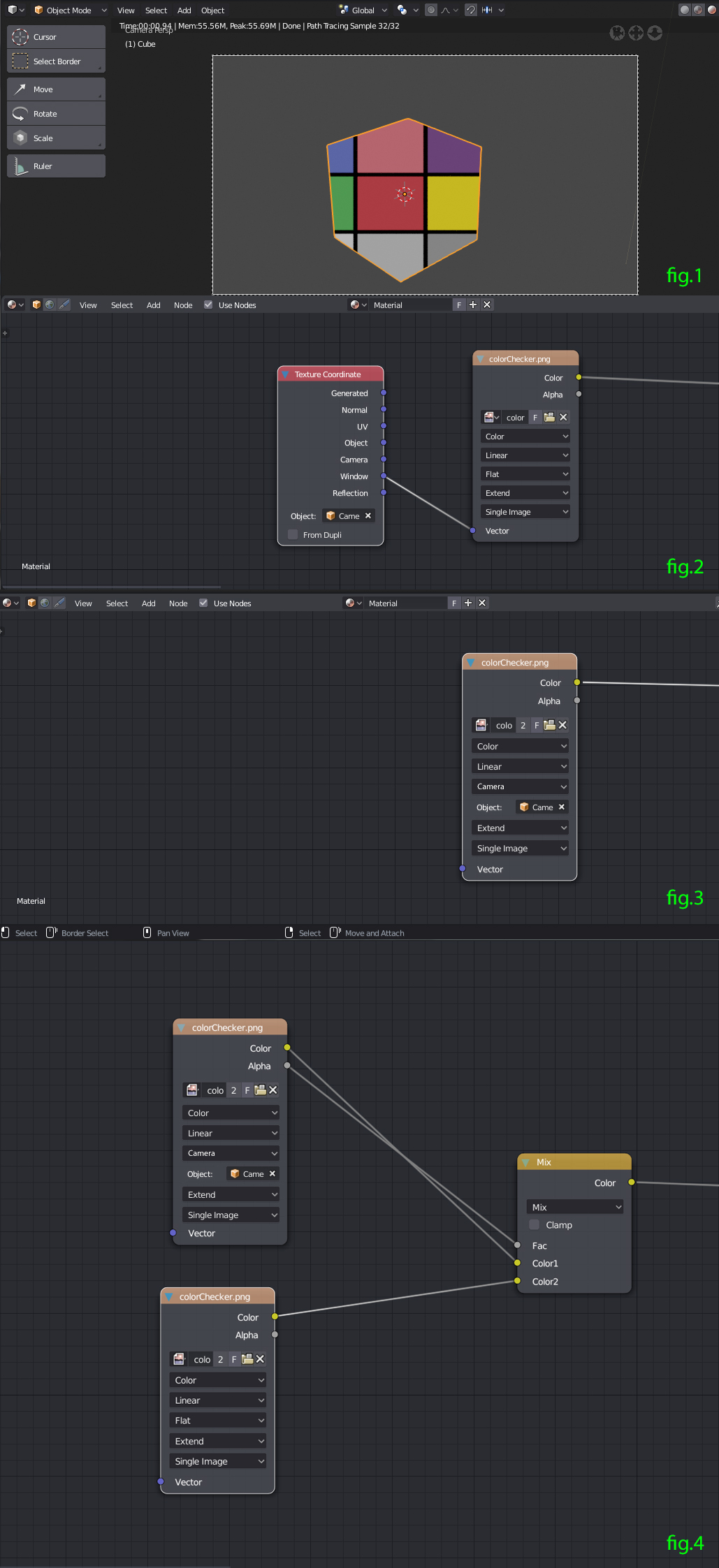
Camera mapping is the action of projecting uvs from a camera so I understand that it should be in the modifier stack as it's playing with uvs. But I don't find any solution on camera projection ( projecting an image from a camera) which doesn't involve uvs. I've tried to use the texture coordinate and the only setting that quite works is the window output but it's just outputting the window of the active camera so it's a NO. (fig 1 and 2)
It would be great to have "camera" in the image texture's projection slot (mock-up in fig 3) so you will have : tube, sphere, box, flat and camera. You'll have the option to select the camera you want. Or just add an option to select a camera in the texture coordinate like the object option when you use the window output.
It would be useful if you want to deal with multiple camera projections or patch textures with matte painting with a mix node ( one entry with the image texture set on camera projection and the other one set to box for exemple).(fig 4)
I hope it's clear enough :) !
7 Comments
hey guys someone as been really kind and have managed to build a working node graph ! devtalk.blender.org/t/camera-projection-for-matte-painting/1976/8
Hi there.
Has anyone found a working solution to this yet ? I've tried all sorts of stuff and ran into the same problems as the OP.
fspy/blam isn't really the right thing for this.
If there was just a way to get the result using "window" in the node view, but using cameras to project the image so that it sticks to the geo when rotating the viewport cam, that would be amazing.
This is literally the last thing stopping me from completely moving over to blender at work and cancelling the other 3D software license.
* @subclock * no, there's no news ! :(
This Patreon subscription based plugin can do it: youtu.be/zV-a9idZrC0 . Are there other options out there? Edit Holy moly, the same guy is working on getting camera projection painting put into Blender natively! developer.blender.org/T81662
Hi, Camera projections can be easily done with this addon: github.com/stuffmatic/blam
Lukas
hey thanks for the response! I was aware of this add-on but for the projection part it's using the uv project modifiers and I don't want to use it as it's working with uv and the modifier stack. I want to manage the texturing and shading in the shading editor and not in two separate places.
the second issues of the uv project is that you need to subdivide your mesh if you want a clean result. Having an heavy mesh is the opposite of what you want when doing matte painting.
Martin
@martin.bailly19: As Blam/Stuffmatic is no longer maintained, and the addon also doesn't work with Blender 2.8, I think it's time for the Blender team to add a real camera projections. This is the numer one technique used in VFX industry!