
Custom properties - allow defining the type and settings before creation
It could be more straightforward if the new / add custom properties button would open a popup, where user can adjust the type of property and other settings.
For some reason when you press "+ New" button, you get a property named "prop", of type float.
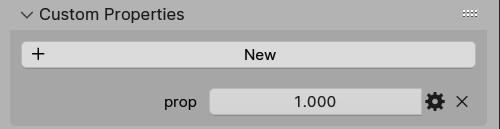
Usually this isn't something I may need, so it feels counter-productive to always have to open the panel after the property is created.
So the flow could be instead this: Press "+ New" > popup opens > user sets the name and all the settings > press done/ok > a new custom property gets added.
I simply don't quite understand this opinionated way of doing things. Why do I get float when I may not need it? This is a bit similar to adding a Bezier curve object - why do I get some curve that is already selected for me, instead of being able to select it?
2 Comments
idk, this sounds like it could be a bad idea. if the settings pop up, i guarantee like 90% of noobs are going to look at every single one, and a lot of them are going to end up changing something they shouldn't, and then spend a long time figuring out what went wrong. It might be better if it was more like the modifier system, where there was a button to duplicate elements.
So the UI should be overly simplified because of newbies? I'm not so sure, I'd rather have a simple box with a foldout for "more" options, only show the name and type by default. So those who know what they need can adjust the settings, if needed. Anyway I don't think newbies are into custom attributes anyway, they probably get to know Custom attributes most likely by watching some tutorial about rigging and drivers.