
Dyntopo Shift+D is too damn small!
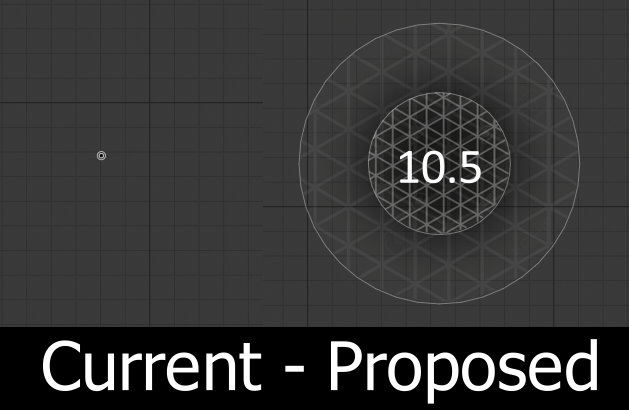
The Shift+D Relative Detail Dyntopo Detail Size widget is impossible to use at smaller sizes.
I think "1" is literally 1 pixel wide, and my sculpting sweet-spot is 10-2, it's really fiddly, always trips me up and I keep having to go back to the type-in box, which sucks because I love changing the brush size with F.
The Fix:
-
Scale it up by 5x or 10x - this way I might actually be able to select a number between 4.5 and 2.5 without counting individual screen pixels.
-
Overlay a visual triangle pattern to illustrate how big the topology will be (This might only be applicable to Relative).
-
Add a number to make tiny sizes usable if the overlay is too small to be readable.
AND... While I'm here. Constant detail (which I barely use) appears to be plugged in backwards? Bigger circles make smaller triangles. What's all that about?
4 Comments
That's why I made the thing of the slide number 50 from here... docs.google.com/presentation/d/1ECvDTQmWRudv0SGMi54KpvX2eja8p_XsyApY3cZoORE/edit
Is [$] but you can test a very old version of it for free that has the same feature github.com/jfranmatheu/Blender_NewSMUI
Maybe it convince you :) Cheers!
Constant detail is a density measurement- the number of triangles per meter or something like that. It makes sense because it's an absolute measurement (not relative to the screen or brush)
* @Josephbburg * Oh ok, cool. Like i said, it's not a tool i use a lot.
* @mep84 * constant density is really good for the early part of a sculpt where you're just trying to get the general sillhouette and big shapes right. Detail is actually harmful at this stage. I tend to only gradually increase the detail level as I 'earn' it.