
Make Minimized Sidebar Menus Pop Out by Clicking a Menu Tab Icon ( Ex: Modifier Tab)
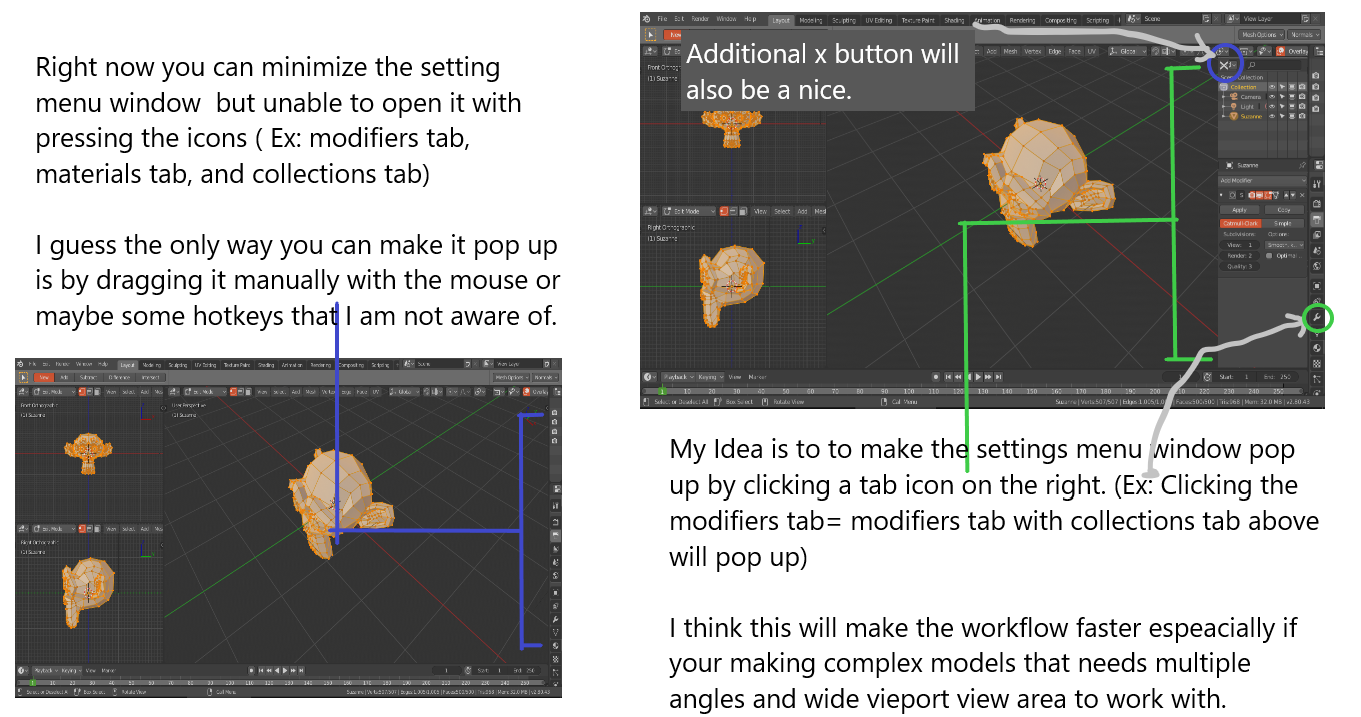
Hello guys. I am not sure what is the proper name of those sidebar menus on the right but I would like to suggest an idea where you can make them pop up just by clicking a certain menu's icon.
Thanks.
13 Comments
I think it could function a bit like Mari does it, since it already looks very similar. When the properties tab is minimized the buttons are conveniently visible but they don't really do anything useful, which is a shame. In my mind they should make a temporary pop out of the menu they would otherwise display, just like mari or photoshop do. Here is a link ot mari's new ui features community.foundry.com/training/32630/mari-4-improved-ui
Also a web image of photoshop's menu images.app.goo.gl/DFDB4C1i2fPjaVjR9 You case see what I mean in menu "B"
solid idea i infact keep all the bars on the right! , i did expect this to be already in it
What if you have the a different editor visible in that space (Graph Editor, Image Editor, another 3D Viewport)? What if you decide to have Properties on the left? Or down in a corner?
This proposal doesn't seem to take into account the flexibility of Blender's windowing system. I'm all for better/faster ways to selectively increase or decrease the general work area, but I'm not sure this solution addresses the problem all that well and introduces a number of questions and problems of its own.
* @Jason van Gumster * The specific editor windows and their respective side bar tabs if for some reasons a user places it on the right side of the monitor, will not be closed instead will just be overlayed or covered temporarily by the modifier pop up menu.
If a user is done operating the Pop up menu (Ex: Modifiers Settings) the next step will be closing it with either clicking the x button or the icon itself.
* @johnpdelacruz26 * i.pinimg.com/originals/78/52/eb/7852eb8f76874bc5d5af0bc7c71fdf81.png
* @johnpdelacruz26 * But what if I put my Properties Editor on the left side of the window? Or I have a separate window that I put on another monitor and it has multiple Properties Editors open, each to different sets of panels?
The Properties Editor is not a sidebar. It's an area just like any other area in Blender. This is an incredibly powerful feature of Blender's windowing system and it feels like your proposal is getting rid of it.
* @Jason van Gumster * I guess when you say properties editor, it means the tab where modifiers tab and materials tab belongs. I am not too familiar with the names.
I am not trying to get rid of it but I just want a feature where if a user decides to make the viewport wider when working modelling, sculpting and what not, and this results of him/her deciding to minimize the windows on the right inlcuding the properties editor, then what a great way it would be to be able to make the properties editor still accesible just by clicking the icon and the pop up menu will come out.
Now will these pop up menu be a recommended default layout for blender? I would say no but If I have a situation where I would like to minimize windows which may inlcude the properties editor then, It would make it handy just to click those icons and no need to drag the properties editor's edge to make it accesible again.
Closing it would will also be faster just by clicking an x button at the top left corner of the pop up menu or just by clicking the specific settings icon again. Lastly, this is just a preference feature where the user has the option to enable and disable it.
Sorry if this too long.
* @johnpdelacruz26 * i.pinimg.com/originals/cf/0c/db/cf0cdb96bd5a2408f5afdce6e053c3f7.png
* @johnpdelacruz26 * The thing is, what's on the right side is actually two areas, each populated with a different editor. At the top is the Outliner and at the bottom is the Properties Editor. It's not a tab or a sidebar. These are separate spaces for visualizing and editing the data in your scene. This is why we tend to toggle a single area (like the 3D Viewport) to maximize using <kbd>Ctrl</kbd>+<kbd>Spacebar</kbd> (2.80 keymap) or <kbd>Shift</kbd>+<kbd>Spacebar</kbd> (pre-2.80 keymap).
Like I said initially, I'm all for ways to more quickly manage areas in Blender's interface, but I feel this proposal throws out the baby with the bathwater.
* @Jason van Gumster * I think I see what you mean, you are saying that there is already certain feature that in some ways make the workflow between the viewport and properties editor smoother with these following hotkeys you are reffering to.
* @johnpdelacruz26 * Anyways this is just a small feature and does'nt entirely affect your workflow if not implented. Thanks for the input regardless.
Great idea. It could use the visual language and behavior of the popovers, just pop to the side on top of other windows.