
Enable Grease Pencil Directly on VSE Output
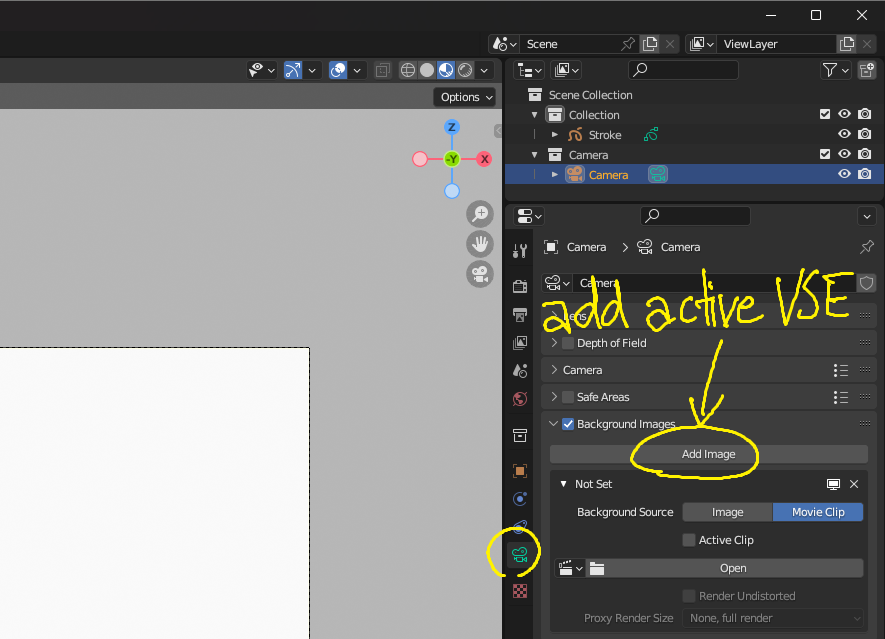
It would be incredibly useful to have a feature that allows users to draw Grease Pencil directly on the output of the Video Sequence Editor (VSE). Currently, the workflow for combining video editing and Grease Pencil involves rendering the video from the VSE, re-importing it into the 3D View or as an Image Plane, and then drawing over it. This process introduces an additional rendering step, which complicates the workflow.
Proposed Feature implemented in any or all of these methods:
1.) VSE Output as Camera Background
Add an option in the Camera settings (e.g., Camera > Data Properties > Background Images > Add VSE output ) to select the active VSE output as a background image. This would allow users to see the fully edited video from the VSE directly in the 2D/3D View, enabling them to use Grease Pencil without needing to render the video first as reference video.
2.) Grease Pencil Integration with VSE
Provide the ability to use Grease Pencil tools directly within the VSE workspace. For example: A dedicated "Grease Pencil Layer" track in the VSE, where users can draw annotations and effects directly over the video timeline. Sync playback between the VSE and the 3D View so that the Grease Pencil drawings align perfectly with the video timeline.
3.) Real-Time VSE Output in 2D View
Allow the VSE output to be viewed in the 2D Animation workspace, making it easier to create frame-by-frame animations and annotations on top of video sequences.
Benefits: Streamlined Workflow: Combines video editing and animation in a single step, eliminating the need for intermediate rendering. Preserved Quality: Avoids re-rendering, maintaining the original video quality. Creative Freedom: Offers greater flexibility for video creators, animators, and editors to experiment with visual effects and annotations directly on the timeline.
Example Use Cases: Adding animated annotations or callouts to video edits. Drawing frame-by-frame effects on top of live-action footage. Creating seamless animated overlays for edited sequences. Implementation Idea: The feature could work by adding an option in the Camera Background Images menu to reference the active VSE output, or by introducing a new Grease Pencil integration mode within the VSE workspace.
2 Comments
The problem with adding it as a background in the 3d view (unrendered), is that the VSE content is embedded in the scene data, and therefore can't be referenced within the same scene because this will cause recursion. The VSE content will need to be moved out of the scene-data-structure and become a data-block of it's own, in order to do what you want. This has been described here too: blender.community/c/rightclickselect/kWbbbc/
awesome thank you for sharing! pretty interesting and it does make a lot of sense. Are you a developer at Blender Foundation?