
Use the numeric keyboard for playback-control of the sequencer.
The numeric keyboard isn't used for anything in the sequencer, and at the same time, the playback controls are difficult to find and remember(ex. alt+a for play/pause). The 'k' button is used for cutting so, the standard NLE controls: J, K, L can't be used unless cut is moved to a different key. So why not move the playback controls to the numeric keyboard? That would have some consistency with using the numeric keyboard for navigating the 3D View.
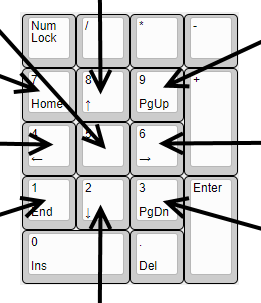
Here are some suggestions on how the keys could be mapped:


This add-on can easily be altered to test move and playback functions mapped to the above-mentioned keys:
gitlab.com/ecea/blender-vse-shortcuts
5 Comments
Work is being done to test this suggestion. Try it out here(in the VSE Facebook Group): facebook.com/groups/1981104845289453/permalink/2034552476611356/
not only the VSE. It could be on any time managing editor, like timeline, graph, ...
@loic.dautry: Good idea. I've changed the title.
has to be noted though those shortcuts would be while hovering the corresponding editors only. Otherwise it's in conflict with other's editors shortcuts like the 3D viewport.
@loic.dautry: Yes, it is context sensitive. That's why I originally only mentioned the sequencer.