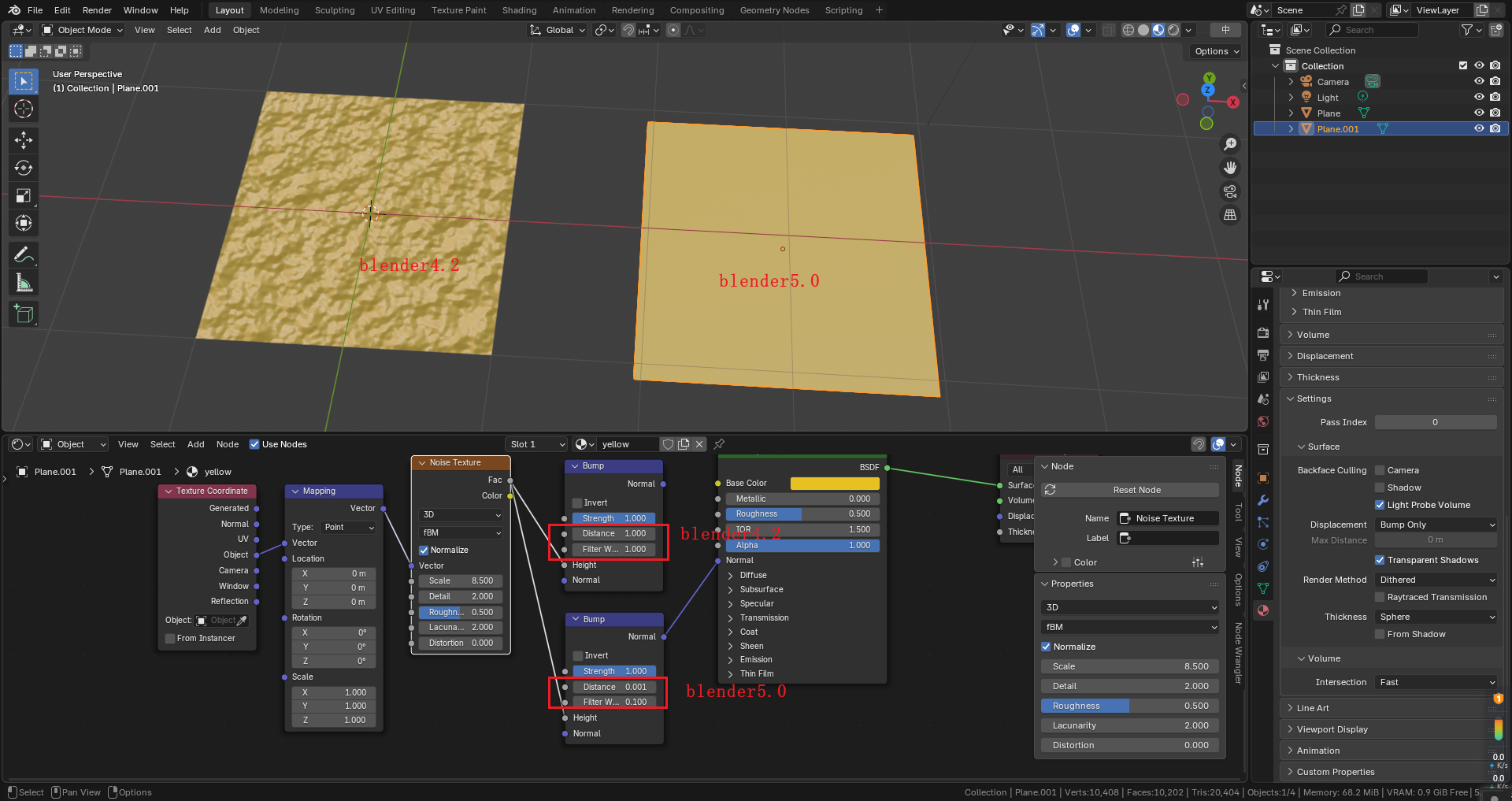
5.0 Suggest restoring the bump node to the original default settings parameters in 4.2
100%
Development Status:
Open
Upvote1Downvote0
x
xinan
3 Jul 2025
6 Comments
Z
Zaki
The new default distance is tuned for very high frequency bump in mind (for example a noise texture with scale of 100+)
To give some background, the distance default was changed after feedback from a series by videos by Christopher 3D made after the introduction of filter width and it's default value being 0.1 instead of a hardcoded 1.0.
There was a now unlisted or privated video before this one that was more influenced by assumptions on filter width, while the actual problem was with distance being too high (too high being like 0.01).
L
Lauloque
I don't understand why the Distance would be set to 0.001. Since it's a multiplier of the values received from the texture, that small Distance is basically nullifying anything it receives.
Filter size should probably be left to 0.1 as it is indeed pretty much what a lot of people would need unless they have a very low resolution bump map, noisy bump maps, or if it has harsh transitions like a checker or stripes. Which is basically never the case as soon as you use images for photorealistic materials.
That being said, I find the tooltip and documentation of the filter size very confusing and artist-unfriendly:
Filter width in pixels, used to compute the bump mapping direction. For most textures the default value of 0.1 enables subpixel filtering for stable results. For stepwise textures a larger filter width can be used to get a bevel like effect on edges
I think we could definitely do something more descriptive and helpful than that:
Controls how much the texture is smoothed when calculating the bump direction.
Lower values (e.g.
0.1
) give
sharper, more detailed bumps
, good for high-resolution or smooth textures.
Higher values smooth over sharp changes in the texture, which can:
Soften jagged or stepped edges
(like in stripes or checker patterns).
Hide the pixel edges
in
low-resolution textures
, creating a more natural, rounded surface.
Use higher values to reduce bump noise or create a
beveled/softened look
on hard edges.
And for the tooltip:
Smooths bump direction. Higher values help soften sharp edges or hide pixelation in low-res textures.
We could probably also rename things to be more representative of what they do:
Strength → Factor (how much to affect the normals received in the normal input, as mentioned in
Remove
Strength
from the Bump node
, this follows how Mix nodes work), or Weight (as in the Principled BSDF layers).
Distance → Multiplier
Filter Width → Smoothing
This combined with the inputs reordering mentioned in the above proposal to visually represent which properties affect which data:
m
mamadsho.nazaramonov
imo, 1 meter is too much, 1mm is somewhat little. Of the two I'd rather have 1mm.
L
Lauloque
Thing is, the Distance property doesn't act a length, it multiplies the values from the texture's pixels. So a "distance" of 1 means it uses the values as is, but 0.001 basically means no bump texture will ever do anything visible.
m
mamadsho.nazaramonov
Isn't the bump dependent on world scale of the object? It being kind of correspondence factor, not merely a multiplier of measureless texture data? If so, I would even suggest adding "m" for measure unit, otherwise, I am confused...
2
Z
Zaki
Height
operates in world space, where a value of 1.0 simulates the offset equal to exactly 1 meter.
Distance
is just a multiplier on
Height
. So for example
Distance
set to 2.0 will make it so a value of 1.0 in
Height
will be equal to 2 meters.

6 Comments
The new default distance is tuned for very high frequency bump in mind (for example a noise texture with scale of 100+)
To give some background, the distance default was changed after feedback from a series by videos by Christopher 3D made after the introduction of filter width and it's default value being 0.1 instead of a hardcoded 1.0.
I don't understand why the Distance would be set to 0.001. Since it's a multiplier of the values received from the texture, that small Distance is basically nullifying anything it receives.
Filter size should probably be left to 0.1 as it is indeed pretty much what a lot of people would need unless they have a very low resolution bump map, noisy bump maps, or if it has harsh transitions like a checker or stripes. Which is basically never the case as soon as you use images for photorealistic materials.
That being said, I find the tooltip and documentation of the filter size very confusing and artist-unfriendly:
I think we could definitely do something more descriptive and helpful than that:
And for the tooltip:
We could probably also rename things to be more representative of what they do:
Strengthfrom the Bump node , this follows how Mix nodes work), or Weight (as in the Principled BSDF layers).This combined with the inputs reordering mentioned in the above proposal to visually represent which properties affect which data:
imo, 1 meter is too much, 1mm is somewhat little. Of the two I'd rather have 1mm.
Thing is, the Distance property doesn't act a length, it multiplies the values from the texture's pixels. So a "distance" of 1 means it uses the values as is, but 0.001 basically means no bump texture will ever do anything visible.
Isn't the bump dependent on world scale of the object? It being kind of correspondence factor, not merely a multiplier of measureless texture data? If so, I would even suggest adding "m" for measure unit, otherwise, I am confused...
Heightoperates in world space, where a value of 1.0 simulates the offset equal to exactly 1 meter.Distanceis just a multiplier onHeight. So for exampleDistanceset to 2.0 will make it so a value of 1.0 inHeightwill be equal to 2 meters.