
Proposal: Open Edges Extrude Along Normals (Extend Outwards)
If faces extrude can extrude properly along normals, why can't open edges?
The following script for 3DS MAX is a miracle and a major timesaver!
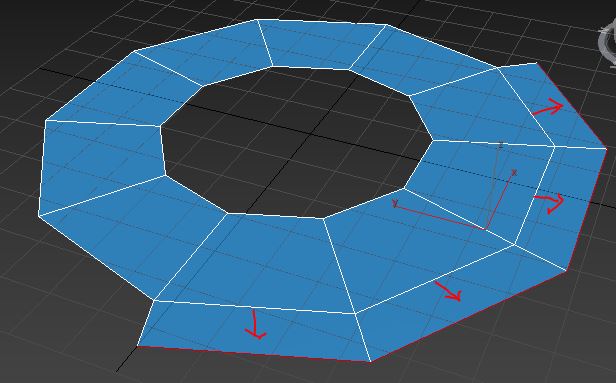
If faces extrude can extrude properly along normals, why can't open edges?
The following script for 3DS MAX is a miracle and a major timesaver!
9 Comments
There is already an addon called "Offset Edges" I use all the time in 2.79 en.blender.org/index.php/Extensions:2.6/Py/Scripts/Modeling/offset_edges
Would be great to see it become a core feature, it is indeed super useful.
Thanks! That script looks promising! I did try it in 2.80.30 and it didn't work for me.
Doesn't work on latest versions.
one way to do it:
another way:
I tried the alt-S and sometimes it works for simple extrusions outwards (convex edges), but going into a concave / inwards (such as the inner hook of a "G") , the edges do not extrude outwards properly.
Extruding and scaling has always been a workaround, but always requires lots of editing afterwards on complex curves, and is not mathematically accurate.
There is an addon included with the daily builds called Mesh Tools under the Testing category. It has a tool called offset edges that does this exactly, though it is not interactive.
Thank you very much 2 years later! :D you made my day
please
This plug-in function is really very useful. I often use it when working with max. it is widely used for thickness adding of complex shapes (ZB, MD exported plane). Now in BL, only the solid modifier can be used to add the overall thickness, which is not flexible enough