
Dynamesh and Zremesher like functions
I personally don't enjoy Dynotopo, I find working with tris in a situation where I constantly have to adjust the level of detail to be quite annoying and stressful*. I'm sure there are many people who prefer Dynotopo over Dynamesh and if it works for them, that's good, but I think there should also be an option for those of us that prefer the ZBrush method of sculpting, where you can have the entire sculpt covered in neatly-arranged quads with a click and drag of the mouse.
On top of that, as mentioned here , Dynamesh also can do volumetric and non-manifold booleans. I've read that there are ways you can kind of work those in by fiddling with various modifiers but that seems like an awfully time consuming process comparatively.
The same applies to ZRemesher, again there are ways of doing a similar thing with modifiers, but it feels clunky and less organized and I think it is worth investing effort into.
I've been on Blendswap, Blenderartists, Artstation, etc. and I keep finding Blender users who did everything in Blender except the sculpting. I feel like if people that use Blender are just going to use ZBrush for sculpting anyways, it kind of defeats the purpose of having a sculpting mode on Blender other than it being free. As such, I think it is really important that this is addressed.
If developers do work towards these, I would hope that they at the very least have a few weeks of experience using ZBrush itself to see how the implementation feels on a program specifically meant for sculpting; I doubt trying it for a day or two would give the devs much reference for what most sculptors appreciate.
EDIT In response to a comment mentioning that not everyone is familiar with ZBrush, I've included links to videos demonstrating dynamesh and zremesher .
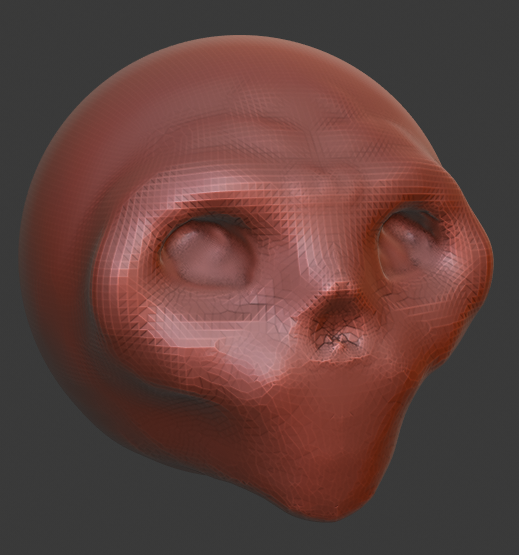
For reference of what I mean, I made this image in Blender after about 30 minutes when I could have already gotten something much higher quality in ZBrush in the same time.
EDIT In response to a question about how the UI would handle these, I've made this new edit.
I was thinking for the 'dynamesh' tool, the user could use the operator search bar ( the thing that comes up when you press space ) or a particular hotkey to bring the tool up. One of the little boxes that appears in the corner with options in it will show up, allowing the user the alter the approximate 'resolution' of the quads (and as a consequence, also the number of them) based on one of those little number slider things. When the operation occurs, it will retopologize the entire thing with quads much the same way ZBrush's does. This will occur on the selected object, but if multiple objects are selected, the whole lot of them will be retopologized as one (as previously mentioned when I mentioned booleans and non-manifold geometry); this would allow Blender users to basic mesh shapes to design the foundation of the form (in ZBrush, many sculptors build a 'skeleton' by making a series of small overlapping spheres and then using Dynamesh to make the one surface). There might also be an option in the menu that allows only certain poly groups to be retopologized.

The 'zremesher' tool would work extremely similarly: operator search/hotkey, it opens a little box, this one specifically with the number of quads. It should go right over the original, likely-higher poly model evenly distributing quads in such a way that they curve and contour to the surface appropriately, to keep the form as close to original as possible (if I had a high poly sculpt of a head, the worked out topology should be more or less the same as the standard 'head/face topology'). It should however, also allow the user the ability to control how the flow of the quads, in the event the algorithm doesn't work as the user would wish; this can be done using 'guides' that the user can draw onto the sculpt.

12 Comments
The Zremesher dev is already working on adding it to Softwares such as Blender. polycount.com/discussion/208030/quadremesher-new-auto-retopo-plugin-for-maya-3dsmax/p1
And We have OpenVDB Voxel remesh as an Addon but its also in the Sculpt branch on Graphical
blenderartists.org/t/pablo-dobarros-master-plan-for-sculpting-and-his-official-sculpting-branch/1150731
twitter.com/pablodp606/media
twitter.com/pablodp606/status/1106299593921347584
twitter.com/pablodp606/status/1129820787232378881
twitter.com/pablodp606/status/1088869819477307392
twitter.com/pablodp606/status/1028061174737391616
twitter.com/pablodp606/status/1086756405003075585
It's not sufficient to say, "Make these features from this other application." No everyone uses every other application (no matter how popular), so you need to specifically explain the specific features that Blender is missing, compared to what it currently has. Mock-ups and example images are a big help.
* @Jason van Gumster * I've made an edit to address the issue. I've opted to link videos demonstrating these tools because I think images wouldn't be able to capture the dynamic nature of them.
* @nic.d.humphreys * That's a good start, but what's really needed is an explanation in a Blender context. All 3D applications work differently, so it's not enough to post videos showing a workflow for another program. How would you envision it working in Blender? And, no, "just like in Zbrush" isn't really going to cut it.
* @Jason van Gumster * I find that the most usual way for blender users would be implementing that kind of remeshing into the Remesh modifier, so it would remesh all properly in quads. Then, maybe, duplicate the functionality to a button on a toolbar or hotkeys to instantly apply the setting or something like that.
* @pholax * Have you tried the Sculpt Features Branch over on Graphicall ? It has a volume-remesh which is something like what you're asking.
* @Jason van Gumster * I'm not quite sure what you mean by saying 'making them like ZBrush's is not going to cut it.' I am proposing just that. If you mean you want me to describe in detail the way ZBrush does it, I can do that.
* @nic.d.humphreys * Describe it in detail. Because I guarantee that there are aspects of Zbrush's UI and general approach that aren't going to be compatible with Blender. Those inconsistencies will need to be addressed.
* @Jason van Gumster * I've edited this page again to try and fit these conditions.
Also I can suggest Instant Meshes for quad autoremesh.
There are a couple addons on the Blender market that do this, too.
* @Josephbburg * Instant meshes is the best for me, because i can mark directions and it respect edges. But Zremesher is good too AFAIK. Voxel remesh is good for boolean merge before sculpt.