
Grease Pencil. Interactive fill tool
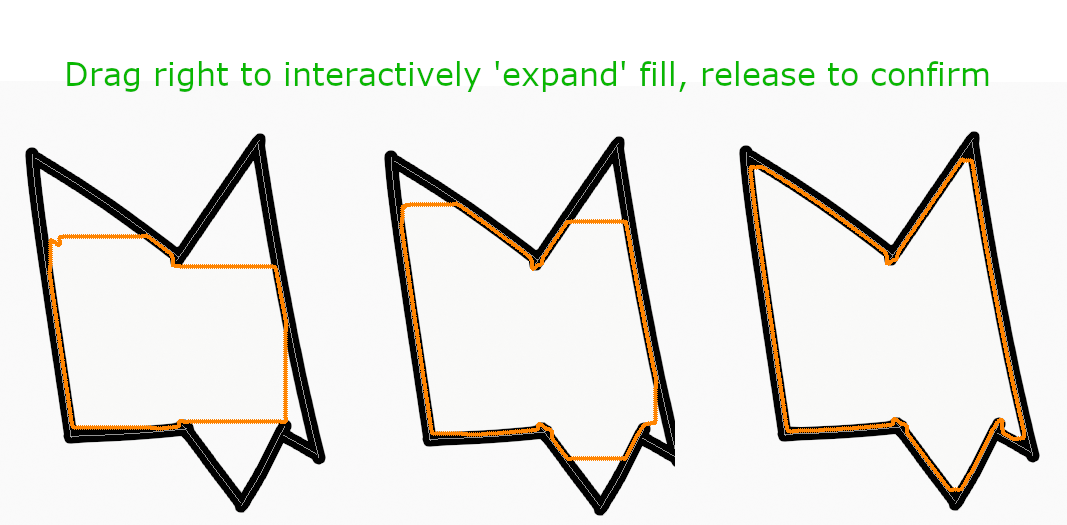
Fill tool proposal: By clicking and dragging (instead of a momentary click/release) the user can interactively set the 'leak size' of the fill to quickly get the appropriate setting before committing the fill by releasing the mouse button or lifting the stylus.
While click-dragging, a preview of the fill boundary is displayed, shrinking or growing as the user moves the mouse left or right.
Dragging right gives a more expansive fill by decreasing 'leak size'. Useful to make sure the fill is reaching all the corners of your shape.
Dragging left gives a more contained fill by increasing 'leak size'. This is useful in case the fill has 'escaped' the region you want to fill and you need to contain it.

2 Comments
This is another example of what was possible with the "Sketchbook Designer" product I mentioned on your other post. I would welcome this.
This is also how the magic wand selection tool works in Procreate, very useful functionality.