
Make AO pass white for the background instead of black
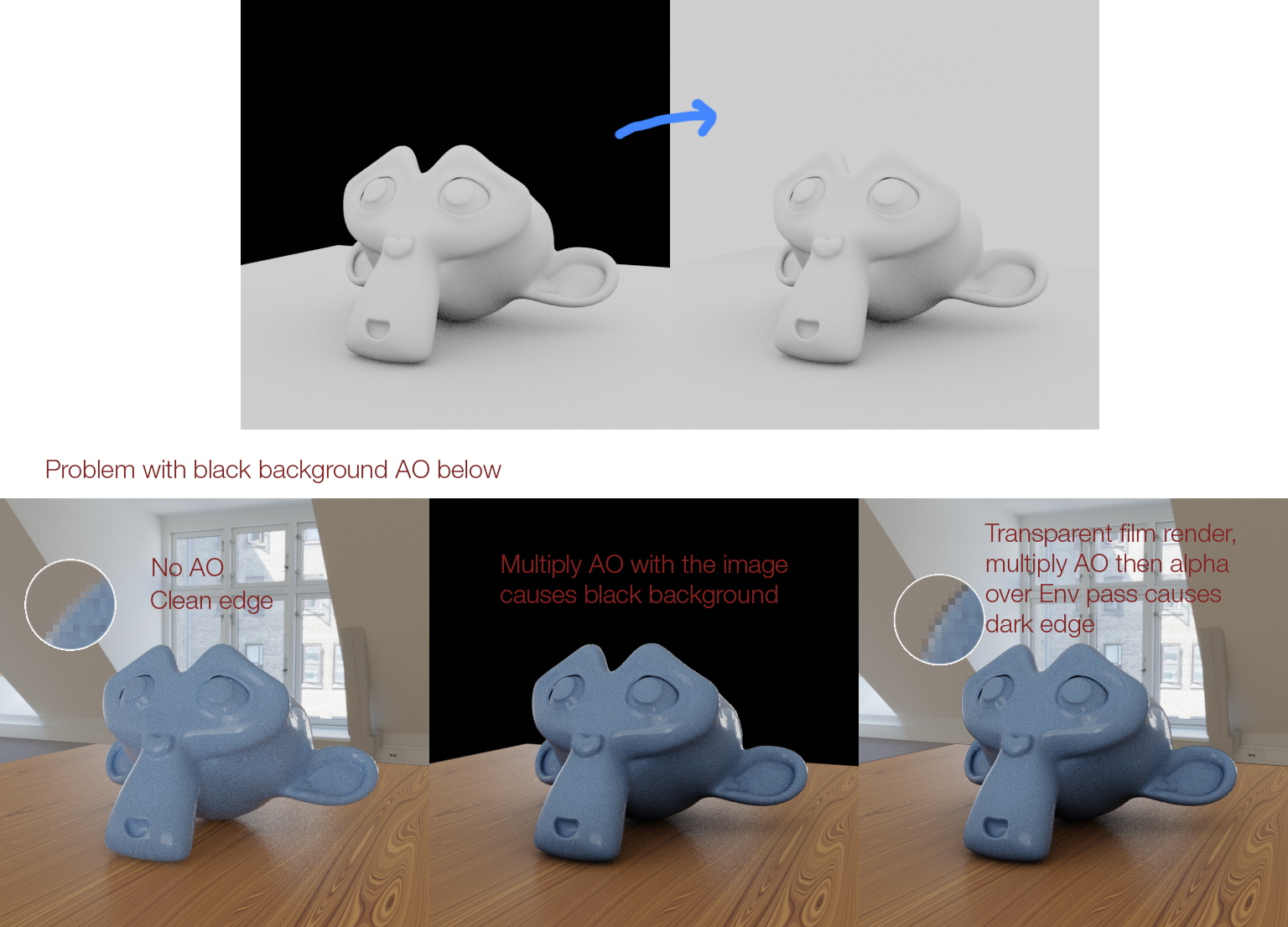
The background is an open space so the AO should be white instead. The AO pass of Cycles is currently black wherever the background is exposed. Multiplying the AO pass with the main color will darken the background which is bad. Edit: Added an example why the black AO background is not a good idea.
10 Comments
I've come across this annoyance before
I suppose the problem is though if the edge of the object is black, then the white pixels would be baked into the anti-aliasing if the background was white.
yes, this is a nightmare because the black background is burned into the anti-aliasing making it impossible to remove in post. Needs to be some AO pass options such as background colour, distance, only local. Can't even use an AO custom AOV generated in a shader, because it doesn't respect normals.
This option needs to be available for all custom AOV's too.
You could use the Cryptomatte node to multiply AO to the required parts of your render. In your case, you can pick the World and invert the matte from the cryptomatte node and use it as a factor for the MixRGB node.
Cryptomatte generates really impressive mattes!
* @salaivv * maybe it's a bug but right now the cryptomatte can't add the World, you have to add every single matte in order to make the mask. In a complex scene it will be a nightmare.
* @Salai Vedha Viradhan * Cryptomatte have only in Cycles...in eevee its a pain to compositing AO. Have to use other soft to compos after rendering in blender...
Can you explain, with an example, showing why the current situation is "bad"?
As the OP explains, the problem is that the AO pass is usually added on top of other passes using the "multiply" blend mode. This means you're "blacking out" the sky, and you never want that.
The AO pass doesn't have an alpha channel, so you usually have to combine it with the alpha channel of another image before you can then multiply it over the other images. In many programs this is kind of convoluted and annoying to do. Also sometimes this results in a thin 1-pixel black edge around the sky.
A white BG would be much better because it would effectively make the sky of the AO channel transparent, since white doesn't show up when multiplied over another image.
* @Jason van Gumster *
* @Jason van Gumster * I have updated the post with an example
* @Jason van Gumster * Another example is when you are using the render to create textures for it, foliage in my case. When you import the textures in your image editor of choice, like others have said, you have to mask out the dark background (what's the use for it being black btw?), what sometimes, almost always, creates a 1 pixel dark border around the selection.