
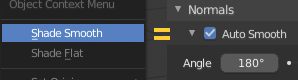
Shade Smooth = Auto Smooth
Hello! When Shade smooth is turned on, the model is smoothed but Sharp edges are not displayed! You need to turn on Auto Smooth separately to display Sharp edges!
It is necessary to equate Shade smooth with Auto Smooth 180 degree for proper display.
11 Comments
I do not understand why need Shade Smooth, which smoothes the model, but does not work with the edges of the Mark Sharp?
The same effect will be obtained if Auto Smooth with a value of 180 degrees turns on with Shade smooth this will not give arbitrary kinks that depend on the smoothing angle, and allow you to correctly display Low poly mesh.
In the Shade smooth command need to add the settings displayed on F9.{attachment Emprvpng}
* @Roman * for game-baking normal maps for example. And yes, your proposal with adjustment window is correct. But autosmooth should be remembered (no default) and 30° Autosmooth 180° do nothing and shouldn`t exist.
if autosmooth is activated by default with a such angle as 180 it won't do anything. to have an effect, as the edge spit modifier to sharp edges, it will consider angle "< to ..." so generally, you need an angle <60 or less to sharp edges with the shade smooth on. autosmooth is needed with some other tools about normals too. so I imagine it could be useful to turn it off sometimes there. it is possible to activate it by the angle so when the angle would be < to 180 and put a slider to set this angle. I wonder if I won't do this in my simple addon autosmooth pie menu and experiment to see the result. someone was explaining how to do this... but the sliders are often coming back when you try to reach an extremity so maybe it's not a good idea for the moment. well I just reported it as a bug and I had this problem since a while and I always forget to report it. so not useless...
* @zgorg2004 * I think, the best solution is: click to smooth+autosmoth. adjustment window appears, and if you changed the angle, addon remember new value and applies it next time. So you can use one value by default and tune it any time or don`t cara about additional clicks.
* @ Vyacheslav * well by default even without having configured it, angle has the value of 30, like in the property window. logical... so yes clicking twice and then set the angle, if needed, is certainly the best simple solution.
agree. Anyway I like the idea to bond smooth and autosmooth tuning. They work together often
* @zgorg2004 * but clicking twice what and how? The fastest solution I see is like this:
So you can call-drag-click or call-click if you are ok with default setting. 4) addon should have default angle setting in the adjustments and addon`s preferences.
{attachment Blender_4jpg} well I just decided to set autosmooth by default with a ctrl U behind...this is a less advanced solution my menu, that what you are saying. but I can drag the mouse to the left or the right outside of the menu to set the angle and I open the menu on the side of waht i want to see during the setting. the autosmooth is a such important function... I did a proposition before to have the angle in a redo menu. but finally I prefer this simple menu I could do. after, doing a more advanced feature as for rotation, why not. but devs answered me they didn't see the interest to make autosmooth more visible and about the angle not at all... in fact I had it into my quick favorites, but adding the angle was not possible. so it made the thing quite useless, even if it was still quicker, that an edgesplit...but apparently they like modifiers a lot. I had the same answer, when I asked about to have the option angle in the redo menu of ctrl B, in edit mode. "I don't see the interest, there is the modifier for this." I even did a proposition that it would be possible to set an interval of angle in the method by angle. the guy developing the bevel, was interested by this idea he never heard before, but he was over loaded. now this is someone else responsible for this. well I'm not hurry after all. I know at least 10% of Blender, even trying hard...
* @zgorg2004 * I am using autosmooth right from quick-favorites :) Hot menu is nice too!
No. It is not the same. But you can make simple separate operator to switch them on together and add to quick favorites.
And how would you allow for users who don't want that particular behavior?