
Change the file output result as 0001 to 1 due conflicts
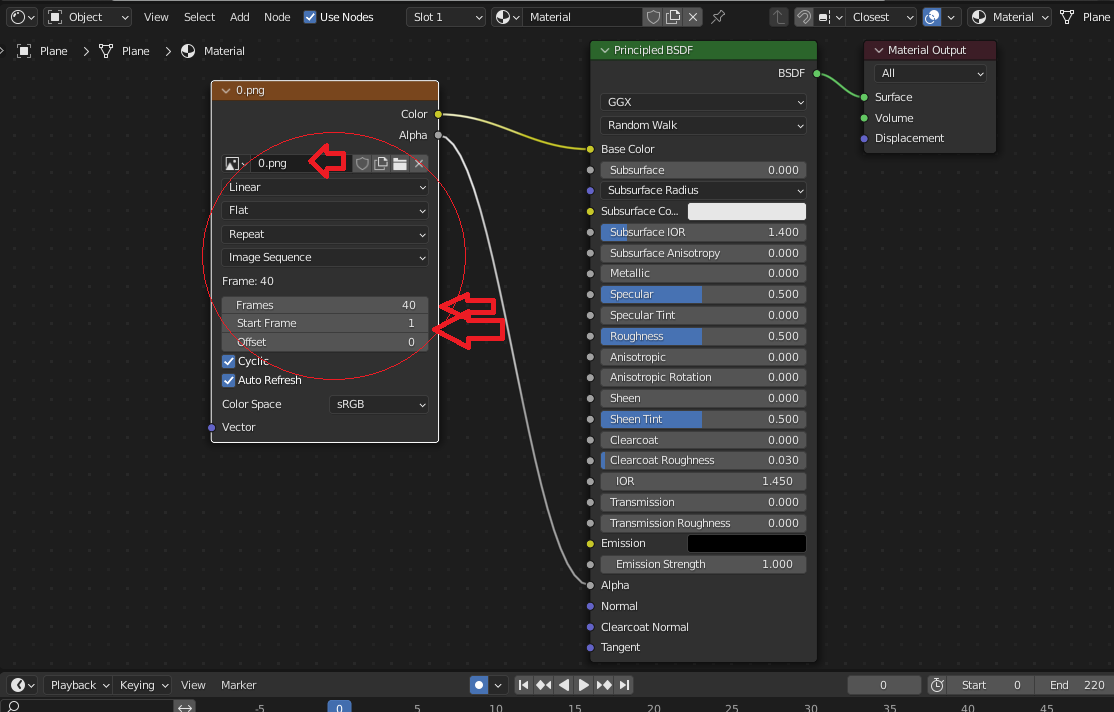
Right now Render sequence images is bad organized by output, due that import sequence need cycle from 1-10 or 1-100 frames not 0001 or 0001-0010 (in case of 0001 etc.. we need some bulk tools to rename this type and RegExr formulas to solve names for blender or krita).
To solve this problem user need:
-
output as 1.png 2 png not 0001.png
-
additionally can be some formula RegExr for output, eg:
- 000%counter
- {000}%counter
- (%datetime}%counter
6 Comments
You don't need to remove the zero padding in order to use an image sequence in Blender, and it's actually highly recommended to always have it to avoid confusion like thinking 1 10 100 all come before 2.
You can do it already.
In your file output name, you can insert a
#to indicate Blender where to write the frame number. Put multiple#to force a minimum amount of digits with zero padding.###will result in 001 002 003#will result in 1 2 3I did not know about this option. Where to read about this "control" around output?
Right in the manual: docs.blender.org/manual/en/latest/render/output/properties/output.html
Though I'd love Blender to propose more file naming variables like this, and also an actual UI to use it instead of leaving this only to some obscure manual page to teach people about its existence.
Like in this proposal blender.community/c/rightclickselect/Slfbbc/
And i remember there were other ones for specific variables such as time stamps, scene metadata, camera name and whatnot but I'm too lazy to search them down again x)
Maybe I'm wrong here with idea, the
FrameandStart Frameshould be prefixed by 00.. or something like this.If I remember correctly, the sequence is inherited from the selection order. If you need, adjust the selection order in the file browser when adding
But what is reason to 0001 instead of 1 ? Only sorting file regarding asc/desc in file list (as 1 10 11 2 3 4 5)?