← All ideas8 Oct 2022fan-daliOpenPaintingUser InterfaceModelingfan-daliBranskugelDangryLauloqueShimoonXylvierbestelixcostadabuyfructdwhavocthehobbithunter3Djablayanekketsukyoujinocular.evolutionsebbosebbo267slowk1dv.imran2018wilhelmzuorion
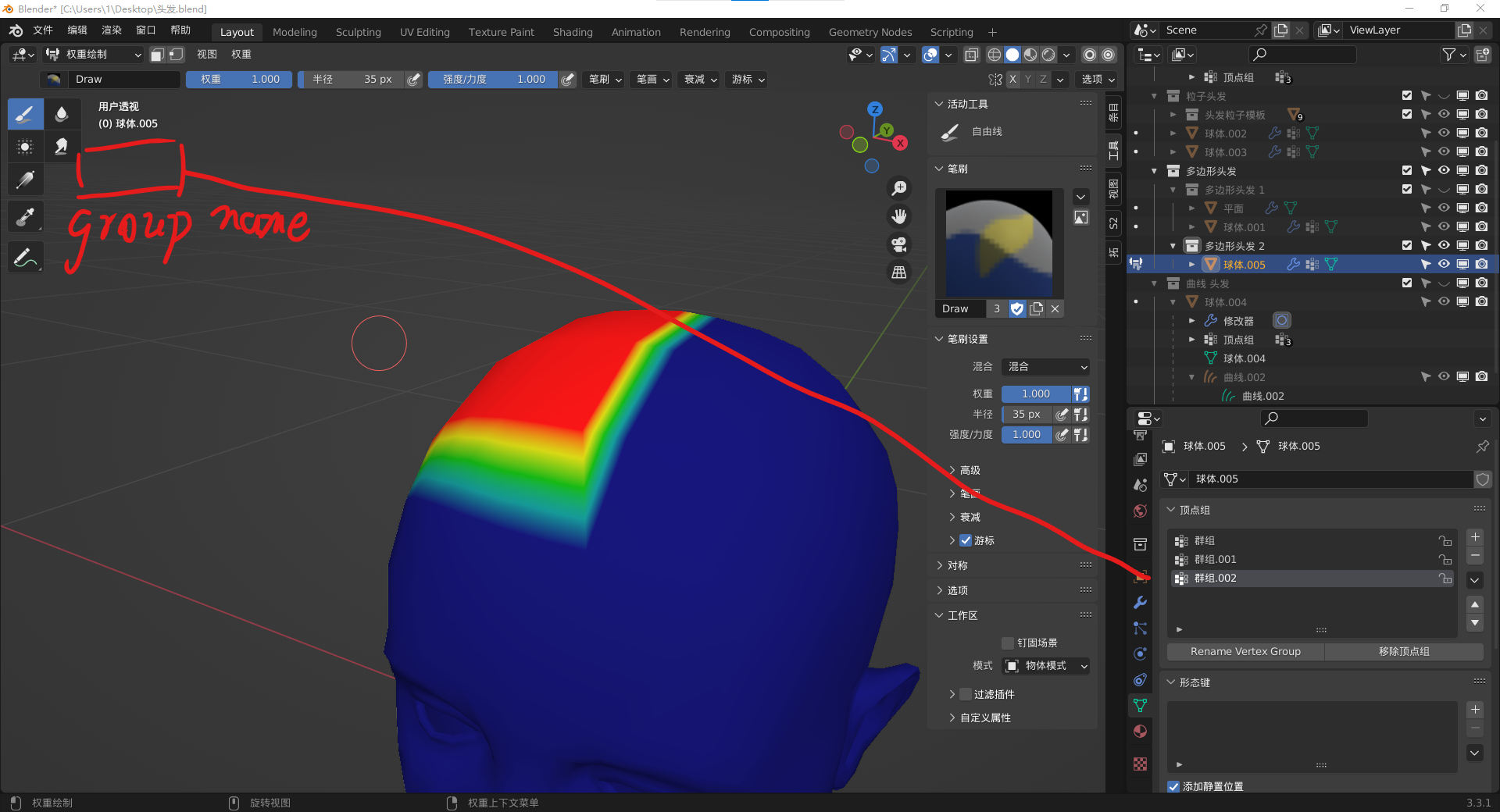
display vertex group name on main window,it can help us which one is we are painting for.
100%
Development Status:
Open
Upvote19Downvote0
f
fan-dali
8 Oct 2022
4 Comments
d
dabuy
Since vertex groups are essencial for this mode we might even add a dropdown to the toolbar, similar to the layer picker grease pencil has
1
d
dabuy
But if we change this, we should be consistent and do it in every mode.
The active shape key is currently shown in this text. Since it's only the active one and gives no information about how they are applied anyway, we may limit this to the modes where they are actually relevant.
object mode -> nothing
edit mode -> shape key
sculpt mode -> shape key
vertex paint mode -> color group
weight paint mode -> vertex group
texture paint mode -> texture
Same with curves and and gpencil objects where applicable.
Amatures show the active bone in edit and pose mode which is fine.
X
Xylvier
I do agree with the matter of consistency, as there were armature and bones already in there. Even adjusting the color of the text in case there is a key on the active frame. I wonder if someone was working on it and left it, or rather a patch didn't go through. But I sure can try to build on the patch and add more functionality, if it get's more interest.
Also, what should be mentioned in which mode I am not 100% sure. I'd like to get some more opinions on that.

4 Comments
Since vertex groups are essencial for this mode we might even add a dropdown to the toolbar, similar to the layer picker grease pencil has
But if we change this, we should be consistent and do it in every mode.
The active shape key is currently shown in this text. Since it's only the active one and gives no information about how they are applied anyway, we may limit this to the modes where they are actually relevant.
object mode -> nothing
edit mode -> shape key
sculpt mode -> shape key
vertex paint mode -> color group
weight paint mode -> vertex group
texture paint mode -> texture
Same with curves and and gpencil objects where applicable. Amatures show the active bone in edit and pose mode which is fine.
I do agree with the matter of consistency, as there were armature and bones already in there. Even adjusting the color of the text in case there is a key on the active frame. I wonder if someone was working on it and left it, or rather a patch didn't go through. But I sure can try to build on the patch and add more functionality, if it get's more interest. Also, what should be mentioned in which mode I am not 100% sure. I'd like to get some more opinions on that.
Look under developer.blender.org/D16258 , I just put my patch up for review.